
Introduction
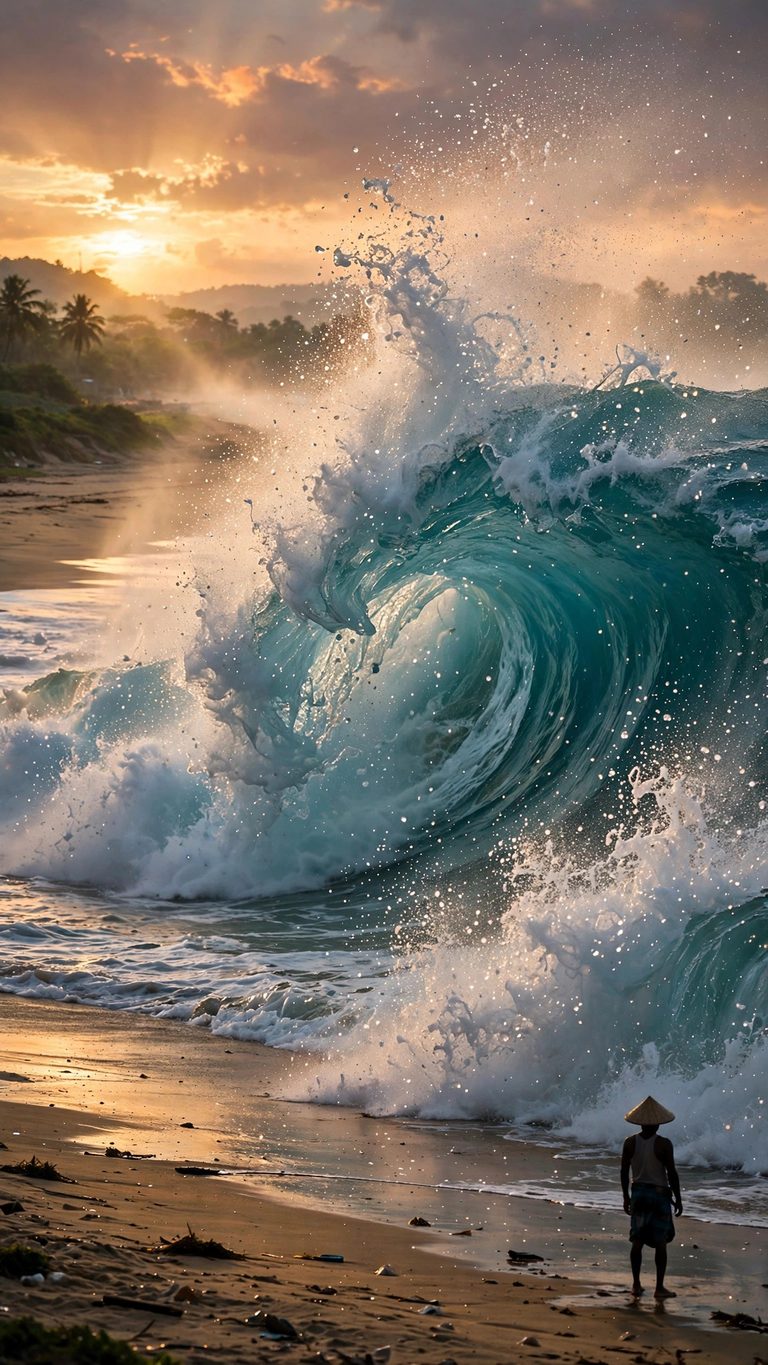
There is something primal about watching a massive ocean wave curl and crash in extreme slow motion. Every droplet hangs in the air like a diamond, time itself seems to bend, and for eight seconds the chaos of the world goes quiet. Cox’s Bazar, home to the world’s longest natural sea beach, provides the perfect stage for this spectacle, and this free viral AI video prompt recreates it with breathtaking fidelity. The prompt delivers a turquoise wave frozen mid-crash at sunset, water sparkling in golden light, with a lone fisherman’s silhouette grounding the scene in human scale. Slow-motion ocean clips are perennial viral performers because they trigger what psychologists call awe, an emotion that makes people share content almost reflexively. If you want a Reel that feels like a deep breath, this is the prompt to use.
The Prompt
Copy the exact prompt below and paste it into your favorite AI video generator:
Extreme slow motion of a massive turquoise ocean wave curling and crashing on Cox's Bazar beach at sunset, water droplets sparkling like diamonds in the golden light, a fisherman's silhouette on the shore, cinematic color grading, ultra detailed, photorealistic
Why This Prompt Works
Slow motion is a cheat code for engagement because it transforms the familiar into the extraordinary. Everyone has seen a wave, but almost nobody has truly seen one; stretching the crash across eight seconds reveals textures, geometry, and light play that feel brand new. The diamond-like droplets are the money shot here, giving viewers a crystalline detail to marvel at and replay. The fisherman’s silhouette does crucial compositional work: it provides scale, making the wave feel monumental, and it adds a human element that invites empathy and storytelling in the comments. Sunset backlighting wraps everything in warm gold, the most universally liked color palette in video content. The cinematic color grading instruction pushes the AI toward rich teals and ambers rather than flat daylight tones, which dramatically improves the premium feel. Ocean content also benefits from a massive, evergreen audience; #OceanVibes communities share relentlessly, and sunset beach clips get saved at high rates, a metric platforms weigh heavily. Pair it with #CoxsBazar to tap into regional pride and travel nostalgia, and you have a clip engineered for saves, shares, and replays.
How to Use This Prompt
Step 1: Copy the complete prompt, keeping the slow motion and photorealistic keywords intact. Step 2: Paste it into Veo 3, Runway, Kling 2.0, Pika, or Sora. Step 3: Select 9:16 vertical format and an 8-second duration; choose the highest frame-rate or slow-motion preset your tool offers to mimic the 240fps feel. Step 4: Generate a few takes and select the one where the wave curl is most defined and the droplets are sharpest. Step 5: Add gentle ocean ambience or a soft piano track, and consider a minimal text overlay like Nature’s power, slowed down. Step 6: Publish with hashtags including #OceanVibes and #ViralReels. On Kling, the fluid simulation for crashing water is particularly strong, so prioritize it for this prompt. Runway users should try the motion brush to emphasize the curling lip of the wave if the tool supports it.
Pro Tips & Creative Variations
To keep your feed fresh, try a storm variant: replace sunset with dark storm clouds and lightning for a dramatic, high-contrast version that thrill-seekers love. A night version with moonlight on the wave creates a silvery, dreamlike aesthetic perfect for lo-fi music pairings. You can swap the fisherman for a surfer riding inside the barrel to target the surf community, one of the most engaged niches online. For a satisfying twist, generate a matching clip of the wave receding and post them as a seamless loop; loops inflate watch time because viewers often watch two or three cycles before scrolling. If droplets look blurry, add tack-sharp water droplets, macro detail to reinforce the instruction. Color experiments work beautifully here: try bioluminescent blue wave at night for a fantasy crossover hit. Finally, consider a duet or stitch format inviting viewers to share their own beach slow-motion clips, turning one video into a community trend under your #AIVideo banner. For an extra satisfying touch, add a barely-there zoom-in during the wave’s peak in your editor; the subtle movement amplifies the slow-motion drama. Try exporting a second version with enhanced contrast and saturation for TikTok, where punchier visuals tend to outperform natural grades.
Where to Post for Maximum Reach
This wave clip belongs everywhere, but tailor it per platform. On Facebook Reels, post it into ocean-lover and beach-life groups and watch the save rate climb, because calming content gets bookmarked for stressful days. TikTok rewards the loop format, so export a seamless loop version and let viewers watch three or four cycles; the algorithm reads those replays as deep engagement. YouTube Shorts is ideal for the satisfying niche, so title it descriptively with keywords like ocean wave slow motion to capture search traffic. Instagram Reels performs best with the Cox’s Bazar location tag plus #OceanVibes, connecting you with the global beach community. Post during lunch hours and late evenings when people seek mental escapes. Reply to comments with a follow-up wave variant to keep the conversation alive. Consider collaborating with travel influencers who can duet your clip with their real beach footage, blending AI art with authentic travel content for a powerful cross-audience hit.
Frequently Asked Questions
How do I get the slow motion to look real? The prompt already specifies extreme slow motion; choose your tool’s slow-mo or high-FPS interpolation option and avoid adding extra camera movement, which can break the effect.
Can I change the beach location? Absolutely. Replace Cox’s Bazar with Maldives, Bali, or any coastline. The wave physics and lighting carry the shot regardless of location.
What music works best? Ambient piano, soft cinematic strings, or natural wave sounds. Avoid heavy beats, which clash with the tranquil mood.
Is 8 seconds enough? Yes. Short, perfect loops outperform long clips on Reels because completion rate stays near 100 percent.
Should I make a loop version? Absolutely. Seamless loops dramatically increase average watch time because many viewers watch two or three cycles before scrolling, which the algorithm interprets as high interest.
How do I handle negative AI comments? Respond warmly and transparently. Most skeptics become fans once they see your honest labeling and consistent quality.
This Cox’s Bazar wave prompt turns eight seconds into pure visual poetry. Generate it, feel the calm wash over your feed, and share it with #OceanVibes. Your audience is waiting for their next deep breath. Keep posting, keep experimenting with wave variants, and let the ocean’s timeless rhythm build your audience one mesmerizing loop at a time.
Related Viral Prompts
- Himalaya Sunrise Timelapse: Free Viral AI Video Prompt for Epic Mountain Reels With Breathtaking Views
- Waterfall Macro Slow Motion: Free Viral AI Video Prompt for Satisfying Nature Reels in Stunning Detail
- Desert Milky Way Timelapse: Free Viral AI Video Prompt for Stunning Night Sky Reels Full of Stars Tonight
# A I V i d e o # P r o m p t B a z a r # C o x s B a z a r # O c e a n V i b e s # V i r a l R e e l s



Leave a Reply