
Introduction
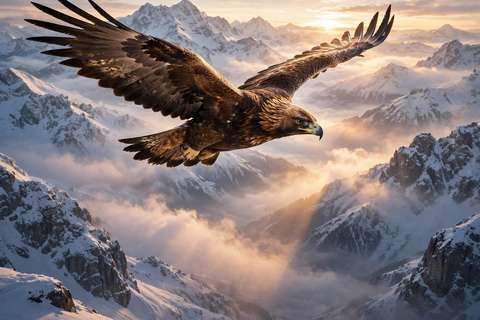
There are few sights in nature more majestic than a golden eagle in flight. The huge wings spread wide, the golden feathers catching the first light of sunrise, the snow-covered mountains rolling away below, it is the kind of image that makes you hold your breath. Wildlife filmmakers wait weeks in freezing conditions for a moment like that, but with Veo 3.1 you can create it in minutes. Ultra slow motion makes the scene even more powerful, because it lets you watch every feather, every wing beat and every shift of the wind as the eagle rides the morning air.
This prompt is written to capture the full grandeur of the moment: the eagle soaring over a snowy mountain range, the sun rising behind the peaks, warm golden light washing across the snow and the bird’s wings, all in smooth ultra slow motion. It is perfect for a nature documentary style clip, a breathtaking Reel, a meditation video background or a screensaver that reminds you how vast and beautiful the world is. The prompt gives Veo 3.1 the camera work, lighting and pacing it needs to make the flight feel real, weighty and free.
The Prompt
Copy the prompt below and paste it into Veo 3.1. It is written to work on the first try, so use it exactly as it is.
Ultra slow motion cinematic video of a majestic golden eagle soaring over snow-covered mountains at sunrise, huge wings spread wide, golden feathers glowing in the warm morning light, camera gliding smoothly alongside the eagle, snow-capped peaks and valleys stretching into the distance, soft pink and orange sunrise sky, gentle clouds below the mountain tops, feathers rippling in the wind, powerful slow wing beats, epic orchestral feeling, shot on a cinema camera, 120fps slow motion, 16:9 widescreen, ultra realistic wildlife cinematography, no text, no watermark
Why This Prompt Works
- Ultra slow motion is what turns a beautiful flight into a breathtaking one. At normal speed the eagle would cross the frame in seconds, but slow motion lets the viewer study every wing beat, every feather and every shift of the air.
- The sunrise lighting does the emotional work. Warm golden light on the eagle’s feathers against cool blue snow creates the contrast that makes the bird glow, and the pink and orange sky adds a sense of new beginnings.
- A camera gliding alongside the eagle makes the viewer feel like they are flying too. Instead of watching from far away, the smooth tracking movement puts you right beside the bird, sharing its view of the mountains below.
- The snowy mountain range gives the scene its epic scale. Endless peaks and valleys stretching into the distance remind the viewer how small we are and how free the eagle is, which is the feeling that makes this clip so shareable.
How to Use This Prompt
- Open your AI video generator and start a new project — Open Sora 2, Veo 3.1 or your favourite AI video tool and start a fresh text-to-video project. Choose a 16:9 widescreen frame so the scene has room to breathe, and set the length to the longest option available for the smoothest motion.
- Paste the full prompt exactly as written — Copy the entire prompt from the box below and paste it in without trimming it. The camera movement, lighting and pacing phrases are what turn a static-looking clip into a video that feels directed rather than randomly generated.
- Generate two or three versions and compare them — Render the prompt two or three times and watch each version all the way through. AI video varies the timing and motion on every run, so one take usually has the most natural movement while the others may stutter or rush a moment.
- Refine with one small follow-up edit — If a detail is wrong, ask for a single targeted fix, such as slower motion, softer light or a steadier camera. One small change at a time keeps the good parts of the clip intact instead of starting over from nothing.
- Export and share your finished video — Export the best take in the highest quality available and share it as a Reel, Short or status update. A simple caption describing the scene helps viewers enjoy the mood before they even press play.
Pro Tips
- Ask for the eagle to fly across the frame rather than toward the camera, because side-on flight shows the full wingspan and the slow wing beats far more clearly than a head-on approach.
- Ask for natural, unhurried motion in your follow-up edits. Slower movement hides small AI glitches and makes the clip feel like it was shot by a real camera operator.
- Generate the clip in the highest resolution your plan allows. Extra detail in the light, texture and reflections is what sells the realism when viewers watch on a big screen.
- Watch the clip with the sound off first. If the visuals hold your attention without music, the video works; then add a gentle soundtrack that matches the mood of the scene.
- Save the version you love before trying variations. Once you have a great take, lock it in so a later experiment never overwrites the clip you actually want to share.
Frequently Asked Questions
Can I use this clip for a nature documentary project?
Yes, it is ideal for that kind of project. The ultra slow motion, the realistic wildlife cinematography and the epic scale suit documentaries, educational videos and nature channels beautifully, and you can pair it with a calm narration about eagles and mountain wildlife.
Why do the eagle’s wings sometimes look strange?
Wings are one of the hardest things for AI video to render, because the feathers move in complex ways. If a take looks off, generate two or three versions and keep the cleanest one, or ask for slower wing beats in a follow-up edit, which usually produces smoother results.
Can I change the bird or the landscape?
Absolutely. Ask for a bald eagle over a forest, a falcon diving over a desert canyon, or an owl gliding through a snowy forest at dusk, and the model will rebuild the scene around your chosen bird and landscape while keeping the slow motion and the cinematic feel.
What music suits this clip best?
A gentle orchestral score or a soft piano piece matches the majesty of the scene perfectly. Avoid fast or loud music, because the power of the clip comes from its calm, slow grandeur, and the soundtrack should honour that pace.
Watching an eagle soar over snowy mountains at sunrise is a reminder that freedom has wings, and this prompt lets you capture that feeling in a single clip. Try it, let the slow motion work its magic, and share a moment of pure wild beauty with the world.
Related Viral Prompts
- Sora 2 Cinematic AI Video Prompt: A Rainy Street at Night With a Lone Walker and Neon Reflections on Wet Pavement
- ASMR Rain AI Video Prompt: Gentle Rain Falling on Leaves With Soft Thunder in the Distance for Deep Relaxation
- Claymation AI Video Prompt: A Cute Clay Character Building a Snowman in a Handmade Winter World Full of Wonder
#Veo31 #GoldenEagle #NatureVideo #SlowMotion #AIVideoPrompt


Leave a Reply