
Introduction
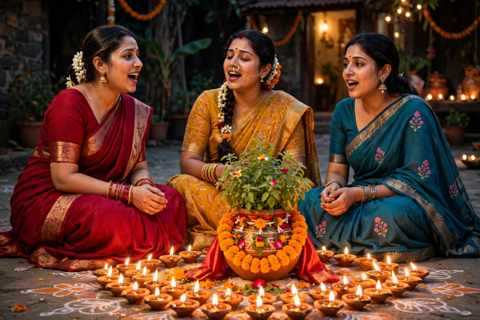
Tulsi Vivah is one of those occasions that fills every Indian home with colour, emotion and togetherness, and this year social media is full of beautiful AI-generated photos celebrating it. If you have been searching for a prompt that truly captures the feeling of women singing wedding songs around a tulsi pot lit by rows of small clay diyas at tulsi vivah, you are in exactly the right place. This article gives you a ready-to-use, copy-paste prompt that turns a simple idea into a stunning, realistic image in seconds.
AI photo tools like Gemini, Midjourney and Bing Image Creator have made it possible for anyone to create professional-looking festive photos without a camera, a studio or any editing skills. The secret is not the tool itself but the prompt you feed it. A vague prompt gives a flat, generic image, while a detailed, well-structured prompt gives you a picture that looks like it was captured by a professional photographer at a real celebration.
That is exactly what this prompt does. It describes women in colourful sarees singing traditional wedding songs together in vivid detail, places the scene seated in a circle around a decorated Tulsi pot lit by rows of small clay diyas, and adds the small authentic touches that make an image feel real rather than computer-made. Whether you want a profile picture, a WhatsApp status, an Instagram post or a family greeting card, this single prompt can give you a beautiful result you will be proud to share.
The Prompt
Copy the complete prompt below and paste it into any AI image generator to create your photo:
Create a hyper-realistic, cinematic photograph of women in colourful sarees singing traditional wedding songs together, seated in a circle around a decorated Tulsi pot lit by rows of small clay diyas. Include rich authentic details such as a terracotta Tulsi pot with garlands, dozens of clay diyas, flower petals, women clapping rhythmically, festive home courtyard. The lighting should be warm and cinematic, with warm diya flames, bright saree colours, evening twilight tones, giving the image a musical, communal and auspicious atmosphere. Capture the scene in ultra-detailed 4K quality with natural skin texture, realistic fabric folds, true-to-life colours, and a softly blurred background that keeps the main subject in sharp focus. The composition should feel like a professional photograph taken at a real Tulsi Vivah celebration, full of emotion, authenticity and festive warmth, with balanced framing and a storytelling mood that instantly grabs attention on social media.
Why This Prompt Works
The first reason this prompt works so well is its specificity. Instead of asking for a generic festive photo, it names the subject precisely: women in colourful sarees singing traditional wedding songs together. AI image generators respond far better to concrete subjects than to abstract ideas, because every clear detail gives the model something real to draw. When you describe clothing, expression, posture and setting together, the result looks intentional and lifelike.
The second reason is the atmosphere it builds. The prompt asks for warm diya flames, bright saree colours, evening twilight tones, which creates a musical, communal and auspicious mood that matches the emotion of Tulsi Vivah. Lighting is what separates an ordinary AI image from one that stops people mid-scroll. Warm cinematic light, soft shadows and glowing highlights make the picture feel photographed rather than generated, and that is exactly what goes viral on Instagram and Facebook.
Finally, the prompt includes authentic cultural details: a terracotta Tulsi pot with garlands, dozens of clay diyas, flower petals, women clapping rhythmically, festive home courtyard. These small elements are what make viewers feel the scene instead of just seeing it. They add depth, storytelling and realism, and they help the image stand out in a feed full of repetitive, low-effort AI pictures. A prompt that tells a story will always outperform one that only lists objects.
How to Use
Follow these simple steps to turn this prompt into a beautiful photo:
- Copy the full prompt from the box above, exactly as written.
- Open your favourite AI image tool, such as Gemini, Midjourney, Bing Image Creator or Meta AI.
- Paste the prompt into the image generation box and press generate.
- Wait a few seconds while the tool creates your image, then review the result carefully.
- If you want a different angle or mood, change one detail at a time, such as the lighting or the background, and regenerate.
- Download the best version in the highest quality available and save it to your phone or computer.
- Share it on Instagram, Facebook or WhatsApp with a festive caption and the hashtags given at the end of this article.
Pro Tips
- Keep the core subject unchanged: women in colourful sarees singing traditional wedding songs together is the heart of this image, so edit around it rather than replacing it.
- Try generating the same prompt twice, because AI tools produce a slightly different result every time and the second version is often better.
- If the faces look slightly off, add the words ‘natural facial features, realistic skin texture’ to your prompt and regenerate.
- For a vertical story or reel cover, add ‘vertical 9:16 portrait orientation’ at the end of the prompt before generating.
- Use the generated image with a short heartfelt caption in your own words, because a personal caption always gets more likes and comments than a copied one.
FAQ
Is this prompt free to use?
Yes, this Tulsi Vivah wedding songs AI photo prompt is completely free to use. You can copy it, edit it and generate as many images as you like for personal sharing on social media, greeting cards and family groups.
Which AI tool works best with this prompt?
This prompt works well with Gemini, Midjourney, Bing Image Creator, Meta AI and most other modern image generators. Gemini and Midjourney usually give the most realistic faces, while Bing Image Creator is a great free option for quick results.
Can I change details in the prompt?
Absolutely. You can change the colours, the background, the time of day or even swap the subject while keeping the same structure. Small, one-at-a-time changes give the best results, because changing everything at once can make the image lose its realistic feel.
Why does my image sometimes look different from what I imagined?
AI generation always involves some randomness, so two runs of the same prompt never look identical. If a result looks wrong, regenerate it, simplify one complicated detail, or add a clarifying phrase such as ‘realistic photography style’ and try again.
So go ahead and try this prompt today, because the best festive photos are the ones that carry real emotion, and this one is made to capture exactly that. Generate your image, share it with your loved ones, and let the warmth of Tulsi Vivah shine through every pixel.
Related Viral Prompts
- Tulsi Vivah 2026 Family Wedding Tulsi Shaligram Flowers Diyas
- Chhath Puja 2026 Night Vigil Women Songs Diyas Riverbank
- Tulsi Vivah 2026 Priest Mantras Mandap Red Gold Cloth
#TulsiVivah #AIPhotoPrompt #ViralPhoto #FestiveVibes #PromptBazar


Leave a Reply