
Introduction
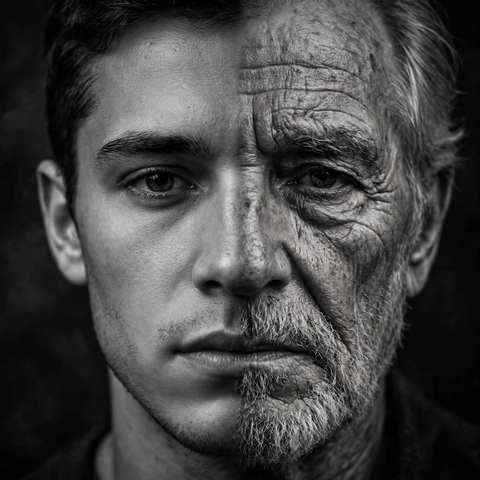
Some portraits make you stop, and some make you think. The split face young and old portrait does both. One half of the face shows you as you are today, young and full of possibility. The other half shows you decades from now, lined, wise, and weathered by a life fully lived. The seam down the middle is where the magic happens, because it forces the viewer to confront time itself. It is artistic, emotional, and deeply philosophical, all in a single black and white image, and that is why it has become one of the most shared conceptual portraits on social media.
The split face concept works because it tells a complete story in one frame. Every viewer sees their own life reflected in it: the youth they remember, the future they imagine, and the person they are becoming in between. That universality is rare in photography. Most portraits show a moment; this one shows a lifetime. People share it not just because it looks striking, but because it means something to them personally.
Creating this effect used to require advanced photo editing, two photos taken decades apart, and hours of careful blending. AI changes everything. With one prompt, Gemini can generate a convincing split face portrait from a single photo of you, imagining your older self with remarkable realism. This article gives you that exact prompt, explains why the concept resonates so deeply, and shows you how to create your own version.
The Prompt
Copy the full prompt below and paste it into Gemini along with your photo:
Transform the person in this photo into an artistic black and white split face portrait, keeping their facial structure and identity recognisable on both sides. Split the face vertically down the middle: the left half shows the person as they are now, young, with smooth skin and youthful features, while the right half shows the same person aged by several decades, with realistic wrinkles, grey hair strands, weathered skin texture, and wise, gentle eyes. Blend the two halves seamlessly along the centre line with no harsh edge. Use dramatic black and white photography with strong contrast, soft studio lighting, deep shadows, fine skin detail, and a plain dark background. The portrait should feel artistic, emotional, and thought-provoking, like a fine art photograph about time, ageing, and the beauty of a life fully lived.
Why This Prompt Works
The split face works because of contrast, and contrast is the most powerful tool in visual art. Young skin against aged skin, smooth against lined, present against future: each pair forces the eye to compare, and comparison creates engagement. The viewer does not just glance at this portrait; they study it, moving back and forth across the centre line, noticing how the same eyes look different with time, and how identity persists through change. That sustained attention is exactly what social media algorithms reward.
Black and white is the second crucial choice. Colour would distract from the concept by drawing attention to skin tones and clothing. Black and white strips the image down to form, texture, and light, which are precisely the elements that show ageing. Wrinkles, shadows, and bone structure all read more powerfully in monochrome. The AI renders black and white portraiture exceptionally well, because the style has a long, consistent tradition in its training data.
The third reason is emotional universality. Everyone ages, everyone wonders about their future self, and everyone has a relationship with time. A split face portrait touches all of that at once, without needing a caption to explain it. That is why it gets shared across age groups: young people see it as art, older people see it as truth, and everyone in between sees it as a mirror. Content that works for every age group is rare, and this concept achieves it naturally.
How to Use This Prompt
Follow these steps to create your split face portrait:
- Choose a clear, front-facing photo of yourself with even lighting and a neutral expression.
- Open the Gemini app and upload your photo.
- Copy the full prompt from the box above and paste it with your photo.
- Generate the image and check that both halves still look like you.
- If the older half looks like a different person, regenerate once or add “same person, same facial structure on both sides”.
- Download the result and share it as an art post, a birthday reflection, or a thought-provoking profile picture.
A front-facing photo is essential for this concept, because the vertical split needs symmetry to work. Side angles or tilted heads make the blend look unnatural. A passport-style or simple selfie, facing the camera directly with a calm expression, gives the best result by far.
Pro Tips for Best Results
- Use a neutral expression. Strong smiles or frowns make the ageing blend harder to render convincingly.
- Ask for a square format for Instagram and art prints.
- If the seam looks too harsh, add “seamless gradual blend at the centre line” to soften it.
- Try a version with the older half on the left and the younger half on the right for a different reading.
- Pair the portrait with a short caption about time or growth. The image invites reflection, so words amplify it.
- Generate a second version in colour if you want a warmer, more personal take on the same concept.
Frequently Asked Questions
Will the older half really look like me?
Remarkably often, yes. The AI ages your actual facial structure rather than substituting a random older person. Bone structure, eye spacing, and face shape carry across the split, which is what makes the result convincing.
Can I control how old the older half looks?
Yes. Change “aged by several decades” to a specific age, for example “aged to about 70 years old”, and the AI will adjust the wrinkles and greying accordingly.
Is this prompt emotional for some people?
It can be. Seeing an aged version of yourself is a powerful experience, and many people find it moving rather than scary. It often sparks conversations about family, parents, and the passage of time.
Why does the split sometimes look uneven?
Uneven splits usually come from tilted or angled original photos. A straight, front-facing photo fixes this in almost every case.
Time changes everything except who you are. The split face portrait proves it: the same eyes, the same soul, two chapters of one life in a single frame. Try the prompt today and meet the person you are still becoming.
Related Viral Prompts
Love this style? Try these next:
- Gemini Black And White Studio AI Photo Prompt: Create a
- Eyes Closeup Aesthetic AI Photo Prompt: Create a Stunning
- Vintage Film Grain AI Photo Prompt: Create a Timeless Nostalgic
#SplitFace #YoungAndOld #BlackAndWhite #AIPhotoPrompt #ConceptArt #PromptBazar


Leave a Reply