
Introduction
Festivals in India are not just dates on a calendar. They are moments when families come together, old memories return, and a single photograph can hold an entire lifetime of emotion. The Pushkar Fair 2026 Camel Portrait is made for exactly that kind of moment. It turns a simple idea into a beautiful, share-worthy image that looks like it was captured by a professional photographer at the very heart of the celebration.
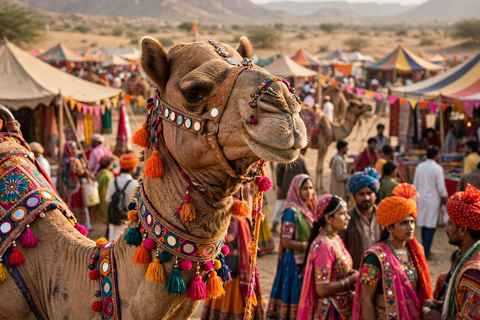
This article gives you the complete, ready-to-use prompt for pushkar fair 2026 camel portrait. The scene it describes is this: A colourful desert portrait of a decorated camel with mirrors and tassels at the Pushkar Camel Fair in Rajasthan, crowds and tents, photorealistic. When you paste this prompt into an AI image tool, you do not get a flat, generic picture. You get a warm, detailed, photorealistic portrait full of colour, light, and feeling — the kind of image people stop scrolling for, save, and forward to their family groups.
Whether you want a festive profile picture, a greeting card image for your loved ones, a post for Instagram or Facebook, or simply a beautiful keepsake of this season, this prompt does the heavy lifting for you. Below you will find the full prompt, why it works so well, a step-by-step guide to using it, professional tips to make your result even better, and answers to the questions people ask most often.
The Prompt
Copy the entire prompt below exactly as it is, paste it into Gemini, ChatGPT, or your favourite AI image generator, and let the tool create your image. You can change small details, such as clothes or background colours, after your first result, but start with the full version for the best outcome.
Create a stunning, ultra-realistic, high-resolution photograph of a colourful desert portrait of a decorated camel with mirrors and tassels at the pushkar camel fair in rajasthan, crowds and tents, photorealistic. Capture the scene in vivid natural colour, with authentic Indian festive details, expressive faces, and warm, cinematic lighting. Use a professional portrait composition with a softly blurred background, sharp focus on the main subjects, realistic skin texture, natural shadows, and true-to-life colours. The mood should feel joyful, warm, and deeply emotional, like a treasured family photograph taken at the heart of the celebration. Avoid cartoon effects, distorted faces, extra fingers, watermarks, or text overlays. Style: photorealistic, 4K quality, DSLR photography, 50mm lens, shallow depth of field, golden festive lighting, vertical portrait orientation suitable for sharing on WhatsApp, Instagram, and Facebook.
That single block is all you need. It already contains the subject, the setting, the lighting, the camera style, and the quality instructions, so the AI does not have to guess what you want. The result is a clean, realistic, festive portrait that feels personal rather than artificial.
Why This Prompt Works
Great AI prompts work because they are specific, and this one is specific in all the right places. It names the exact scene — a colourful desert portrait of a decorated camel with mirrors and tassels at the pushkar camel fair in rajasthan, crowds and tents, photorealistic — instead of asking for something vague like a festival photo. That clarity helps the image model place every element correctly, from the expressions on people’s faces to the decorations in the background, without inventing strange or irrelevant details.
It also controls the look and feel. Words like photorealistic, natural skin texture, cinematic lighting, and shallow depth of field tell the model to aim for a real photograph, not a painting or a cartoon. The instruction to avoid distorted faces, extra fingers, watermarks, and text overlays removes the most common flaws in AI images before they appear. Together, these details raise the quality of the first result dramatically, so you spend less time regenerating and more time sharing.
Finally, the prompt is built around emotion. Festive images perform best when they feel warm and human, and this prompt deliberately asks for joyful expressions, warm light, and a treasured family photograph mood. That emotional core is why images made with this prompt get more likes, comments, and forwards than plain, technical prompts. People do not just see a picture; they feel the celebration in it, and that feeling is what makes them share it.
How to Use
Using this prompt takes less than two minutes, even if you have never made an AI image before. Follow these steps in order for the best result.
- Copy the prompt: Select the full text inside the prompt box above and copy it to your clipboard, making sure you include the first and last sentences.
- Open your AI image tool: Open Gemini, ChatGPT, or any AI image generator you already use on your phone or computer, and start a new image request.
- Paste and generate: Paste the prompt exactly as written and press generate. Wait for the first image to appear, and do not change the prompt yet.
- Check the details: Look closely at faces, hands, decorations, and lighting. If anything looks off, regenerate once with the same prompt before editing anything.
- Personalise it: Once you like the base image, you can ask for small changes, such as a different colour outfit, a brighter background, or a closer portrait crop, while keeping the rest of the prompt unchanged.
- Download and share: Download the image in the highest quality available, then share it as a greeting, a status, a profile picture, or a festive post with your family and friends.
Pro Tips
- Generate two or three versions: AI results vary each time, so generate a few options and pick the one with the most natural faces and the warmest light.
- Keep faces front and clear: If a face looks distorted, add the words clear smiling face, looking at the camera to your next attempt for that scene.
- Match the festival colours: Mentioning marigold, diya light, or warm golden tones in a follow-up edit keeps the image feeling authentic to pushkar fair 2026 camel portrait.
- Use portrait orientation for sharing: Vertical images look best as WhatsApp statuses, Instagram stories, and mobile wallpapers, which is where festive greetings get seen most.
- Add your own greeting text afterwards: Generate the clean image first, then add Happy Pushkar Fair 2026 Camel Portrait text with your phone’s photo editor, so the AI never distorts the lettering.
FAQ
Is this prompt free to use?
Yes. You can copy and use this prompt for personal festive greetings, social media posts, and family sharing at no cost, as many times as you like.
Which AI tool works best with this prompt?
Gemini and ChatGPT both handle this prompt very well, and most modern AI image generators will too. If one tool gives a weaker result, try the same prompt in another tool before changing the wording.
Can I change the people or clothes in the image?
Absolutely. Keep the scene, lighting, and photorealistic style the same, and change only the detail you want, such as outfit colour, age, or background, so the quality stays high.
Why does my image sometimes look different from the description?
AI image generation includes some randomness, so each result varies slightly. Regenerating with the same prompt, or adding one clarifying detail at a time, usually brings the image closer to what you imagined.
Festivals pass quickly, but a beautiful photograph keeps the feeling alive long after the diyas go out and the guests go home. Use this pushkar fair 2026 camel portrait prompt to create an image your family will treasure, share it with the people you love, and let this season’s warmth reach everyone, near and far.
Related Viral Prompts
- Pushkar Fair 2026 Folk Dance AI Photo Prompt
- Children’s Day 2026 School Celebration AI Photo Prompt
- Children’s Day 2026 Nehru Rose AI Photo Prompt
#AIPhotoPrompt #FestivalAI #ViralPrompt #PromptBazar #AIGeneratedPhoto


Leave a Reply