
Introduction
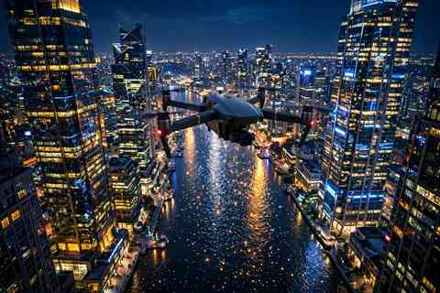
There is no shot more cinematic than a drone flying between glowing skyscrapers at night, the river sparkling below, the whole city lit up like a circuit board. It is the opening shot of every great city film, and it is also one of the most saved and shared video formats on social media — because it makes any city look like the future.
The format works because it gives viewers a feeling they cannot get any other way: flying. The smooth forward motion, the towers sliding past on both sides, the river glittering below — it is freedom, scale and beauty in ten seconds, and it works as a travel video, a brand opener, or a pure mood piece.
The video prompt below is written for Veo 3, Sora 2 and Kling, with the flight path, the lighting and the timing designed so the drone move feels smooth, real and breathtaking.
The Prompt
Copy the prompt below and paste it into your favourite AI tool. It is written to work exactly as it is, with no editing needed.
Vertical 9:16 AI video, 8-10 seconds, photorealistic cinematic drone footage style, for Veo 3 / Sora 2 / Kling. A smooth drone flight through a modern city at night, flying forward between two rows of glowing skyscrapers, their windows lit in warm gold and cool blue, neon signs glowing on rooftops. Below, a wide river sparkles with reflections of the city lights, boats with tiny lights drifting slowly, a bridge glowing in the distance. The drone flies steadily forward and slightly downward, passing close to a glass tower on the left, its lit windows sliding past, then opening out over the river as the city skyline spreads wide ahead. Light haze softens the distant towers, a few clouds glow orange above the skyline, the moon hangs small and bright. Camera: smooth steady forward drone motion, no shake, gentle descent, slight banking turn at 6 seconds to reveal the river. Sound: soft wind, distant city hum, gentle water below, a faint cinematic swell of music. Lighting: rich city glow, warm gold windows against deep blue night, sparkling river reflections, cinematic colour grading, epic scale, awe-inspiring and dreamy mood, ultra-detailed windows and water, smooth realistic drone motion.
Why This Prompt Works
This prompt works because it copies the grammar of real drone cinematography: a steady forward move, a reveal, and a descent. The city provides the scale, the river provides the sparkle, and the smooth motion provides the feeling of flight.
- Forward motion creates the flying feeling: a steady push forward is the single most powerful camera move in drone video — it makes viewers feel airborne.
- Skyscrapers add scale: towers sliding past on both sides make the viewer feel small and the city feel enormous.
- The river adds sparkle: reflected lights on water double the city’s glow and give the lower half of the frame its magic.
- The reveal is the payoff: opening out over the river at six seconds gives the video a second act and a reason to watch to the end.
- Night light is cinematic light: gold windows against blue night is the most film-like palette there is, and it needs no filter.
The result is a video that works as a travel post, a brand opener, a music video background, or simply ten seconds of beauty that people save and replay.
How to Use This Prompt
- Open Veo 3, Sora 2 or Kling and start a new text-to-video or image-to-video project in 9:16 vertical format.
- Copy the full video prompt from the box above and paste it in, keeping the camera move, timing and sound cues exactly as written.
- If your tool supports a first frame, upload a still image that matches the opening shot so the subject and setting stay consistent.
- Generate two or three takes and pick the one with the smoothest motion, the cleanest loop point and the most natural sound.
- Trim the clip to 8 to 10 seconds, add captions if the platform mutes sound by default, and export in the highest quality available.
- Post it as a Reel, Short or TikTok with a short hook caption and the hashtags below, and reply to early comments quickly to boost reach.
Pro Tips
- Name a real city in the prompt — “like Singapore at night” or “like New York at night” — to give the skyline a recognisable character.
- Keep the drone move slow and steady; fast drone moves look fake and make viewers dizzy.
- Generate three takes and pick the one with the smoothest forward motion and the cleanest river reveal.
- Add a trending cinematic audio track underneath; the right music can double the video’s reach and saves.
- Try a second version at dawn, swapping the night glow for golden sunrise over the river, for a completely different mood.
- Use the clip as the opening three seconds of a longer travel video — it hooks viewers instantly.
FAQ
Which AI video tool is best for drone shots?
Sora 2 is excellent on smooth drone-style camera moves, and Veo 3 renders city lights and water reflections beautifully. Kling is a solid free option for flythroughs.
Can I make the video about my own city?
Yes. Name your city and its river or landmark in the prompt — “flying over the Thames in London” or “over the Yamuna in Delhi” — and the AI will build the skyline around it.
Why do my drone videos sometimes look shaky or warped?
Because the prompt asks for too much movement. This prompt uses one steady forward move with a gentle descent, which the tools render far more cleanly than sharp turns or fast dives.
Can I use this video for my business or brand?
Yes, it is perfect as a brand opener, a real estate video, or a travel agency post. It makes any city — and any brand — look cinematic and premium.
The city is glowing, the river is sparkling, and the sky is yours. Take off, and let the night do the rest.
Related Viral Prompts
Neon Street Dancer AI Video Prompt
Sora 2 Cinematic AI Video Prompt
#NightCity #AIVideoPrompt #DroneVideo #Cinematic #PromptBazar


Leave a Reply