
Introduction
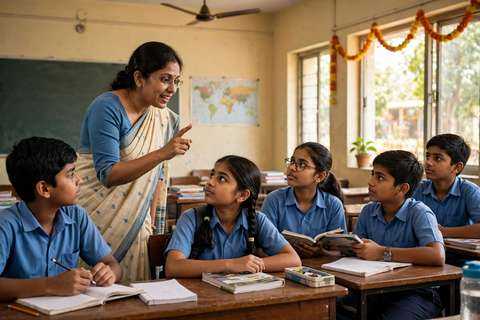
Some photos stop people mid-scroll because they carry a feeling, not just a scene, and this prompt is built around exactly that kind of moment. Students with books listening to an inspiring teacher in class on National Education Day is one of those images people save, share and send to their family groups, because it captures the warmth of National Education Day in a single frame. The trick is not an expensive camera or a perfect location. It is a clear, detailed prompt that tells the AI image tool exactly what to show, how the light should fall, and what emotion the picture should carry.
The scene at the heart of this prompt is students with books listening to an inspiring teacher in class on National Education Day. At first glance it seems easy to describe, but a good photo needs the tool to know where the light comes from, which details matter most, and what the people in the frame are feeling. That is why the prompt below is long and specific. Every extra detail is there for a reason, and together they turn a vague idea into a picture that feels alive.
You will notice that the prompt asks the tool to keep the face exactly the same as your uploaded photo. That matters more than anything else, because a festive photo only feels personal when the person in it is clearly you. The rest of the prompt then builds the world around that face: the setting, the light, the colours and the mood. Keep reading for the full prompt, the reasons it works, and the simple steps to use it.
The Prompt
Copy the complete prompt below and paste it into your AI image tool along with your photo:
Transform the uploaded photo into a beautiful, realistic festive photograph of a classroom of focused students in a bright classroom with books and a blackboard. Keep my face exactly the same as in the original photo, with the same facial features, same skin tone, same smile and same identity, do not change or beautify the face. Show students with books listening to an inspiring teacher in class on National Education Day in vivid detail, with open books, raised hands and an inspiring teacher guiding the lesson. Setting: a bright classroom with books and a blackboard, with authentic festive decorations, natural surroundings and a sense of place that feels real and lived in. Outfit and styling: traditional festive clothing suited to National Education Day, neat, colourful and appropriate for the occasion, with natural fabric folds and realistic details. Lighting: warm, natural and cinematic, soft golden light that flatters the subject, gentle shadows, and a glow that matches the time of day in the scene. Camera: shot on a DSLR, 50mm lens, shallow depth of field, sharp focus on the main subject, softly blurred background, eye-level angle, natural composition. Style: ultra-realistic photograph, high detail, true-to-life colours, natural skin texture, no cartoon look, no distorted hands or faces, no extra people, no watermark, no text. Mood: focused, curious and motivating, joyful and heartfelt, a photograph that feels like a real memory from National Education Day.
Why This Prompt Works
This prompt works because it is specific where most prompts are vague. Instead of asking for a generic festive photo, it names the subject, the setting, the light and the mood, so the AI tool has a clear picture to build. When the tool knows that the scene is students with books listening to an inspiring teacher in class on National Education Day, it can place the right details in the right places, and the result looks intentional rather than random. Specificity is the single biggest difference between an average AI photo and a viral one.
Another reason this prompt performs well is balance. It is detailed, but it does not overload the tool with contradictory ideas. Every sentence points in the same direction, toward a warm, realistic National Education Day photograph. The tool is not asked to be funny and solemn at the same time, or modern and ancient at once. That single clear direction is what lets it produce a coherent, believable image on the first or second try.
Put simply, the prompt succeeds because it treats the AI tool like a skilled photographer with a clear brief. It gives the subject, the setting, the light, the camera and the feeling, and it protects your face above everything else. For a National Education Day photo, that combination is powerful: the scene feels authentic, the person in it is recognisably you, and the mood matches the occasion. Readers and followers respond to that authenticity, which is why photos made with prompts like this one get saved and shared far more than generic festive graphics. If you use this prompt exactly as written for your first attempt, you will see the difference immediately, and you will have a strong base to customise from.
How to Use This Prompt
Using this prompt takes only a few minutes, and the steps below work for Nano Banana 2 and Gemini image editing. Follow them in order for your best first result.
- Step 1: Open Nano Banana 2 or Gemini image editing on your phone or computer and start a new image edit. Make sure you are signed in, because the tool needs your account to save and download the finished photo.
- Step 2: Upload a clear, well-lit photo of yourself or your subject, ideally a front-facing portrait with a natural expression. The better the uploaded photo, the more accurately the tool can keep the face the same in the festive scene.
- Step 3: Copy the full prompt from the box above and paste it into the prompt field, exactly as written. Do not shorten it on your first try, because every detail about the setting, the lighting and the camera helps the tool build a realistic image.
- Step 4: Generate the image and look closely at the result. Check the face first, then the hands, the outfit and the background. If something looks off, generate two or three more takes with the same prompt and pick the cleanest one.
- Step 5: Refine only if needed by changing one small detail at a time, such as the brightness or the colours, then download the best version in high quality and share it on WhatsApp, Instagram or Facebook with a short festive caption.
Most people get a great result within two or three generations. Save your favourite version, and keep the prompt saved in your notes so you can reuse it for other photos or other family members during National Education Day.
Pro Tips
These five tips will help you get a polished, shareable photo instead of a rough first draft.
- Use a sharp, front-facing photo with good natural light as your upload, because the tool copies the face from that image and a blurry or dark photo gives it less to work with.
- Keep the face instruction untouched when you customise the prompt. You can change the background, the colours or the time of day, but the line about keeping the face exactly the same should always stay.
- Generate at least three versions before you choose. AI tools vary slightly each time, and the third take is often the one where the light, the expression and the background all come together perfectly.
- If the outfit or the decorations look wrong, add one precise detail in your own words, such as a colour or a specific decoration, rather than rewriting the whole prompt and losing the parts that already work.
- Download the largest size the tool offers and avoid re-uploading a compressed copy, because each save loses detail and the warm festive glow looks best in the highest quality version.
Frequently Asked Questions
Is this National Education Day AI photo prompt free to use?
Yes, the prompt itself is completely free to copy and use as many times as you like. You only need access to an AI image tool such as Nano Banana 2 or Gemini, which may have its own free limits or paid plans, but the prompt text here costs nothing and you can reuse it for different photos throughout National Education Day.
Will the AI photo really look like me?
Yes, if you upload a clear photo and keep the face instruction in the prompt. The prompt explicitly tells the tool to keep your face exactly the same, with the same features, skin tone and smile. For the best match, use a recent front-facing photo in good light, and generate a few takes so you can choose the one where the likeness is strongest.
Can I change the background or outfit in this prompt?
Yes, you can change the setting, the colours or the outfit by editing those lines in the prompt, as long as you keep the face instruction and the camera and lighting details. Change one thing at a time so you can see what each edit does, and keep the overall mood of the scene the same so the photo still feels like a real National Education Day moment.
Why does my first generated photo sometimes look wrong?
AI image tools vary with every generation, so the first result is not always the best one. Common issues are a slightly changed face, odd hands or a cluttered background. Generate two or three more versions with the same prompt, check the face and hands closely, and pick the cleanest image. Small refinements to one detail at a time usually fix the rest.
Students with books listening to an inspiring teacher in class on National Education Day is more than a photo idea, it is a way to hold on to the feeling of National Education Day and share it with the people you love. Try the prompt today, pick the version that feels most like you, and share it with pride, because the best festive photos are the ones that feel real, warm and personal.
Related Viral Prompts
If you enjoyed this prompt, try these popular festive prompts next:
- Chhath Puja 2026 Evening Aarti Diyas Riverbank Golden Dusk
- Chhath Puja 2026 Family Journey Village Train Luggage Festival
- Chhath Puja 2026 Children Offering Flowers Sun God Riverside
#AIPhotoPrompt #NanoBanana #GeminiAI #FestivePhoto #PromptBazar


Leave a Reply