
Introduction
Pixar characters have a special kind of charm. Their big expressive eyes, their warm smiles and their bright colourful worlds make you feel happy the moment you see them, whether you are five years old or fifty. Turning yourself into a Pixar character has become one of the most shared AI photo trends, because the result is instantly joyful and impossible not to smile at. It is the perfect style for a fun profile picture, a birthday post, a gift for a friend or simply a reminder that you do not have to take yourself too seriously all the time.
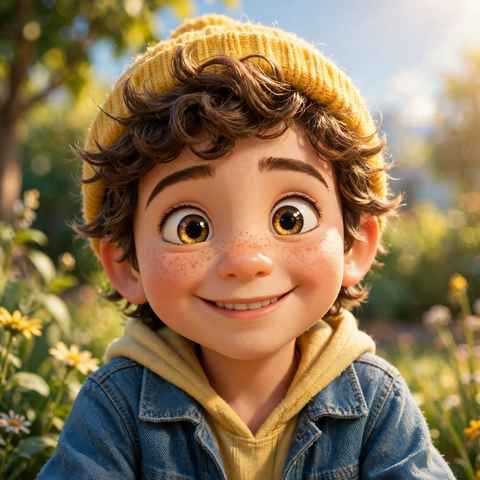
This Nano Banana 2 prompt transforms your photo into a cheerful 3D Pixar style portrait, with the big expressive eyes, smooth stylised features and bright sunny background that define the look. Your face stays recognisably yours, but it is rebuilt with the soft rounded modelling, the warm lighting and the vibrant colours of a modern animated film. The result looks like you just walked out of a Pixar movie, ready for an adventure, and it is guaranteed to make your friends smile when it appears in their feed.
The Prompt
Copy the prompt below and paste it into Nano Banana 2. It is written to work on the first try, so use it exactly as it is.
Transform this photo into a cheerful 3D Pixar style animated portrait, high-quality Disney Pixar animation look, big expressive warm eyes, smooth stylised 3D character modelling, soft rounded facial features, bright sunny background with blue sky and fluffy clouds, vibrant saturated colours, warm golden sunlight, joyful happy expression, detailed hair with individual strands, cinematic 3D render quality, soft shadows, playful and heartwarming mood, keep the face recognisably the same person, no text, no watermark
Why This Prompt Works
- Big expressive eyes are the signature of the Pixar look. They carry the emotion of the whole portrait, so the prompt enlarges and brightens the eyes while keeping their shape and colour faithful to you, which makes the character feel alive.
- Smooth 3D modelling is what separates Pixar style from a cartoon filter. The prompt asks for rounded, softly lit geometry with realistic subsurface skin, so the portrait looks like a rendered film character rather than a flat drawing.
- A bright sunny background sets the emotional tone. Blue skies, fluffy clouds and golden sunlight tell the viewer this is a happy story before they even look at the face, and that optimism is the heart of the Pixar feeling.
- Vibrant saturated colours complete the transformation. Pixar films use rich, joyful palettes, so the prompt pushes the colours brighter and warmer, which makes the portrait pop in a social media feed full of muted photos.
How to Use This Prompt
- Open Nano Banana 2 and upload your photo — Start with a clear, well-lit photo of yourself or your subject. A sharp front-facing shot with a neutral expression works best, because the model keeps your face and pose faithful while it rebuilds the style, lighting and background around you.
- Paste the full prompt exactly as written — Copy the entire prompt from the box below and paste it into Nano Banana 2. Do not shorten it or leave out the camera, lighting and texture details, because those small phrases are what push the result from a plain filter look to a believable photograph.
- Generate and compare two or three versions — Run the prompt two or three times and compare the results side by side. Nano Banana 2 varies the grain, light and framing slightly on every run, so one version usually nails the mood while the others feel a little flat.
- Refine with one small follow-up edit — If something is off, ask for a single targeted fix, such as softer flash, warmer tones or a tighter crop. Small follow-up edits protect the parts you already like instead of rebuilding the whole image from scratch.
- Download and share your finished photo — Save the best version at full resolution and share it on Instagram, WhatsApp or your profile. A short caption about the style you recreated helps friends understand the look and often gets them asking for the prompt.
Pro Tips
- Use a photo where you are smiling naturally, because the Pixar style amplifies expressions, and a genuine smile becomes a big warm animated grin that makes the whole portrait shine.
- Keep the background of your source photo simple. A plain wall behind you gives the model a clean canvas, so the new scene it builds looks intentional instead of cluttered.
- If the first result looks too clean or too digital, add the words heavier grain and softer flash to your follow-up edit for a more authentic vintage feel.
- Try the same prompt with a full-body photo and a close-up portrait. The style adapts beautifully to both, and you will get two very different images worth sharing.
- Save your favourite result before making more edits. Keeping a copy of the version you love means you never lose a great image to an experiment that did not work out.
Frequently Asked Questions
Will the Pixar portrait still look like me?
Yes, the prompt is written to keep your face recognisably yours. The eyes get bigger, the features get softer and the style becomes 3D animation, but your smile, your face shape and your hairstyle stay faithful, so friends will know it is you at a glance.
Can I turn a couple or family photo into Pixar style?
Yes, group photos work wonderfully in this style, and they look like a cast of characters from an animated film. Make sure every face is clearly visible in the source photo so the model can stylise each person faithfully.
Can I change the background to something else?
Absolutely. Ask for a beach, a snowy mountain, a city street or a magical forest in a follow-up edit, and the model will rebuild the world behind your character while keeping the Pixar styling. The sunny sky is just the happiest starting point.
Is this style good for a professional profile picture?
It is perfect for a fun or creative profile, but it is not suited to a formal corporate profile. Use it for Instagram, WhatsApp and personal pages where personality matters, and keep a clean studio headshot for LinkedIn and your CV.
A Pixar portrait is a little dose of joy, and this prompt makes one in seconds. Try it on your favourite smiling photo, share the result, and enjoy the moment your friends realise the animated hero on their screen is you.
Related Viral Prompts
- Nano Banana 2 Ghibli Style AI Photo Prompt: A Dreamy Ghibli Style Portrait With Soft Colours and a Magical Forest
- Nano Banana 2 3D Collectible AI Photo Prompt: A 3D Rendered Collectible Figure on a Display Stand With a Soft Glow
- Nano Banana 2 Wedding Figurine AI Photo Prompt: A Bride and Groom as Collectible Figures in a Wedding Toy Box
#NanoBanana2 #PixarStyle #3DPortrait #AnimatedPhoto #AIPhotoPrompt


Leave a Reply