
Introduction
Some of the most shared mass entry videos on Indian social media are not shot on film sets at all. They are shot in metro stations, railway platforms, and crowded city spaces, where an ordinary location suddenly turns into a movie scene the moment a hero walks in slow motion. The metro station hero entry has become a whole genre of Reels: a stylish man walks through the crowd, people turn to look, the lights reflect off the floor, and the background music hits at exactly the right beat. It feels grand because the contrast is so strong, an everyday place made to look like a blockbuster interval scene.
With AI video tools, you can now create this exact scene without standing in a real metro station with a camera. This article gives you a complete metro station hero entry video AI prompt that controls the walk, the crowd reaction, the lighting, and the camera movement. Paste it into Veo, Flow, Kling, or Runway, and you get a movie style slow motion clip that is ready to post with a mass song.
The Prompt
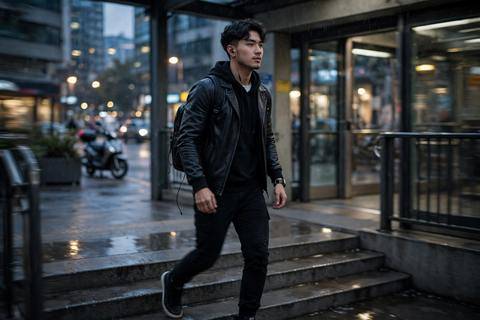
Create an ultra realistic cinematic vertical video, 9:16 aspect ratio, 8 seconds long. Scene: a stylish young Indian man in a black shirt, black trousers, sunglasses, and a long black coat walks heroically in slow motion through a modern metro station in India. Crowds of daily passengers part slightly as he walks, some turning to look at him with admiration. The station has bright white ceiling lights, glowing sign boards, polished reflective floors, and a train arriving in the background with motion blur. Camera: low angle front tracking shot moving backward as the hero walks toward the camera, then a smooth side profile shot showing his confident stride and coat flowing slightly. His expression is calm and powerful, jawline sharp, hair perfectly styled. Style: movie quality, ultra realistic, sharp facial details, dramatic contrast between the hero and the busy crowd, cool white and steel tones with warm accent lights, smooth slow motion throughout, film grain, no text, no watermark, no distorted faces or extra limbs.
Why This Prompt Works
This prompt works because it builds the scene around contrast, which is the core trick of every mass entry video. The hero is dressed in solid black while the station is bright and busy, so the eye goes straight to him in every frame. The crowd is described as parting and turning, which gives the AI a clear behaviour to animate instead of a random crowd milling about. Without that direction, AI crowds often look frozen or chaotic. With it, the scene instantly reads as “everyone is watching him,” and that feeling is what makes viewers share the clip.
The camera plan is the second reason this prompt delivers. A low angle front tracking shot is the classic hero entry angle in Indian cinema, because it makes the person look taller and more powerful. Switching to a side profile mid-clip shows the coat flow and the stride, which are the two details audiences remember. Keeping the whole clip in slow motion is also deliberate: slow motion stretches an 8 second clip into something that feels grand and gives the video model more frames to keep the face stable.
Finally, the prompt names the exact environment details that sell realism: reflective floors, glowing sign boards, and a train arriving with motion blur. These background layers stop the scene from looking like an empty studio render. Real metro stations are full of light reflections and movement, and when the AI includes them, the hero entry feels like it was filmed in a real place at rush hour.
How to Use This Prompt
Open your AI video generator and paste the full prompt without cutting any part of it. The crowd behaviour and camera angles are load bearing details, so removing them will weaken the result. Choose 9:16 vertical format and 8 seconds duration. Veo 3 and Flow handle crowd scenes and reflections particularly well, while Kling is a good option if you want a free generation. If your tool supports it, enable high quality or performance mode rather than draft mode, because crowd scenes need the extra detail.
When the clip is ready, check three things: the hero’s face stability across the walk, the coat movement, and whether the crowd looks natural. If the face wobbles, regenerate once or twice with the identical prompt. Then pair the clip with a mass background track, add a text hook in the first second like “Wait for the walk,” and post it as a Reel or Short. Creators who post hero entry clips in a series, changing only the location or outfit, tend to grow faster because viewers start waiting for the next entry.
Pro Tips for Best Results
- Dress the hero in one solid dark colour. Mixed colours confuse the model in crowd scenes and make the hero blend into the passengers.
- Keep sunglasses on the hero. They hide the eyes, which are the hardest facial feature for AI video to keep stable, and they add instant mass appeal.
- Do not ask for a running or jumping hero. A confident walk in slow motion renders far more realistically than fast action in a crowd.
- If the crowd looks strange, simplify by regenerating. Crowd scenes vary a lot between generations, and one clean take is worth three average ones.
- Add your own city name in the caption, like “Delhi Metro Entry,” to attract local viewers and comments.
Frequently Asked Questions
Can I make this metro entry video without showing a real metro brand?
Yes. The prompt describes a generic modern metro station with no brand names or logos, so the result looks like any Indian metro station and avoids trademark issues.
Which AI tool handles crowd scenes best?
Google Veo 3 and Flow currently handle crowds and reflections most reliably. Kling also works well, but you may need an extra regeneration to get a clean crowd take.
Why does my hero’s face change during the walk?
Face drift happens when the camera angle changes too fast. This prompt uses a slow front tracking shot followed by one smooth side profile, which minimises drift. If it still happens, keep the sunglasses on and regenerate.
Can I use this clip for YouTube Shorts monetisation?
Yes, you can use AI generated clips in monetised Shorts as long as your video tool’s terms allow it. Adding your own editing, music, and voiceover further strengthens originality.
The metro is ordinary. The walk is not. Copy the prompt, create your hero entry, and turn an everyday station into the interval scene your audience will replay again and again.
Related Viral Prompts
- Staircase Love Bump Video AI Prompt: Create a Playful — a cute romantic moment on a staircase.
- Gym Transformation Video AI Prompt: Create a Motivational — a powerful before and after fitness story.
- Building Explosion Action Video AI Prompt: Create a Dramatic — a movie style action clip with a hero silhouette.
#HeroEntry #MetroStation #MassEntry #AIVideoPrompt #ViralReels #PromptBazar


Leave a Reply