
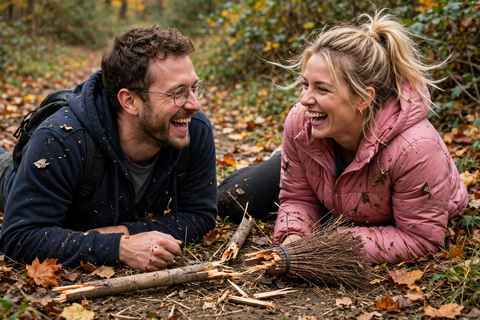
Halloween 2026 is almost here, and this year the most shared posts are not the ones with expensive costumes or professional shoots. They are the ones made in minutes with a single AI prompt. This Halloween Witch Broom Crash Video AI Prompt is built exactly for that moment: one clear prompt, your own photo, and a result that looks like it came from a themed photoshoot. Whether you want something funny and light-hearted for Instagram, a profile picture, or a fun clip for Reels, this prompt gives you a finished look without makeup, wardrobe or editing skills.
The secret is in the details. Instead of a vague request like “make me spooky”, this prompt describes a funny witch broom crash video in a suburban lawn at dusk, with warm evening light with a comic tone and a wobbly broom flight ending in a lawn crash. That level of direction is what keeps the AI from guessing, and it is why the results look consistent, realistic and shareable. Below you will find the full copy-paste prompt, why each part of it works, a simple step-by-step guide, pro tips to improve your result, and answers to the questions people ask most.
The Prompt
Copy the full prompt below and paste it into your AI tool with your photo uploaded:
Create a vertical 9:16 AI video from my uploaded photo. Keep the same face, facial features, skin tone, hairstyle and body shape exactly as in the photo, so the person stays clearly recognisable throughout the clip. The scene shows a funny witch broom crash video in a suburban lawn at dusk. The camera holds a steady medium shot with a slow push-in, and the motion is smooth and continuous, not jumpy. Warm evening light with a comic tone shapes the mood, which feels funny and light-hearted. The key moment is a wobbly broom flight ending in a lawn crash, timed to land cleanly in the middle of the clip so viewers replay it. Add natural sound for the scene, soft background music that fits the mood, and realistic motion in hair, clothes and background elements. Keep the lighting consistent from the first frame to the last, avoid distorted hands and faces, avoid sudden scene changes, and end on a frame that loops neatly back to the opening shot. Render in high resolution, sharp focus on the subject, realistic skin texture, cinematic colour grading, and no text, watermark or logo anywhere in the frame.
Why This Prompt Works
It starts with your face. The prompt tells the AI to keep your exact face, features and proportions. That single instruction is the difference between a fun edit and a stranger in a costume. Most failed Halloween edits happen because this line is missing, so the model redesigns the face along with the outfit.
It describes one scene, not ten. The prompt locks in a funny witch broom crash video in a suburban lawn at dusk. One subject, one setting and one light source give the model a clear brief, which means sharper results, fewer weird artefacts and less need to regenerate again and again.
It controls light and mood. Warm evening light with a comic tone is written into the prompt on purpose. Light is what makes a Halloween image feel funny and light-hearted instead of flat or cartoonish, and naming it keeps the whole image consistent from background to skin tones.
It bans the usual mistakes. The prompt explicitly excludes distorted hands, plastic skin, text and watermarks. These negative instructions quietly remove the most common AI artefacts, so your first or second generation is usually good enough to post.
It is built for sharing. The vertical framing, sharp focus and realistic texture are chosen for Instagram, Reels, Stories and WhatsApp status. The image reads clearly even at thumbnail size, which is exactly what a profile picture or a feed post needs.
How to Use This Prompt
- Open Veo, Kling or Seedance on your phone or computer and start a new image edit or video project.
- Upload one clear photo of yourself with your face fully visible, good light and a simple background. A half-body or head-and-shoulders shot works best.
- Copy the full prompt from the box below and paste it exactly as written. Do not shorten it, because the detail lines are doing the real work.
- Generate the first version and check three things: your face still looks like you, the costume and setting match the description, and there are no distorted hands or odd artefacts.
- If something looks off, change only one thing at a time, for example the lighting or the background, and regenerate. Small edits beat full rewrites.
- Download the best version, crop it for your platform if needed, and post it with a short caption and Halloween hashtags.
Pro Tips
- Use a recent, well-lit selfie. Blurry or dark uploads force the AI to invent facial details, and that is when the face starts drifting.
- Keep your hair and accessories simple in the upload photo. Heavy hats or sunglasses in the source photo confuse the face-lock instruction.
- Generate two or three versions and pick the best. Even a great prompt varies slightly each run, and the second run is often the keeper.
- If the costume looks too strong or too weak, add one line like “subtle makeup” or “more dramatic costume” and regenerate instead of rewriting the whole prompt.
- For profile pictures, check the result at small size first. If it still reads clearly in a tiny circle, it will work everywhere.
- Post early in Halloween week. Spooky content peaks in the days before October 31, so a post made on October 29 or 30 gets more reach than one made on the day itself.
FAQ
Will the AI keep my face exactly the same?
Yes, as long as you use a clear upload photo and keep the face-preservation line in the prompt. The prompt explicitly says to keep your exact face, features, skin tone and hairstyle. If the face still drifts, try a brighter, front-facing photo and regenerate.
Which tool works best for this prompt?
Veo, Kling or Seedance works very well with this prompt because it handles face-preserving edits and detailed scene descriptions reliably. You can also try other image or video tools, but keep the prompt text unchanged for the first attempt so you can compare results fairly.
Can I use this prompt for a couple, family or pet photo?
Yes. The same structure works for group photos if you upload a clear group shot and change the subject line to mention everyone in the frame. For pets, mention the pet clearly and keep the costume small and simple so the animal still looks natural.
Is this prompt free to use?
Yes. Copy it, adapt it and use it for your own photos as much as you like. If you share the result, a short credit or a mention of PromptBazar is appreciated but not required.
Halloween is the one week of the year when a bold, funny and light-hearted look gets more love than a perfect one, so do not wait for the perfect costume. Try this prompt today, post your favourite version, and enjoy the reactions. Happy Halloween, and may your feed be spooky in the best possible way.
Related Viral Prompts
- Glam Witch Halloween AI Photo Prompt
- Halloween Haunted House AI Photo Prompt
- Ghostface AI Photo Prompt
#Halloween2026 #AIPhotoPrompt #ViralAI #PromptBazar #HalloweenVideo


Leave a Reply