
Introduction
The best festive photos on social media right now share one secret: the creator knew exactly what to ask for. Devotees reading the Akhand Path before the Guru Granth Sahib on Guru Nanak Jayanti is a perfect example, because the scene is full of natural beauty that only shows up when the prompt describes it properly. This article walks you through a detailed prompt for Guru Nanak Jayanti, explains why each part of it matters, and shows you how to turn it into a photo your friends and followers will love.
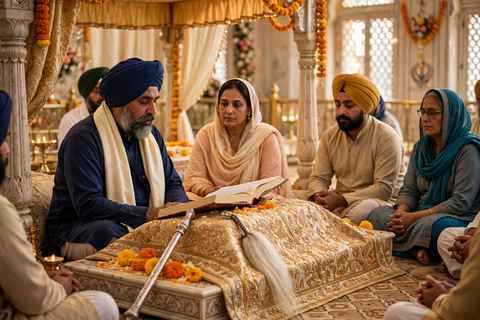
Think about what makes a Guru Nanak Jayanti photo memorable. It is rarely the fanciest outfit or the biggest decoration. It is the honest moment in the middle: a group of devoted readers in inside a peaceful gurdwara before the Guru Granth Sahib, with the holy scripture on a decorated palki, soft light and readers taking turns with folded hands. When an AI tool understands that moment, it can recreate it beautifully, and when it does not, the result looks empty. The prompt in this article is written to give the tool that understanding, in plain language it can follow.
One reason this style is trending is that it is personal. People are no longer happy with generic festival graphics. They want photos that show real people in real festive moments, and AI photo tools now make that possible without a studio. Devotees reading the Akhand Path before the Guru Granth Sahib on Guru Nanak Jayanti fits that trend perfectly, because it is warm, specific and instantly recognisable as a Guru Nanak Jayanti moment. Use it for a profile picture, a greeting post, a story, or a family WhatsApp share.
The Prompt
Copy the complete prompt below and paste it into your AI image tool along with your photo:
Transform the uploaded photo into a beautiful, realistic festive photograph of a group of devoted readers in inside a peaceful gurdwara before the Guru Granth Sahib. Keep my face exactly the same as in the original photo, with the same facial features, same skin tone, same smile and same identity, do not change or beautify the face. Show devotees reading the Akhand Path before the Guru Granth Sahib on Guru Nanak Jayanti in vivid detail, with the holy scripture on a decorated palki, soft light and readers taking turns with folded hands. Setting: inside a peaceful gurdwara before the Guru Granth Sahib, with authentic festive decorations, natural surroundings and a sense of place that feels real and lived in. Outfit and styling: traditional festive clothing suited to Guru Nanak Jayanti, neat, colourful and appropriate for the occasion, with natural fabric folds and realistic details. Lighting: warm, natural and cinematic, soft golden light that flatters the subject, gentle shadows, and a glow that matches the time of day in the scene. Camera: shot on a DSLR, 50mm lens, shallow depth of field, sharp focus on the main subject, softly blurred background, eye-level angle, natural composition. Style: ultra-realistic photograph, high detail, true-to-life colours, natural skin texture, no cartoon look, no distorted hands or faces, no extra people, no watermark, no text. Mood: solemn, reverent and deeply peaceful, joyful and heartfelt, a photograph that feels like a real memory from Guru Nanak Jayanti.
Why This Prompt Works
Finally, the camera and style instructions keep the image grounded in reality. Mentioning a 50mm lens, shallow depth of field and natural skin texture tells the tool to behave like a real camera, not a painting app. The ban on distorted hands, extra people and watermarks removes the most common AI mistakes before they happen. That is why this prompt produces clean, shareable results far more often than a short, casual prompt.
A good prompt is really a short brief for a photographer, and this one reads like one. It tells the tool who the subject is, where they are, what they are wearing, how the light falls, and how the photo should feel. Because the scene is devotees reading the Akhand Path before the Guru Granth Sahib on Guru Nanak Jayanti, each of those details matters: the setting gives context, the outfit gives culture, and the light gives emotion. Leave any of them out and the image loses part of its story.
Put simply, the prompt succeeds because it treats the AI tool like a skilled photographer with a clear brief. It gives the subject, the setting, the light, the camera and the feeling, and it protects your face above everything else. For a Guru Nanak Jayanti photo, that combination is powerful: the scene feels authentic, the person in it is recognisably you, and the mood matches the occasion. Readers and followers respond to that authenticity, which is why photos made with prompts like this one get saved and shared far more than generic festive graphics. If you use this prompt exactly as written for your first attempt, you will see the difference immediately, and you will have a strong base to customise from.
How to Use This Prompt
Using this prompt takes only a few minutes, and the steps below work for Nano Banana 2 and Gemini image editing. Follow them in order for your best first result.
- Step 1: Open Nano Banana 2 or Gemini image editing on your phone or computer and start a new image edit. Make sure you are signed in, because the tool needs your account to save and download the finished photo.
- Step 2: Upload a clear, well-lit photo of yourself or your subject, ideally a front-facing portrait with a natural expression. The better the uploaded photo, the more accurately the tool can keep the face the same in the festive scene.
- Step 3: Copy the full prompt from the box above and paste it into the prompt field, exactly as written. Do not shorten it on your first try, because every detail about the setting, the lighting and the camera helps the tool build a realistic image.
- Step 4: Generate the image and look closely at the result. Check the face first, then the hands, the outfit and the background. If something looks off, generate two or three more takes with the same prompt and pick the cleanest one.
- Step 5: Refine only if needed by changing one small detail at a time, such as the brightness or the colours, then download the best version in high quality and share it on WhatsApp, Instagram or Facebook with a short festive caption.
Most people get a great result within two or three generations. Save your favourite version, and keep the prompt saved in your notes so you can reuse it for other photos or other family members during Guru Nanak Jayanti.
Pro Tips
These five tips will help you get a polished, shareable photo instead of a rough first draft.
- Use a sharp, front-facing photo with good natural light as your upload, because the tool copies the face from that image and a blurry or dark photo gives it less to work with.
- Keep the face instruction untouched when you customise the prompt. You can change the background, the colours or the time of day, but the line about keeping the face exactly the same should always stay.
- Generate at least three versions before you choose. AI tools vary slightly each time, and the third take is often the one where the light, the expression and the background all come together perfectly.
- If the outfit or the decorations look wrong, add one precise detail in your own words, such as a colour or a specific decoration, rather than rewriting the whole prompt and losing the parts that already work.
- Download the largest size the tool offers and avoid re-uploading a compressed copy, because each save loses detail and the warm festive glow looks best in the highest quality version.
Frequently Asked Questions
Is this Guru Nanak Jayanti AI photo prompt free to use?
Yes, the prompt itself is completely free to copy and use as many times as you like. You only need access to an AI image tool such as Nano Banana 2 or Gemini, which may have its own free limits or paid plans, but the prompt text here costs nothing and you can reuse it for different photos throughout Guru Nanak Jayanti.
Will the AI photo really look like me?
Yes, if you upload a clear photo and keep the face instruction in the prompt. The prompt explicitly tells the tool to keep your face exactly the same, with the same features, skin tone and smile. For the best match, use a recent front-facing photo in good light, and generate a few takes so you can choose the one where the likeness is strongest.
Can I change the background or outfit in this prompt?
Yes, you can change the setting, the colours or the outfit by editing those lines in the prompt, as long as you keep the face instruction and the camera and lighting details. Change one thing at a time so you can see what each edit does, and keep the overall mood of the scene the same so the photo still feels like a real Guru Nanak Jayanti moment.
Why does my first generated photo sometimes look wrong?
AI image tools vary with every generation, so the first result is not always the best one. Common issues are a slightly changed face, odd hands or a cluttered background. Generate two or three more versions with the same prompt, check the face and hands closely, and pick the cleanest image. Small refinements to one detail at a time usually fix the rest.
Devotees reading the Akhand Path before the Guru Granth Sahib on Guru Nanak Jayanti is more than a photo idea, it is a way to hold on to the feeling of Guru Nanak Jayanti and share it with the people you love. Try the prompt today, pick the version that feels most like you, and share it with pride, because the best festive photos are the ones that feel real, warm and personal.
Related Viral Prompts
If you enjoyed this prompt, try these popular festive prompts next:
- Black Friday 2026 Midnight Sale Crowd Neon Mall Doors
- Black Friday 2026 Fashion Flatlay Clothes Shoes Sale Tags Table
- Chhath Puja 2026 Mud Lamps Rows Ghat Steps Evening River
#AIPhotoPrompt #NanoBanana #GeminiAI #FestivePhoto #PromptBazar


Leave a Reply