
Introduction
Studio Ghibli’s dreamy, hand-painted worlds have completely taken over social media feeds in 2026, and the monsoon rain dance makeover is one of the most beloved trends going viral right now. With a single copy-paste prompt, you can transform an ordinary selfie into a breathtaking monsoon rain dance portrait that looks like a film still straight out of a Miyazaki classic.
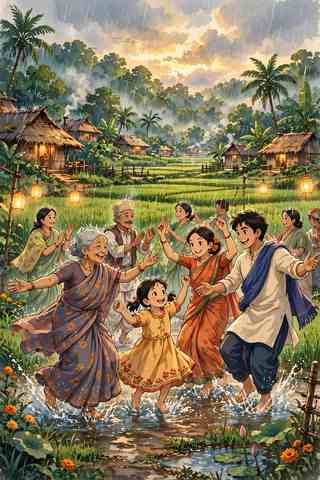
Picture this: you dancing barefoot in the rain with your head tilted up in a lush green courtyard in the middle of a joyful monsoon downpour. Raindrops bounce off broad banana leaves, while paper boats float in the puddles at your feet. Everything is rendered in monsoon greys, fresh leaf greens and silver rain streaks, wrapped in that unmistakable Ghibli warmth that makes the whole image feel alive. The result is pure wild freedom — the kind of picture that makes people stop scrolling, save it instantly, and send it to their friends.
In this guide you will get the exact Ghibli Style Monsoon Rain Dance AI photo prompt, a clear breakdown of why it produces such stunning results, simple step-by-step instructions for using it with any AI image generator, pro tips for flawless generations, and answers to the questions everyone asks. Let’s turn your photo into pure Ghibli magic.
The Prompt
Copy the exact prompt below and paste it into your favorite AI image generator together with your photo. Do not reword it — every phrase has been tuned for face accuracy and an authentic Studio Ghibli look.
Transform my photo into a Studio Ghibli anime-style portrait: keep my exact face, facial features and expression. Place me in a lush green courtyard in the middle of a joyful monsoon downpour, showing you dancing barefoot in the rain with your head tilted up. Include raindrops bounce off broad banana leaves and paper boats float in the puddles at your feet. Use monsoon greys, fresh leaf greens and silver rain streaks, soft painterly watercolor textures, big expressive anime eyes, gentle cinematic lighting, vertical portrait orientation, highly detailed, whimsical and heartwarming.
Why This Prompt Works
First, it protects your identity. The opening line — “keep my exact face, facial features and expression” — instructs the AI to treat your uploaded photo as a strict character reference instead of a loose suggestion. This is the difference between a portrait that is unmistakably you and a generic anime face. Most failed Ghibli edits go wrong right here, because a vague prompt lets the model invent a new person.
Second, it speaks fluent Ghibli. Phrases like “soft painterly watercolor textures,” “big expressive anime eyes,” and “gentle cinematic lighting” are the visual DNA of Studio Ghibli films, from My Neighbor Totoro to Spirited Away. Combined with the monsoon rain dance setting — a lush green courtyard in the middle of a joyful monsoon downpour — and a palette of monsoon greys, fresh leaf greens and silver rain streaks, the generator has everything it needs to paint a scene that feels hand-crafted rather than computer-made.
Third, it controls the composition. The explicit “vertical portrait orientation” keeps the framing perfect for phone wallpapers, profile pictures, and stories, where most of these images get shared. Meanwhile the two signature details — raindrops bounce off broad banana leaves and paper boats float in the puddles at your feet — fill the frame with storytelling elements so the result never looks empty or generic.
Finally, it directs the emotion. A great Ghibli image is never just pretty; it feels like something. Words like “whimsical and heartwarming” push the model toward the wild freedom that defines this particular scene, giving you a portrait with genuine emotional weight instead of a flat, pretty picture.
How to Use This Prompt
You do not need any editing skills or expensive software. The whole process takes about two minutes from start to finish.
- Choose a clear photo of yourself. A front-facing selfie with good lighting and a neutral background works best, because the AI needs to read your facial features accurately. Avoid sunglasses, heavy shadows, or group shots.
- Open your AI image generator. This prompt works with ChatGPT, Gemini, Midjourney, Leonardo, and most modern image tools that accept an image plus a text prompt. Pick whichever one you already use.
- Upload your photo and paste the prompt. Attach your picture first, then paste the full prompt text exactly as written above into the prompt box. Keep the wording intact for the most reliable results.
- Generate and review. Hit generate and wait for your monsoon rain dance Ghibli portrait. Check that your face still looks like you and that the monsoon rain dance details — raindrops bounce off broad banana leaves — came through clearly.
- Regenerate or refine if needed. If something looks off, generate once more with the same photo; small variations often fix themselves. For stubborn issues, see the pro tips below before changing the prompt.
Once you love the result, download it at the highest available resolution so the painterly textures stay crisp when you share or print it.
Pro Tips for Best Results
These small adjustments separate an okay result from a jaw-dropping one.
- Start with a sharp, well-lit selfie. The AI can only preserve the face it can see clearly. Natural daylight facing a window beats any filter, and the Ghibli lighting in the prompt will handle the mood.
- Keep the background of your photo simple. A plain wall or blurred background lets the model focus on your face and then rebuild the monsoon rain dance world — a lush green courtyard in the middle of a joyful monsoon downpour — around you without visual clutter fighting the composition.
- Generate two or three versions and pick the winner. AI generation has natural randomness. Running the same photo and prompt a few times gives you options, and you will quickly spot which one nails the wild freedom you are after.
- Match your expression to the scene. Since the prompt preserves your expression, a gentle smile suits the monsoon rain dance mood far better than a stern look. Raindrops bounce off broad banana leaves, and your expression should feel like it belongs in that moment.
- Upscale before posting. Run your favorite result through a free AI upscaler so the watercolor textures and fine details like paper boats float in the puddles at your feet stay sharp on high-resolution phone screens.
Frequently Asked Questions
Will this prompt really keep my real face?
Yes — that is exactly what the opening instruction is for. By telling the AI to keep your exact face, facial features and expression while restyling everything else, the model preserves your identity and only repaints the art style, setting, and lighting around you. Using a clear front-facing photo makes the likeness even stronger.
Which AI tools work best with this Ghibli prompt?
Any modern image generator that accepts both an uploaded photo and a text prompt will work, including ChatGPT, Gemini, Midjourney, and Leonardo AI. Tools with a dedicated character-reference or face-ID feature give the most consistent likeness, but even standard image-plus-prompt modes produce excellent monsoon rain dance results with this wording.
Why does my result look wrong or not like me?
The most common cause is a low-quality source photo — blur, harsh shadows, or sunglasses confuse the face matching. Try a sharper, front-facing selfie in soft daylight. If the monsoon rain dance scene elements are missing, make sure you pasted the complete prompt without trimming the detail sentences.
Can I post my Ghibli portrait on social media?
Absolutely — that is what this trend is for. These portraits are made to be shared as profile pictures, stories, and posts. Just remember the usual courtesy: the underlying photo is yours, the style is AI-generated, and crediting the prompt source is always appreciated when friends ask how you made it.
The monsoon rain dance Ghibli portrait is the perfect viral formula: one selfie in, one breathtaking anime transformation out, and a result so wild freedom-filled that sharing it feels irresistible. Copy the prompt above, upload your photo, and step into your own Miyazaki moment — your hand-painted alter ego is waiting.
Related Viral Prompts
Love this style? Try these next:
#GhibliAI #AIPhotoPrompt #StudioGhibli #AnimePortrait #ViralPhotoTrend




Leave a Reply