
Introduction
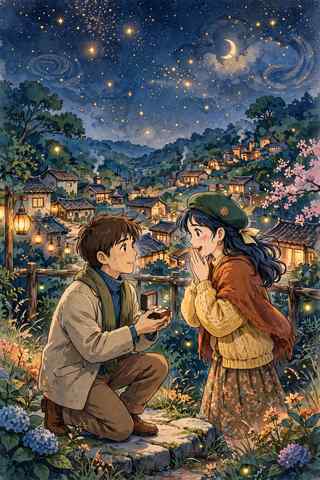
Imagine opening your gallery and finding yourself inside a Studio Ghibli film — not as a stranger, but unmistakably you, reimagined with soft cel shading and a hand-painted world. That is exactly what this Ghibli AI photo prompt delivers. Built for a couple, it preserves your real facial features while rebuilding the scene around you: a hilltop under a starry sky, complete with a kneeling proposal and a glowing ring box.
Ghibli portraits go viral for a simple reason: they feel nostalgic even when they are brand new. The prompt leans into that by describing light, texture and mood the way a background artist would — the Milky Way overhead, fireflies around, and a small telescope all play their part. The AI is not just restyling pixels; it is following art direction, which is why the finished portrait has depth, warmth and that unmistakable storybook quality.
Whether you want a new profile picture, a gift for someone special, or just a delightful experiment, this guide has you covered. Below you will find the exact copy-paste prompt, why each part of it matters, how to run it on any popular AI tool, pro tips that noticeably improve results, and answers to common questions. Let us create your magical and unforgettable Ghibli portrait together.
The Prompt
Here is the exact prompt. Copy everything inside the box below and paste it into your favorite AI image generator along with your photo. Do not change the wording on your first try — it is tuned so the AI keeps your face recognizable while rebuilding the world as a hilltop under a starry sky.
Transform our photo into a Studio Ghibli anime portrait of a starry night proposal, keeping both of our exact faces, hairstyles and emotional expressions. Show a kneeling proposal on a hilltop under a brilliant starry sky, a glowing ring box open, the Milky Way overhead, fireflies drifting and a small telescope nearby. Use soft cel shading, deep sparkling night colors, magical starlight and the unforgettable romance of a Ghibli night scene. Portrait orientation, highly detailed anime illustration.
Notice how the prompt does three jobs at once: it locks in your identity (“keeping my exact face”), it art-directs the scene (a kneeling proposal, the Milky Way overhead), and it sets the rendering style (soft cel shading, hand-painted details). That three-part structure is what makes it reliable across different AI tools.
Why This Prompt Works
Your face stays the star. The prompt’s first job is preservation: your exact face, hairstyle and expression carry over into the anime version. The transformation applies to wardrobe, setting and rendering — you become a couple — while the features your friends know remain front and center.
The scene is fully art-directed. Great Ghibli frames are never empty. That is why the prompt stages a hilltop under a starry sky with a kneeling proposal and a glowing ring box, then layers atmosphere with the Milky Way overhead. Each noun is a brushstroke the AI can actually paint, producing a composed scene rather than a blurred backdrop.
It uses the studio’s real visual grammar. Soft cel shading, hand-painted backgrounds and magical and unforgettable lighting are not buzzwords here; they describe how Ghibli films are genuinely constructed. Speaking the AI’s language this precisely is what yields that authentic storybook glow instead of generic “cartoon.”
Details invite a second look. Fireflies around and a small telescope reward viewers who linger, and lingering drives saves, shares and comments. Virality loves discoverability, and this prompt bakes it into every generation.
How to Use This Prompt
Step 1 — Choose your photo wisely: Natural daylight, facing the camera, minimal background clutter. Great input is the cheapest way to get a great Ghibli portrait of a couple.
Step 2 — Grab the prompt: Copy the entire block from the “The Prompt” section. Every clause earns its place, from face preservation to the hand-painted finish.
Step 3 — Run it in any AI image app: Midjourney, DALL-E, Gemini, Leonardo, Firefly — all handle this well. Attach your photo, paste the prompt, and generate.
Step 4 — Pick your favorite take: Run it two or three times and choose the version with the strongest likeness and the most magical background. Variation is normal and desirable.
Step 5 — Share the magic: Download in the highest quality available. These portraits perform beautifully as profile photos, wall prints and social posts.
Pro Tips for Best Results
Use a sharp, front-facing photo. The prompt preserves your exact face, but it can only preserve what it can see. A clear photo with even lighting gives the AI the most to work with.
Keep the prompt intact on round one. Details like a kneeling proposal and the Milky Way overhead were balanced against each other. Change one thing at a time afterward so you learn what each clause does.
Ask for portrait orientation explicitly if needed. The prompt already requests it, but some tools default to square — add “vertical 3:4” to the end if your generator ignores the orientation cue.
Regenerate for background variety. Your face stays consistent while backgrounds like fireflies around and a small telescope remix between runs. Three generations usually surface one clear winner.
Finish with a gentle upscale. AI portraits sharpen beautifully. A light 2x upscale makes the hand-painted background details — a glowing ring box especially — look stunning in print or as a wallpaper.
Frequently Asked Questions
Will this prompt really keep my face looking like me?
Yes — that is the prompt’s first instruction. It tells the AI to preserve your exact face, hairstyle and expression while transforming you into a couple. For the strongest likeness, start with a clear, front-facing, well-lit photo and avoid heavy makeup filters on the source image.
Which AI image tools work with this prompt?
All major ones: Midjourney, DALL-E, Google Gemini, Leonardo AI, Adobe Firefly and similar generators. Any tool that accepts an uploaded reference photo plus a text prompt will work. If your tool has an image-strength or creativity slider, keep it in the middle so your face stays faithful while the magical and unforgettable Ghibli scene shines.
Can I customize details like a kneeling proposal?
Absolutely. After your first successful generation, swap individual details to taste — change a kneeling proposal to something personal, or adjust the setting while keeping the Milky Way overhead. Change one element at a time so you can see exactly what each edit does to the final portrait.
Is the prompt free to use, and can I share my result?
The prompt itself is completely free — copy it, remix it and use it as often as you like. Most AI tools offer free tiers or trial credits, so your first portraits may cost nothing at all. Your generated portrait is yours to share; posting it with Ghibli and AI art hashtags is a great way to join the trend.
Your photo already holds a story — this prompt simply retells it the way Studio Ghibli would, with soft light, hand-painted detail and a magical and unforgettable heart. Copy the prompt, keep your face front and center, and let a hilltop under a starry sky become your own little film still. When your portrait is ready, share it proudly: the world can always use one more moment of Ghibli magic.
Related Viral Prompts
#GhibliAI #AIPhotoPrompt #StudioGhibli #StarryNightProposal #PromptBazar




Leave a Reply