
Introduction
There is a particular kind of magic in a Studio Ghibli background. Light filters through leaves in soft patches, clouds pile up like whipped cream, and even a quiet village street seems to hum with stories. It is no wonder millions of people dream of living inside those painted frames — and now, with one clever AI prompt, your own photograph can take you there.
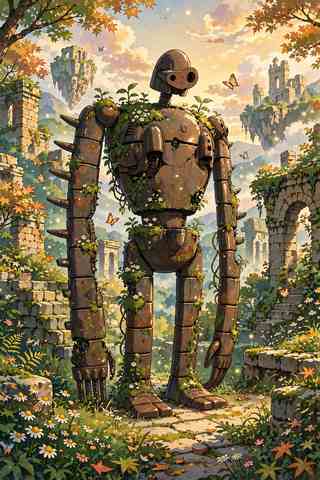
This prompt reimagines you in a scene of beside a gentle ancient robot tending a floating garden in the sky. Every detail is painted in the Ghibli house style: a moss-covered robot, blooming garden flowers, fluttering butterflies, all glowing with that warm, nostalgic light. Most importantly, the prompt is engineered to preserve your facial identity, so friends will recognize you instantly — you will simply look like the most beautiful animated version of yourself.
Below you will find the full copy-paste prompt, why each part of it matters, exactly how to use it with any AI image generator, pro tips that make the difference between a good result and a breathtaking one, and a FAQ section. Let us turn your photo into a tender and timeless work of art.
The Prompt
Copy the exact prompt below and paste it into your favorite AI image generator along with your photo:
Transform this photo into a Studio Ghibli style anime portrait, keeping the exact face, expression and identity of the person. Place the subject in a scene of beside a gentle ancient robot tending a floating garden in the sky, surrounded by a moss-covered robot, blooming garden flowers, and fluttering butterflies. Hand-painted anime look with soft watercolor shading, delicate line art, vibrant yet gentle colors, dreamy lighting and a richly detailed background. Portrait orientation, high detail, 4k anime illustration.
Why This Prompt Works
The secret of this prompt is specificity. Instead of asking for “an anime picture,” it asks for a “Studio Ghibli style anime portrait” — and that single phrase carries enormous visual information. The AI reaches for soft watercolor gradients, gentle cel shading, expressive eyes, and backgrounds packed with loving detail.
Identity preservation is the second pillar. By explicitly instructing the model to keep your exact face and expression, the prompt prevents the most common disappointment in AI portraits: looking like a stranger. Your bone structure, your smile, the little things that make you recognizable all survive the transformation.
The third pillar is the scene itself. Describing a moss-covered robot, blooming garden flowers, and fluttering butterflies turns a flat portrait into a story. Ghibli’s genius was always in backgrounds that feel like places you could visit, and these concrete details push the AI to compose a tender and timeless world around you rather than a plain backdrop.
The finishing touch is the quality directive. “Portrait orientation, high detail, 4k anime illustration” may sound like technical garnish, but it consistently produces sharper lines, richer color, and a more polished final image — the difference between a fun experiment and a portrait you will actually frame.
How to Use This Prompt
Using this prompt could not be simpler. It works with Midjourney, DALL-E, Gemini, Stable Diffusion, Leonardo AI, and virtually every modern AI image generator. Follow these six steps:
- Choose your photo. Pick a clear, front-facing picture with good lighting and a simple background. The AI preserves identity best when it can see your face clearly — avoid heavy filters, sunglasses, or extreme angles.
- Open your AI image tool. This prompt works in Midjourney, ChatGPT with DALL-E, Google Gemini, Leonardo AI, or any image generator that accepts an uploaded reference photo plus a text prompt.
- Copy the prompt. Scroll up to the box under ‘The Prompt’ and copy the entire text exactly as written — every detail about the Laputa robot guardian garden scene matters, from a moss-covered robot to fluttering butterflies.
- Upload and paste. Upload your chosen photo to the tool, then paste the prompt into the prompt field. If your tool has a face-match or image-strength setting, set it to favor the reference photo.
- Generate and review. Hit generate and wait a few seconds. Check that your face still looks like you and that the a moss-covered robot and blooming garden flowers details came through beautifully.
- Refine and share. If anything looks off, regenerate or tweak one detail at a time. When you love it, download the highest resolution available and share your tender and timeless Ghibli portrait with the world.
Pro Tips for Best Results
These small refinements separate an okay result from a jaw-dropping one:
- For an even stronger Ghibli feel, append the words ‘soft watercolor texture’ to the prompt — it deepens the hand-painted look.
- Pair it with a poetic caption. A short dreamy line about Laputa robot guardian garden can make your social post twice as shareable.
- Use a high-resolution source photo. The sharper your original image, the more facial detail the AI can preserve through the Ghibli transformation.
- Generate two or three versions. Small variations in lighting and composition appear each time, so pick your favorite from a shortlist.
- Avoid sunglasses and hats in the source photo. Anything covering your face makes identity preservation much harder for the AI.
- Use the result as a profile picture first. Ghibli portraits make fantastic avatars because they are warm, distinctive, and instantly eye-catching.
Frequently Asked Questions
Which AI tools work with this Ghibli prompt?
Virtually all of them: Midjourney, DALL-E through ChatGPT, Google Gemini, Leonardo AI, Stable Diffusion, and popular mobile apps. Any tool that accepts an uploaded photo plus a text prompt can run it. Results vary slightly by model, so try your favorite first.
Why does my result look different from the examples?
AI generation includes randomness, and each model interprets style slightly differently. Your source photo’s lighting, angle, and expression all influence the output. Generate a few versions and pick the best — small tweaks to scene details can also steer the result.
Does it work on group photos?
It can, but single-person portraits give the most reliable identity preservation. With groups, the AI sometimes blends features. For the sharpest tender and timeless result, crop to one face or generate individual portraits and combine them later.
Why is the Ghibli style so popular right now?
Studio Ghibli’s hand-painted look triggers pure nostalgia — soft light, lush nature, and heartfelt simplicity. In a feed full of glossy filters, a tender and timeless watercolor portrait stands out as warm and human, which is why these images get shared so widely.
There is a little bit of magic waiting in every camera roll, and now you know exactly how to release it. With one copy-paste prompt, your everyday photo becomes a tender and timeless Ghibli portrait worthy of a film still. Try it today, experiment with the scene details, and enjoy seeing yourself through the eyes of classic anime.
Related Viral Prompts
Love this style? Try these next:
- Nausicaa Glider Over Jungle AI Photo Prompt — turn your photo into a dreamy Nausicaa glider over jungle scene.
- Totoro Rainy Bus Stop Umbrella AI Photo Prompt — turn your photo into a dreamy Totoro rainy bus stop umbrella scene.
- Calcifer Fireplace Cozy AI Photo Prompt — turn your photo into a dreamy Calcifer fireplace cozy scene.
#GhibliAI #AIPhotoPrompt #StudioGhibli #Laputa #PromptBazar




Leave a Reply