
Introduction
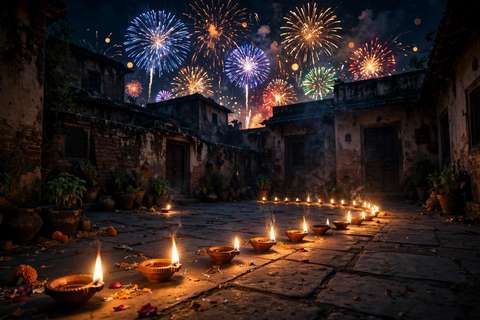
Diwali night has a rhythm: first one diya, then another, then a hundred of them, until the whole courtyard glows — and then the fireworks bloom above like the sky itself is celebrating. It is the most beautiful night of the Indian year, and this prompt turns it into a video that feels like standing in the middle of it.
The format works because it is built on a perfect sequence: darkness, then light, then more light, then the sky. Each diya lighting is a small moment of hope, and the fireworks are the celebration that follows. Viewers watch to the end because they want to see the courtyard fully lit and the sky fully blooming.
The video prompt below is written for Veo 3, Sora 2 and Kling, with the timing, camera move and sound designed so the diyas light one by one and the fireworks arrive at exactly the right second.
The Prompt
Copy the prompt below and paste it into your favourite AI tool. It is written to work exactly as it is, with no editing needed.
Vertical 9:16 AI video, 8-10 seconds, photorealistic cinematic style, for Veo 3 / Sora 2 / Kling. A dark traditional Indian courtyard on Diwali night, just after sunset, deep blue twilight sky. Rows of unlit clay diyas are arranged in patterns on the ground and along the steps, marigold flowers scattered between them, a rangoli glowing faintly in the centre. The camera holds a low wide shot, then slowly rises and pushes in. One by one, the diyas light up across the courtyard — first one flame, then five, then fifty — warm golden flames flickering to life in a wave across the ground, their light reflecting on the stone floor and on the marigold petals. At 6 seconds, fireworks bloom above the courtyard in gold and red, lighting the whole scene, sparks drifting down like falling stars. In the background, a house glows with fairy lights, silhouettes of a family watch from a doorway, a child points up at the sky in wonder. Sound: soft night ambience, the gentle whoosh of flames catching, a distant firework whistle at 6 seconds, then a soft celebratory boom, happy distant laughter. Lighting: warm golden diya flames against deep blue night, fireworks lighting the sky, cinematic colour grading, shallow depth of field, joyful and sacred festive mood, ultra-detailed flames and sparks, smooth rising camera motion.
Why This Prompt Works
This prompt works because it respects the ritual. The diyas lighting one by one is the heart of Diwali — light defeating darkness, one small flame at a time — and the fireworks are the joy that follows, not the other way around.
- One-by-one lighting builds anticipation: flames appearing in a wave give the video a rhythm and a reason to keep watching.
- Diyas are the emotional core: a hundred small flames are more moving than any single big light, because each one is a prayer.
- Fireworks are the payoff: arriving at six seconds, they reward viewers who stayed for the lighting and end the video on celebration.
- The family adds heart: silhouettes watching from a doorway and a child pointing at the sky make the scene human, not just decorative.
- Gold against blue is Diwali’s palette: warm flames and fireworks against deep twilight blue is the classic, instantly recognisable Diwali look.
The video ends with the courtyard glowing and the sky blooming — which is exactly how Diwali night feels, and exactly why people share it.
How to Use This Prompt
- Open Veo 3, Sora 2 or Kling and start a new text-to-video or image-to-video project in 9:16 vertical format.
- Copy the full video prompt from the box above and paste it in, keeping the camera move, timing and sound cues exactly as written.
- If your tool supports a first frame, upload a still image that matches the opening shot so the subject and setting stay consistent.
- Generate two or three takes and pick the one with the smoothest motion, the cleanest loop point and the most natural sound.
- Trim the clip to 8 to 10 seconds, add captions if the platform mutes sound by default, and export in the highest quality available.
- Post it as a Reel, Short or TikTok with a short hook caption and the hashtags below, and reply to early comments quickly to boost reach.
Pro Tips
- Keep the camera move slow and rising — a gentle lift makes the courtyard feel like it is waking up with light.
- If the diyas light too fast, add “diyas lighting slowly one by one, a wave of flames across the courtyard” to control the pace.
- Generate three takes and pick the one where the flame wave and the fireworks are best timed — timing is everything in this video.
- Add a caption like “one diya at a time, the darkness disappears” to give the video a message worth sharing.
- Try a second version with the camera at ground level among the diyas for an intimate, immersive feel.
- Post on Diwali evening when festival content peaks, and share it with family groups first — they will spread it further than any algorithm.
FAQ
Which AI video tool is best for Diwali videos?
Veo 3 renders flames and fireworks beautifully, and Sora 2 handles the slow rising camera move well. Kling is a good free option for festival videos.
Can I add my family to the video?
Yes. Upload a photo as the first frame in image-to-video mode, or describe “our family in festive dress lighting diyas together” — the prompt keeps the courtyard and adds your people.
Why do my diyas sometimes look like candles or lamps?
Because the prompt is too vague. This prompt specifies “small clay diyas arranged in patterns” with marigolds and rangoli, which keeps the scene unmistakably Diwali.
Can I use this video as a Diwali greeting?
Yes, it is perfect for one. Add “Happy Diwali” as a text overlay at the end, and send it to family and friends — it is far more memorable than a static card.
One diya, then a hundred, then the whole sky. Light the first flame, and let Diwali do the rest.
Related Viral Prompts
Diwali Couple Photoshoot AI Photo Prompt
Diwali Sky Lanterns AI Photo Prompt
Dev Diwali Varanasi Ghats AI Photo Prompt
#Diwali2026 #AIVideoPrompt #HappyDiwali #Diya #PromptBazar


Leave a Reply