
Introduction
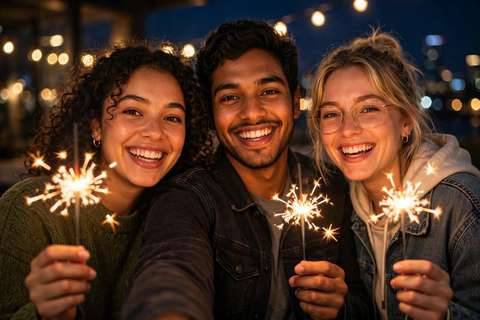
Every Diwali night has that one perfect selfie: a group of friends squeezed together, sparklers in hand, faces glowing golden, everyone laughing at the same moment. It is the picture that gets shared, re-shared and looked back on for years, because it captures friendship at its brightest. This prompt recreates that joyful selfie moment, with sparklers lighting up genuine smiles, bokeh lights sparkling behind, and the whole night feeling like a celebration.
Friendship and Diwali go hand in hand, from bursting crackers together as children to sharing sweets and selfies as adults. Whether you want a fun image for your friends group, a throwback-style post, or a festive profile picture, this prompt delivers a ready-to-use, photorealistic selfie scene. Below is the full prompt, why it works so well, and tips to make it look like your own gang.
The Prompt
Copy the full prompt below and paste it into your favourite AI image generator. It is written to work with tools like Midjourney, DALL-E, Gemini, Leonardo AI and Meta AI, and you can adjust the names, colours and details to match your own celebration.
Photorealistic joyful selfie portrait of a group of young Indian friends celebrating Diwali at night, four friends squeezed together smiling and laughing, each holding a lit sparkler showering golden sparks, faces glowing warmly in the sparkler light, festive clothes in bright colours, fairy lights and fireworks bokeh sparkling in the dark background, selfie perspective from a slightly raised front angle, candid and natural expressions, one friend holding the phone, joyful Diwali night atmosphere, detailed faces and sparkler sparks, realistic skin tones, sharp focus on the group, high resolution, 4k photography style
Why This Prompt Works
This prompt works because it understands how a selfie actually looks. The slightly raised front angle, the friends squeezed together, and one friend holding the phone are all details that tell the AI this is a selfie, not a formal group photo. That perspective matters, because it creates the intimate, close-up feeling of a real phone selfie, with faces large in the frame and the background melting into beautiful bokeh.
The sparkler light is the other key ingredient. Warm golden light on smiling faces flatters everyone, hides imperfections, and creates the unmistakable glow of Diwali night. By describing the sparks, the laughter and the festive clothes together, the prompt gives the generator a complete emotional picture: not just people holding sparklers, but friends genuinely enjoying a festival night together. That emotion is what makes viewers smile when they see the image.
How to Use
Follow these simple steps to turn the prompt into a picture you will love sharing:
- Copy the full prompt from the box above, including every detail about the lighting, clothes and setting.
- Open your AI image tool of choice, such as Midjourney, DALL-E, Gemini, Leonardo AI or Meta AI, and paste the prompt into the text box.
- If the tool lets you upload a photo, add your own picture first so the result looks like you and your family.
- Generate the image, then look closely at the faces, hands and festive details before accepting it.
- If anything looks off, change one or two words at a time, for example the colour of an outfit or the time of day, and generate again.
- Download the best version in the highest quality available and share it on WhatsApp, Instagram or Facebook with your Diwali wishes.
Pro Tips
These small tweaks make a big difference to the final result:
- Mention the number of friends in your group, for example ‘five friends’, so the AI does not add or remove people from your gang.
- Ask for ‘one friend making a funny face’ if you want a playful, candid version instead of a perfect posed selfie.
- Add your favourite hangout detail, like a terrace railing or a decorated doorway, to ground the selfie in a familiar place.
- If faces look too similar or artificial, generate a few versions and pick the one with the most distinct, natural expressions.
- Use the finished selfie as your group’s Diwali greeting or as a fun throwback post with your real festival photos.
FAQ
Can I make the selfie look like my real friend group?
Yes, if your AI tool supports image references. Upload a real group photo of your friends, then paste this prompt, and the tool will blend your group’s appearance with the sparkler night scene. Without a reference, you will still get a joyful selfie, but with generic faces.
Is it safe to hold sparklers for a selfie?
Real sparklers burn very hot, so always hold them away from faces, hair and clothes, and never let children hold them unsupervised. For a completely safe option, this AI selfie gives you the same golden glow and happy faces with zero risk.
Is this prompt free to use?
Yes, this prompt is completely free to use. You can copy it, change it and generate as many images as you like for personal sharing. If your AI tool has a paid plan, only the tool itself may charge you, never the prompt.
Which AI image generator works best with this prompt?
This prompt is written in plain, descriptive language, so it works well on almost every popular generator, including Midjourney, DALL-E, Gemini, Leonardo AI and Meta AI. Midjourney usually gives the most cinematic lighting, while Gemini and Meta AI are the easiest free options for quick festive portraits.
Friends make Diwali brighter than any firework, and a sparkler selfie keeps that brightness alive long after the night ends. Copy this prompt, capture your gang’s sparkler smiles, and share a selfie full of light, laughter and friendship. Happy Diwali to you and your friends!
Related Viral Prompts
- Diwali 2026 Office Party AI Photo Prompt: A Cheerful Portrait of Colleagues in Ethnic Wear Celebrating With Diyas and Sweets at Work
- Kali Puja 2026 Night AI Photo Prompt: A Powerful Portrait of Devotees Worshipping Goddess Kali With Red Hibiscus Flowers and Diyas
- Diwali 2026 Sky Lanterns AI Photo Prompt: A Magical Portrait of a Family Releasing Glowing Paper Lanterns Into the Night Sky Together
#Diwali2026 #SparklerSelfie #FriendsGoals #AIPhotoPrompt #FestivalVibes


Leave a Reply