
Introduction
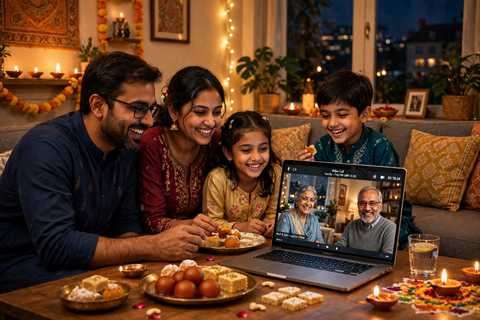
When Diwali arrives, everyone wants a photo that does the festival justice, and this prompt was written for exactly that moment. The scene it creates, a family gathered around a laptop on Diwali night, smiling relatives waving from the screen with a plate of sweets, diyas glowing on the table, and laughter bridging thousands of miles, is the kind of image that gets saved, shared and printed, because it feels personal and festive at the same time. In this article you will find the full copy-paste prompt, why it works so well, and how to make it your own.
The Diwali season is also one of the busiest times for AI photo trends, with families, couples and friends all looking for fresh ideas that stand out from last year’s posts. A photo of a family gathered around a laptop on Diwali night, smiling relatives waving from the screen with a plate of sweets, diyas glowing on the table, and laughter bridging thousands of miles works because it is specific: it has a place, a moment and a feeling, and the AI can render all three when the prompt is written well. Vague prompts produce vague photos, but this one names the flowers, the light, the clothes and the expressions, so the result looks like a real photograph taken at a real celebration.
In this article, you will get the complete prompt ready to copy, a breakdown of why each part of it works, step-by-step instructions for Gemini and ChatGPT, pro tips for the best result, and answers to the questions people ask most about this Diwali photo idea. By the end, you will have everything you need to create a photo that looks professional, feels personal, and is ready to share with everyone you love.
The Prompt
Copy the full prompt below and paste it into Gemini or ChatGPT along with your photo. It describes the scene in rich detail, including the lighting, the setting, the outfits and the mood, so the AI has everything it needs to create a realistic, festive photograph.
Photorealistic emotional photo, Diwali festival night, a warm Indian family at home in festive dress gathered around a laptop on a decorated table, the laptop screen showing smiling relatives abroad waving and holding up a plate of sweets, clay diyas and marigolds on the table, fairy lights and a rangoli in the background, a box of sweets open between them, everyone laughing together, warm golden light, keep every face 100% identical, natural skin texture, ultra-detailed, cinematic warm tones, 4K, vertical portrait, shot on 50mm lens
Why This Prompt Works
The reason this prompt trends every Diwali is simple: it gives the AI everything it needs and nothing it does not. Let us look at the choices that make the difference.
- Millions of Indian families celebrate Diwali across continents, so this scene speaks to a huge, emotional audience.
- The laptop screen inside the photo creates a clever frame-within-a-frame that makes viewers stop and look twice.
- Sweets on both sides of the call are a beautiful symbol of love travelling across distance.
- Warm golden light and genuine laughter give the image a hopeful, heartwarming mood.
Put together, these choices do something simple but powerful: they give the AI a complete scene instead of a vague idea. That is why photos made with this prompt look like they were taken by a professional photographer at a real Diwali celebration, and why they keep getting shared long after the festival is over.
How to Use This Prompt
You do not need any editing skills or expensive software to use this prompt. Just follow the steps below in order, and your photo will be ready to share.
- Open Gemini or ChatGPT on your phone or computer and start a new image chat.
- Upload a clear, well-lit photo of yourself or your family. A front-facing photo with a natural smile works best.
- Copy the full prompt from the box above and paste it into the chat, keeping the face-lock wording exactly as written.
- Wait for the first result, then look closely at the faces, the hands and the festival details before deciding anything.
- If something looks off, change one detail at a time, for example the outfit colour or the background, and generate again.
- When you are happy with the photo, download it in the highest quality available and save the original.
- Share it on Instagram, WhatsApp status or Facebook with a short festive caption and the hashtags at the end of this article.
If your first result is not perfect, do not worry, that is normal. Even professional photographers take many shots to get one great photo. Change one small detail, generate again, and within two or three tries you will have a Diwali photo you are proud to share.
Pro Tips
A few smart tweaks can make a big difference to your final photo. Try these pro tips once you have your first version.
- Ask for ‘relatives waving and holding a plate of sweets’ on the screen so the call feels alive.
- Keep the laptop screen bright but not overexposed, so the faces on it stay visible.
- Place diyas and marigolds on the table to anchor the scene in Diwali.
- Use ‘everyone laughing together’ for natural, joyful expressions.
- Add fairy lights in the background for depth and warmth.
- Try a version with the screen showing a child blowing out a sparkler for extra emotion.
Remember, the prompt is a starting point, not a rulebook. Once you have a version you love, feel free to experiment: change the colours, the time of day or the background, and make the photo truly yours. The best AI photos always have a personal touch that no prompt can write for you.
FAQ
Can I use real family photos for this prompt?
Yes. Upload a photo of your family at home and a photo of your relatives abroad. The AI will combine them into one video-call scene, keeping every face identical.
Does this prompt work for other festivals too?
Absolutely. Just change ‘Diwali’ to Rakhi, Eid, Christmas or any festival, and swap the diyas for that festival’s decorations. The video-call idea works year-round.
What makes the video call look realistic?
The prompt asks for a bright laptop screen, warm room light and natural reactions. Asking for ‘everyone laughing together’ keeps the expressions genuine instead of posed.
Is this good for a Diwali greeting card?
Yes, it makes a wonderful digital greeting card. Add text like ‘Distance means so little when love means so much’ over the image before sharing.
Try the prompt tonight, share the result with your family, and let the festival glow a little longer in your feed.
Related Viral Prompts
#Diwali2026 #AIPhotoPrompt #NRIDiwali #FamilyLove #PromptBazar


Leave a Reply