
Introduction
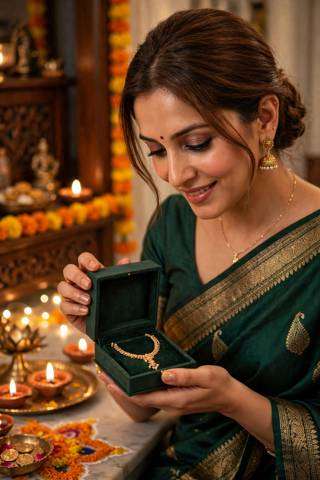
Some festival moments deserve more than a quick phone snapshot, and this prompt turns one of them into a picture worth framing. The velvet box opens to a flash of gold, the necklace catches the lamplight, and the recipient’s expression does the rest of the storytelling. The scene at the heart of this prompt is simple to picture: An elegant portrait of a woman opening a gold necklace gift box on Dhanteras, sparkling jewellery, festive home background, photorealistic. That is the image this article helps you create, step by step, with a prompt you can copy in full and use straight away.
Festival pictures travel further than ordinary photographs because they carry shared memories. When someone scrolls past an image that reminds them of their own home, their own family rituals, or their own childhood celebrations, they pause, and that pause is what every creator wants. Jewellery gifts on Dhanteras are keepsakes, so the prompt keeps the gold sharp, the hands steady and the background softly festive.
This article therefore does more than hand you a block of text. It explains why the prompt is written the way it is, shows you how to use it without wasting generations, and gives you practical tips for fixing the small flaws that often spoil an otherwise lovely AI portrait. Whether you are making a picture for Instagram, a WhatsApp status, a family group, or a blog post, the same prompt will serve you well, and the guidance below will help you get the best possible version on your first few tries.
The Prompt
Copy the complete prompt below exactly as it appears. It is written as a single block so that nothing gets lost when you paste it into your image generator.
Ultra-realistic high-resolution photograph of An elegant portrait of a woman opening a gold necklace gift box on Dhanteras, sparkling jewellery, festive home background, photorealistic, cinematic lighting, sharp focus, natural skin texture, festive atmosphere, balanced portrait framing, softly blurred bokeh background, professional DSLR quality, photorealistic, Instagram-ready, no text or watermark
Notice how the prompt balances subject, setting, light and camera quality in one flowing description. It names the scene first, then adds cinematic lighting and sharp focus, then asks for natural skin texture so faces avoid the plastic look that betrays many AI images, and finally requests a softly blurred background so the subject stands out cleanly against the festive setting.
Why This Prompt Works
The difference between a flat AI picture and a believable one is almost always specificity, and this prompt is specific where it matters most. The velvet box opens to a flash of gold, the necklace catches the lamplight, and the recipient’s expression does the rest of the storytelling.
Three choices carry most of the weight. First, the prompt describes a real, recognisable moment instead of a vague celebration, which gives the generator concrete objects to render: lamps, flowers, fabrics, sweets, or hands mid-gesture, depending on the scene. Second, it fixes the light as warm and cinematic, which flatters skin tones and makes festive colours richer rather than garish. Third, it specifies portrait framing with a blurred background, the classic recipe for a photograph that feels taken by a person rather than assembled by software.
Jewellery gifts on Dhanteras are keepsakes, so the prompt keeps the gold sharp, the hands steady and the background softly festive. The final ingredients, professional DSLR quality and the instruction to leave out text and watermarks, protect the result in a different way. Text inside AI images often comes out misspelled, and watermarks instantly make a picture look borrowed, so excluding both keeps your image clean, credible and ready to post without editing. Together these choices produce a picture that looks intentional, warm and unmistakably festive.
How to Use
Using the prompt takes less than a minute, but a few thoughtful tweaks will lift the result from pleasant to genuinely shareable.
- Copy the full prompt exactly as written, including the lighting and camera details, because those phrases control the photorealistic finish. Paste it into your AI image generator of choice, such as Midjourney, DALL-E, Gemini, or any tool that accepts detailed text prompts.
- Generate two or three versions instead of settling for the first image, then compare faces, hands and the background glow before choosing. Look closely at the details that matter: the diyas should glow warmly, skin should look natural, and the festive background should stay softly blurred.
- If a face looks stiff or a detail looks wrong, change only one phrase at a time and regenerate, rather than rewriting the whole prompt at once. Try small swaps first, for example asking for a gentler smile, a slightly wider frame, or warmer evening light, and keep the version you like best.
- Save your favourite image at full resolution and crop it carefully for the platform where you will post it, keeping faces clear of the edges. For Instagram, a portrait crop usually works best, while a wider crop suits WhatsApp status or a Facebook post with family.
- Add a short, personal caption about your own celebration when you share the picture, because a real memory behind the image always performs better. Mention the festival, the people in the frame, or a small detail from your day, and finish with the hashtags listed at the end of this article.
Once you have a version you love, resist the urge to keep generating endlessly. Pick the image with the most natural faces and the warmest light, save it, and share it while the festival is still in everyone’s mind, because timing matters almost as much as quality for festive posts.
Pro Tips
Before you settle on a first result, run through these practical tips; most disappointing AI photos fail on one of these five points.
- Keep the lighting warm: golden hour or diya light flatters skin and makes festive colours glow, while cold white light can make the same scene look clinical.
- Protect the faces: if the generator distorts a hand or a smile, regenerate with the phrase ‘natural hands, relaxed expression’ added to the prompt.
- Do not overload the background: fairy lights and flowers should blur gently behind the subject, so the people stay the obvious focus of the picture.
- Match the picture to the occasion: a devotional scene should feel calm and reverent, while a party scene should feel loose, laughing and a little chaotic.
- Post at the right moment: festival images perform best on the day of the festival or the evening before, when everyone is already in a celebratory mood.
Above all, remember that the prompt is a starting point, not a cage. Once you understand which phrases control light, framing and realism, you can adapt the same structure to birthdays, weddings, or any family occasion, and your pictures will keep the same polished, believable quality.
FAQ
Can I use this prompt for free?
Yes, you can copy and use this prompt freely in your own AI image generator, and you may share the resulting picture on your personal social media accounts without paying anything or asking permission.
Will this prompt work on any AI image tool?
It works best on tools that understand detailed descriptive prompts, including Midjourney, DALL-E, Gemini and similar generators, though exact results vary because each tool interprets lighting and faces slightly differently.
How do I make the picture look more like my own family?
Change the clothing colours, the number of people, or a small background detail to match your home, but keep the lighting and camera phrases untouched, because those are what create the realistic, professional finish.
Can I change the prompt for a different festival?
Absolutely, and that is the easiest way to reuse it: swap the festival details and decorations for another occasion while keeping the structure, the lighting language and the portrait framing exactly the same.
Festivals are remembered in pictures long after the lights come down, so take this prompt, make something beautiful from it, and share a little of your celebration with the people who will recognise it instantly.
Related Viral Prompts
#Diwali2026 #AIPhotoPrompt #FestivePortrait #IndianFestivals #Photorealistic


Leave a Reply