
Introduction
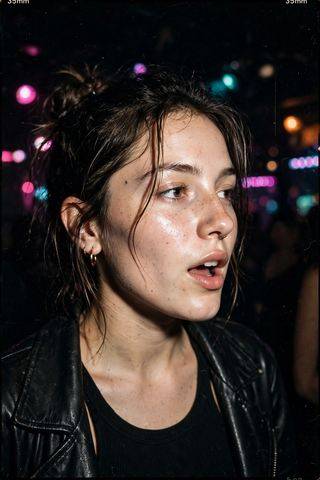
Scroll through any feed right now and you will spot this style everywhere, from casual creators to polished brand accounts, and there is a good reason for that. This raw nightclub flash portrait captures a candid portrait inside a nightclub, lit by harsh direct flash against darkness, and it does so in a way that feels fresh even though the style is blowing up all over social media right now. Whether you are posting for fun, building a personal brand, or simply trying something new with your photos, this is one of those prompts that rewards a little creativity and gives back a lot of visual impact.
The beauty of this style is how personal it feels. Change the outfit, the expression or the setting, and the same prompt gives you a completely different result that still looks unmistakably yours. In this guide you will find the complete copy-paste prompt, a clear explanation of why each part of it matters, and simple steps for turning it into your own standout image. We will also cover the small tweaks that separate a good result from a great one, so you can avoid the flat, generic look that comes from vague prompts.
What follows is built around a candid portrait inside a nightclub, lit by harsh direct flash against darkness. The setting is a dark club floor with distant neon and crowd bokeh, the signature detail is blurred club lights glowing behind a sharply flashed face, and the overall feeling should be polished but natural, never over-processed. That combination is exactly what partygoers and nightlife creators chasing that unfiltered flash-photo look are searching for right now, and it is why this style keeps appearing on explore pages, reels covers and profile pictures alike.
The Prompt
Copy the entire prompt below exactly as it is, paste it into your favourite AI image generator, and add your own photo or description of the person you want in the picture. Do not shorten it on your first try, because every phrase in it is doing a specific job, from the lighting to the framing to the finish.
Ultra-realistic high-resolution photograph of a candid portrait inside a nightclub, lit by harsh direct flash against darkness, cinematic lighting, sharp focus, natural skin texture, festive atmosphere, balanced portrait framing, softly blurred bokeh background, professional DSLR quality, photorealistic, Instagram-ready, no text or watermark. Setting: a dark club floor with distant neon and crowd bokeh. Signature detail: blurred club lights glowing behind a sharply flashed face. Keep the face consistent, natural and expressive, with realistic proportions, true-to-life colours and a polished, high-end finish suitable for sharing on social media.
Once you have your first result, you can start experimenting. Swap the outfit, change the background colour, or adjust the mood, but keep the core structure intact. The phrases about cinematic lighting, sharp focus and natural skin texture are what keep the image looking like a real photograph instead of a cartoon or a plastic-looking render.
Why This Prompt Works
The first reason this prompt works is specificity. It does not just say portrait, it describes a candid portrait inside a nightclub, lit by harsh direct flash against darkness in concrete visual terms. AI image tools respond far better to concrete scenes than to abstract adjectives, so describing the setting as a dark club floor with distant neon and crowd bokeh gives the model something real to build, and the result looks grounded instead of dreamlike in the wrong way.
The second reason is the lighting language. Cinematic lighting tells the generator to shape the face with light and shadow rather than flattening it with even, boring illumination. Combined with sharp focus and natural skin texture, that lighting makes the portrait believable at a glance, which is the whole point of a photorealistic prompt. People should wonder how you took the photo, not whether it is AI.
The third reason is framing and finish. Balanced portrait framing keeps the subject front and centre without awkward cropping, while the softly blurred bokeh background separates the person from the scene and adds depth. Professional DSLR quality and the Instagram-ready finish then polish the result, so it looks ready to post without heavy editing. Together, these choices explain why this raw nightclub flash portrait keeps going viral: it looks expensive, but it costs nothing to try.
How to Use
Follow these steps in order, and you will get a clean, shareable result on your first or second attempt. Take your time with step two in particular, because a good reference photo makes more difference than any other single choice.
- Choose a clear, well-lit photo of the person for a candid portrait inside a nightclub, lit by harsh direct flash against darkness, with the face fully visible and facing the camera.
- Open your AI image generator and paste the full prompt from the box above, keeping every detail about blurred club lights glowing behind a sharply flashed face intact.
- Upload your reference photo if the tool supports it, or add a short description of the person, their outfit and their expression.
- Generate the first version and check the face, the hands and the background carefully before you share anything.
- Adjust one thing at a time if needed, such as the setting (a dark club floor with distant neon and crowd bokeh) or the mood, and regenerate until the image feels natural.
- Download the best version, give it a light crop if needed, and post it with a caption that invites friends to try the same raw nightclub flash portrait.
If the first result looks slightly off, do not throw the whole prompt away. Small changes usually fix it. Try softening one adjective, clarifying the pose, or simplifying the background, and you will often find the second or third generation is the one worth posting.
Pro Tips
These tips come from testing lots of portrait prompts, and they apply especially well to this raw nightclub flash portrait. Use them to push a good image into great territory without spending hours tweaking.
- Keep the face consistent: for a candid portrait inside a nightclub, lit by harsh direct flash against darkness, the face is the anchor, so always check that blurred club lights glowing behind a sharply flashed face reads clearly before anything else.
- Watch the background: a dark club floor with distant neon and crowd bokeh should support the subject, not compete with it, so a softer, simpler backdrop usually wins.
- Light matters most: if the result looks flat, add a hint of warm or cool directional light in your own words and regenerate.
- Stay natural with skin: avoid words like flawless or plastic, because natural skin texture is what sells the photorealistic look.
- Try three variations: generate the same raw nightclub flash portrait with different outfits or moods, then pick the strongest one instead of settling for the first.
One last tip: save your winning prompt and your best reference photo together. When this style trends again, or when friends ask how you made it, you will be able to recreate the look in seconds instead of starting from scratch.
FAQ
Can I use my own photo with this raw nightclub flash portrait prompt?
Yes, absolutely. Upload a clear front-facing photo and paste the prompt as written. The generator will use your features as the starting point, and blurred club lights glowing behind a sharply flashed face will help keep the result recognisable. Avoid blurry, heavily filtered or side-profile photos for the best match.
Which AI tool works best for this style?
Most modern image generators handle this prompt well, because it uses standard photographic language rather than tool-specific tricks. Try the tool you already use first, and only switch if the face consistency or the setting (a dark club floor with distant neon and crowd bokeh) keeps coming out wrong after two or three attempts.
Why does my result look fake or over-smoothed?
That usually happens when the prompt is shortened or when extra beauty words are added. Keep the phrases about natural skin texture, sharp focus and cinematic lighting, remove words like perfect or doll-like, and regenerate. One clean generation beats five over-edited ones.
Can I change the outfit or setting and still use this prompt?
Yes, and you should. The structure stays the same while the scene changes, so swap the outfit, the colours or the mood to suit partygoers and nightlife creators chasing that unfiltered flash-photo look. Just keep the core photographic instructions intact, and the raw nightclub flash portrait will still look polished and photorealistic.
Now it is your turn. Copy the prompt, make it yours with one personal twist, and share the result, because the best version of this raw nightclub flash portrait is the one that looks unmistakably like you, full of character, beautifully lit, and ready for everyone to admire.
Related Viral Prompts
If you enjoyed this raw nightclub flash portrait, you will love these other trending prompts from the same collection. Each one uses the same proven structure with a completely different scene, so you can build a whole feed of standout portraits.
#AIPhotoPrompt #ViralPhoto #AIPortrait #PhotoTrend #NightLife


Leave a Reply