
Introduction
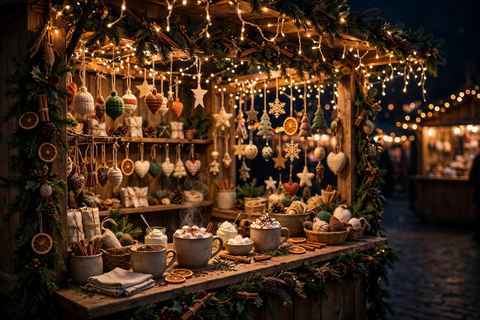
Christmas markets are the beating heart of the festive season, and in 2026 they are trending harder than ever as a photo theme. The smell of cinnamon, the steam rising from hot cocoa, and the glow of a thousand fairy lights create a scene that feels like stepping into a snow globe. This prompt captures all of that magic in a single, richly detailed night photograph.
What makes a market stall photo so shareable is its layers. Every ornament, every string of lights, every smiling visitor adds something new to discover. Use this image for a holiday greeting, a travel memory, or a festive post, and it will instantly transport anyone who sees it to a cold December evening full of warmth and wonder.
The Prompt
Copy the prompt below and paste it into your favourite AI image tool. It is written to give you a detailed, photorealistic result on the first try, with the camera, the lighting, and the mood already built in, so you do not need to guess any of the technical details yourself.
Create a magical photorealistic night photograph of a festive Christmas market stall glowing with warm fairy lights, steaming mugs of hot cocoa on a wooden counter, handmade glass ornaments and knitted decorations hanging in neat rows, snowflakes falling gently, happy visitors browsing in woollen scarves, a large Christmas tree sparkling in the background, shot on a 35mm lens at f/2.0, cinematic warm and cool colour contrast, atmospheric depth, ultra detailed, no text, no watermark.
Why This Prompt Works
- Night-time fairy lights create a natural glow that makes the whole scene feel magical.
- Hot cocoa steam adds movement and a sense of warmth against the cold night air.
- Handmade ornaments give the stall character and a charming, authentic feel.
- The mix of warm stall light and cool blue snow creates beautiful cinematic contrast.
How to Use This Prompt
- Open Nano Banana 2 or your favourite AI image generator and upload a clear, well-lit photo if the prompt uses your own face, or start from a blank canvas for a fully generated scene.
- Copy the full prompt from the box above and paste it into the prompt field, keeping every detail about the lighting, the lens, and the composition exactly as written.
- Choose your image size before generating: a 4:5 vertical crop for Instagram posts and stories, a square 1:1 crop for profile pictures, or a wide 16:9 frame for a cinematic look.
- Generate two or three versions and compare them, looking closely at the face, the hands, and the small details, then pick the version that feels the most natural and true to the scene.
- Download your favourite version, give it a light polish in your photo editor if needed, and share it with your friends, family, or followers, adding the hashtags below to reach more people.
Pro Tips
- Ask for gentle snowfall in the prompt to add depth and a dreamy winter mood.
- Keep the stall as the main subject and let the crowd blur softly in the background.
- Warm amber tones against deep blue night sky give the strongest festive contrast.
- Add a wooden sign or a basket of cinnamon sticks for extra market authenticity.
- A wide 16:9 frame works beautifully for this scene, like a still from a Christmas film.
More Ideas to Try
Once you have your first version, do not stop there. A good prompt is a starting point, and a few small twists can turn one photo into a whole collection. Here are four easy ways to get even more from this idea.
- Try the same christmas 2026 market scene at a different time of day. Morning light makes everything feel fresh and bright, while evening light adds warmth, drama, and a golden glow that suits festive and portrait photos beautifully.
- Change one small detail and generate a second version, such as swapping the background, the outfit colours, or the main prop. Small changes like these give you a whole series of matching photos from a single idea.
- Use this prompt as a starting point for a themed set. Generate three or four variations with the same style and colours, then share them together as a carousel, a story series, or a matching set of greeting cards.
- Pair the finished image with a short personal caption about why you chose this scene. A few honest words about your own memories or plans make the photo feel personal, and personal posts always get more likes, comments, and shares.
Frequently Asked Questions
Can I change the market stall to sell something else, like gingerbread or candles?
Yes, simply swap the items in the prompt. Replace hot cocoa and ornaments with gingerbread houses, scented candles, or roasted chestnuts, and keep the fairy lights and snowfall. The structure of the prompt stays the same, so you can create a whole series of market stall photos with different goods at each stall.
Which AI tool works best for this prompt?
Nano Banana 2 gives the best results for this style because it keeps faces consistent and understands detailed prompts very well. Gemini, ChatGPT image tools, and Midjourney also work nicely. If one tool struggles with a detail, try another, as each tool interprets the same prompt in a slightly different way.
Is this prompt free to use?
Yes, the prompt itself is completely free to copy and use. Most AI image tools offer a free daily allowance, and Nano Banana 2 is available inside the Gemini app at no extra cost for basic use. If you generate many images every day, a paid plan gives you a higher limit and faster results.
What image size should I choose for social media?
For Instagram feed posts and WhatsApp status, choose a 4:5 vertical image. For a profile picture or a Facebook post, a square 1:1 image works best. For a YouTube thumbnail or a wide festive banner, go with 16:9. The prompt works at any size, so pick the crop that fits where you plan to share it.
Christmas 2026 Market AI Photo Prompt is more than just a photo idea; it is a little piece of festive magic you can create in minutes. Try the prompt today, make it your own, experiment with the variations above, and share the joy with the people you love most. Your next favourite photo might be just one prompt away.
Related Viral Prompts
Christmas 2026 Advent Calendar Child Opening Door Chocolates
Christmas 2026 Carol Singers Lanterns Songbooks Snowy Church
Christmas 2026 Midnight Mass Church Candles Families Snow
#Christmas2026 #ChristmasMarket #FestiveLights #AIPhotoPrompt #WinterMagic


Leave a Reply