
Introduction
Some photos instantly make you smile, and a children’s day face painting photo prompt is one of them. Whether you are creating content for social media, a school page, a celebration post or a personal memory, the right AI photo prompt can turn a simple idea into an image that feels warm, real and alive. This prompt is built for exactly that moment, and it works even if you have never written an AI prompt before.
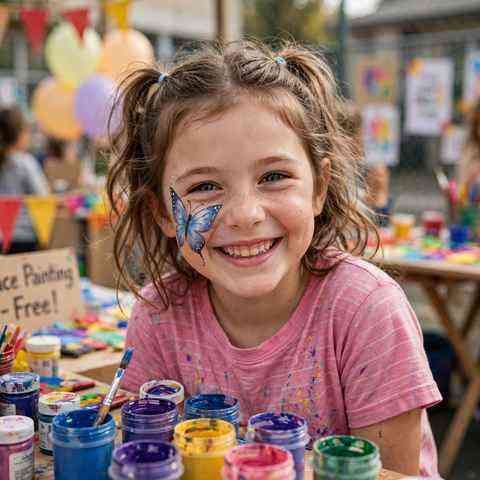
The scene is set in a lively school fair stall with paint pots, brushes and a queue of excited children, and the heart of the image is a smiling girl with a delicate butterfly painted on her cheek. That combination matters because AI image generators respond best to a clear hero, a clear place and a clear feeling. When you give the tool all three, it does not have to guess, and the result looks like a photograph someone actually took rather than a stiff illustration. The details below, butterfly face paint, paint pots, brushes, school fair stalls, smiling child, give the generator the texture it needs to fill the frame believably.
What makes this prompt especially useful right now is timing. Seasonal and celebration content performs best when it matches what people are already thinking about, and this theme is firmly in season. Parents, teachers, friends and families are all searching for images like this, which means a well-made version can travel far on Instagram, Facebook, Pinterest and WhatsApp. The prompt below is written so you can copy it exactly, paste it into your favourite AI image tool, and get a beautiful result on your first or second try.
Before you generate, read the prompt once through and picture the scene in your head. Notice how it describes the people, the place, the light and the small details that make the moment feel real. Those small details are the secret of every great AI photo. A vague prompt gives a vague picture, but a prompt that names the expressions, the props and the light gives you a picture with soul. Keep that idea in mind as you use and adapt the prompt for your own posts, cards, invitations and stories.
The Prompt
Copy the prompt below and paste it into your AI image generator:
Photorealistic portrait photograph, Playful portrait of a kid with a butterfly painted on her cheek at a school fair, paint pots and smiles, photorealistic. A smiling girl with a delicate butterfly painted on her cheek, set in a lively school fair stall with paint pots, brushes and a queue of excited children. Key details: butterfly face paint, paint pots, brushes, school fair stalls, smiling child. Natural expressions, authentic body language, soft realistic lighting, sharp focus on the main subject with a gently blurred background, true-to-life colours, high-resolution DSLR look, 85mm portrait lens, shallow depth of field, no text, no watermark, no distorted hands or faces, candid documentary photography style.
Why This Prompt Works
The first reason this prompt works so well is that the butterfly on the cheek is a small, beautiful detail that draws the eye instantly. AI generators are excellent at rendering a single clear story, and when the story is obvious, the image is obvious too. Viewers understand it in a second, and that instant understanding is what makes them stop scrolling, like the post and share it with someone else.
The second reason is depth. Paint pots and a fair stall add colour and context without stealing focus. A flat image with one subject and nothing around it feels empty, but this prompt layers a hero, a setting and supporting details so the eye has somewhere to travel. That richness is what separates a professional-looking AI photo from a quick, forgettable one.
The third reason is emotion. A genuine smile makes the portrait warm, shareable and full of personality. People do not share images because they are technically perfect; they share them because they feel something. This prompt is built around a feeling, joy, pride, wonder or calm, and that feeling is what gives the finished photo its power on social media and in personal messages alike.
How to Use
Follow these simple steps to get the best result from this prompt:
- Copy the full prompt from the box above, exactly as written, including the details about butterfly face paint, paint pots, brushes, school fair stalls, smiling child.
- Paste it into your AI image generator of choice, such as Midjourney, DALL-E, Gemini, Leonardo or any photorealistic image tool you already use.
- Choose a portrait or square format depending on where you will post it, and set the quality to the highest available option.
- Generate two or three versions and compare them, looking for natural faces, correct hands and the clearest version of the main subject.
- Pick your favourite, download it, and add your own caption, greeting or logo before posting it on social media or printing it.
Pro Tips
Describe the butterfly precisely, blue and purple wings with tiny dots, so it renders cleanly.
Keep the paint fresh and neat, not smudged, for a polished portrait.
Ask for soft daylight so the painted colours look true and the skin looks natural.
Finally, always generate more than one version. Even a perfect prompt can produce a small flaw in one attempt, a strange hand or an odd background detail, and comparing three versions lets you choose the cleanest one. If a version is almost perfect but one detail is wrong, change just that one phrase in the prompt and regenerate, rather than rewriting the whole prompt from scratch.
Another useful habit is to save your best prompts in a note or document. Over time you will build a personal library of prompts that you know work well, and you can reuse the structure, hero, setting and feeling, for new occasions. That library becomes a real creative asset, especially if you post regularly for a page, a school, a business or a community group.
FAQ
Can I change the butterfly to another design?
Yes. A flower, a tiger or a star works just as well; only the design description changes.
How do I keep the face paint looking realistic?
Say ‘neatly painted, slightly glossy, following the curve of the cheek’ to avoid a sticker-like look.
Is this prompt good for a fair poster?
Absolutely. It advertises the fun of the fair in one cheerful face.
Should other children appear in the background?
A soft, blurred queue behind her adds fair atmosphere without distracting from the portrait.
In the end, the best AI photos are the ones that feel like real moments, and this children’s day face painting photo prompt does exactly that. Copy the prompt, make it your own with a small personal twist, and share the beautiful result with the people who will love it most.
Related Viral Prompts
#ChildrensDay2026 #FacePainting #AIPhotoPrompt #SchoolFair #ButterflyArt


[…] Childrens Day 2026 Face Painting AI Photo Prompt: A Playful Portrait of a Kid With a Butterfly Paint… […]