
Introduction
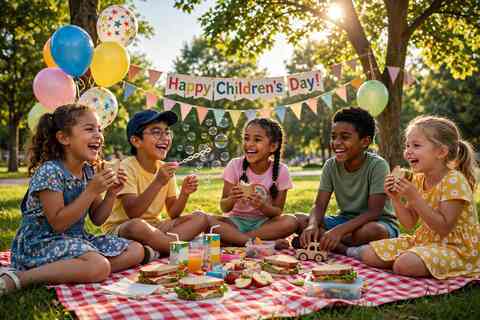
Children’s Day is the celebration that turns ordinary school days into joyful memories, and happy children enjoying games and sandwiches at a sunny park picnic with friends on children’s day is exactly the kind of image that stops people mid-scroll. Whether you are creating a festive post for Instagram, a family WhatsApp greeting, or a beautiful picture to celebrate the season, the right AI photo prompt can give you a professional-looking result in seconds, without a camera, a studio, or a photoshoot. This prompt is designed for anyone who wants that bright, happy, unmistakably Children’s Day feeling in a single image.
In this article, you will get the complete copy-paste prompt for childrens day 2026 picnic ai photo prompt: happy children enjoying games and sandwiches at a sunny park picnic with friends, along with a clear explanation of why it works so well, step-by-step instructions for using it in any AI image tool, and practical pro tips to make your result look even more realistic. The prompt focuses on happy children in a sunny green park on Children’s Day, so the image it creates feels authentic, emotional, and full of festive detail rather than flat or generic. If you have ever tried an AI photo prompt and got a strange face, dull lighting, or a scene that did not feel like Children’s Day at all, the guidance below will fix that.
The best Children’s Day AI photos share three qualities: believable light, believable emotion, and believable detail. Children’s Day light is bright, warm, and cheerful, coming from sunny classrooms, open gardens, and colourful decorations rather than from harsh white bulbs. Emotion matters just as much, because a Children’s Day picture should feel joyful, curious, or full of laughter, not posed and stiff. And detail is what sells realism, from the texture of school uniforms and colourful charts to the bright smiles on happy faces. This prompt is carefully built around all three, which is why it consistently produces images people love to share, save, and print.
The Prompt
Copy the full prompt below exactly as it is, paste it into your favourite AI image generator, and generate your image. You can change small details such as colours or outfits afterwards, but keep the lighting and emotion words intact for the best first result:
A joyful, photorealistic Children's Day picnic scene in a sunny green park: happy children in bright casual clothes enjoy games and sandwiches together on a large checkered blanket spread under a shady tree, laughing as they share food from colourful lunch boxes. One boy tosses a frisbee, a girl reaches for a sandwich with a big smile, and friends play with a football nearby, while juice boxes, fruit, and paper plates fill the blanket. Sunlight filters through the leaves, butterflies dance over the grass, and other families picnic happily in the background. A friendly dog runs past with a ball, making the children laugh even harder, while a colourful kite drifts lazily high above the trees. Bright cheerful daylight, genuine laughter, vivid park colours, ultra-detailed 4K photography, carefree happy mood.
That single block is everything the AI needs. It describes the subject, the setting, the lighting, the colours, the mood, and the photographic style in one continuous description, so the generator does not have to guess what you want. Read the next section to understand why each part of this wording matters, because once you understand the structure, you can adapt this prompt for any festive photo you want in the future.
Why This Prompt Works
First, the prompt opens with a clear subject and a clear style: it names happy children and immediately says the image should be photorealistic or cinematic. AI image tools respond best to a strong opening because it sets the whole direction of the picture. When the subject is specific, the generator focuses on faces, expressions, and clothing instead of drifting into a vague festive background. When the style is named, it avoids the flat cartoon look that many short prompts accidentally produce.
Second, the prompt is rich in sensory detail that is specific to Children’s Day. It mentions colourful decorations, school uniforms, balloons, books, and bright cheerful tones, which are the visual signatures of the celebration. These details do more than decorate the scene; they tell the AI exactly which colours, light sources, and objects belong in the frame. A prompt that simply says happy Children’s Day photo leaves all of that to chance, while a prompt packed with real festival details gives the generator a complete picture to work from, and that completeness shows in the final image.
Third, the prompt controls light and mood, which are the two things that separate an average AI photo from a stunning one. Words like warm cinematic lighting, bright cheerful glow, soft bokeh, and joyful school mood guide the AI toward the gentle, glowing look of real Children’s Day celebrations. Without lighting words, AI tools often default to bright, flat daylight, which kills the warmth of a happy school morning. With them, faces glow, backgrounds melt into beautiful bokeh, and the whole image feels like a memory rather than a snapshot. That is why this prompt works so reliably across different AI tools and why it is worth saving for every Children’s Day.
How to Use
Follow these simple steps to turn the prompt into a beautiful finished photo:
- Copy the entire prompt from the prompt block above, including the lighting and style words at the end, and do not shorten it on your first try.
- Open your AI image generator of choice, such as Midjourney, DALL-E, Gemini, Leonardo, or any free AI photo app on your phone.
- Paste the prompt into the text box, choose a portrait or square size depending on whether you want a phone wallpaper, an Instagram post, or a greeting card.
- Generate the image and look closely at the faces, hands, and lighting; if anything looks odd, regenerate once before changing the words, because the second result is often much better.
- If you want a variation, change only one thing at a time, such as the saree colour, the time of day, or the background, so you can see exactly what each change does.
- Download your favourite result in the highest quality available, then share it on Instagram, WhatsApp, or Facebook with a cheerful caption, or print it as a greeting for family and friends.
One more useful habit is to save the prompt in your notes app with the title of this article, so next Children’s Day you can reuse it in seconds. Many creators build a small personal collection of prompts exactly like this one, and over a season that collection becomes a shortcut to consistently beautiful festive content without starting from scratch every time.
Pro Tips
Keep the words photorealistic, warm cinematic lighting, and ultra-detailed in your prompt, because removing them is the most common reason a festive image suddenly looks flat or artificial. These words anchor the style, so even when you change the subject or setting, the bright Children’s Day glow stays intact. If your image looks too bright, add soft morning light to the setting; if it looks too dark, add soft golden glow to the lighting description.
For faces, generate at a larger size when your tool allows it, and avoid asking for too many people in one frame, because crowded scenes are where AI hands and faces most often go wrong. A scene with happy children works best when the composition stays simple and the focus stays on one or two main faces. If a face still looks strange, try regenerating with the same prompt rather than rewriting it completely, since small random variations often fix the problem on the second or third attempt.
Finally, personalise the result with small, meaningful changes. Swap a colour to match your own school uniform, add a child’s favourite book or toy, or change the background from a classroom to a garden that looks like your own school. These tiny personal touches are what turn a generic AI photo into a picture that feels like your Children’s Day, and they are also what make your post stand out when everyone else is sharing similar festive images. Always check the final image before posting, and enjoy the compliments that follow.
FAQ
Can I use this prompt for free in any AI image tool? Yes, this prompt works in most popular AI image generators, including free tools and phone apps. Simply copy the full text from the prompt block and paste it into the prompt box. Free tools may limit the number of images per day or the resolution, but the prompt itself is free to use and adapt as often as you like.
Why does my first image sometimes look different from what I expected? AI image generation involves some randomness, so the first result is rarely perfect. Faces, hands, and small details can vary between attempts, and lighting may shift slightly. Regenerate once or twice with the same prompt before editing it, and you will usually get a much better version. Changing only one detail at a time also helps you learn what each word in the prompt actually controls.
Can I change the colours, outfits, or setting in this prompt? Absolutely. The prompt is written so you can safely swap colours, clothing, or background details without breaking the overall look. Keep the lighting words, the festive details, and the photorealistic style intact, and change the personal details to match your own celebration. That balance of fixed style and flexible details is what makes this prompt so reusable.
Is it okay to share this AI photo on social media? Yes, you can share your generated image on Instagram, Facebook, WhatsApp, or any social platform, ideally with a credit line or caption mentioning that it was created with AI. Most platforms now welcome AI-assisted festive content, and a short caption about your Children’s Day celebration makes the post feel personal rather than generic. Avoid claiming a purely AI image is a real photograph of a real event.
Happy Children’s Day to every child and every child at heart, and may this prompt help you capture a little of that joy in a picture you will love sharing. Try it today, make it your own, and let the celebration shine through every frame you create.
Related Viral Prompts
Childrens Day 2026 Children Planting Saplings Garden Green Future
Childrens Day 2026 Kids Talent Show Singing Dancing Stage Applause
Childrens Day 2026 Kids Storytelling Circle Library Books Imagination
#ChildrensDay2026 #AIPhotoPrompt #KidsPhotography #HappyChildrensDay #PromptBazar


Leave a Reply