
Introduction
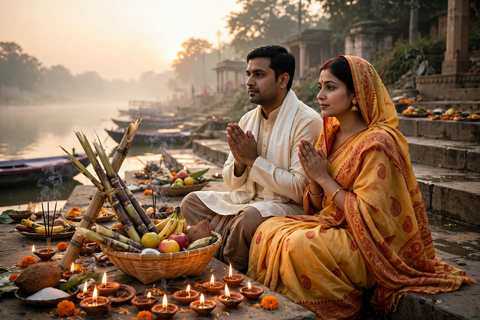
Every Chhath Puja season, one kind of photo takes over everyone’s feed: a husband and wife keeping the Chhath fast together in a peaceful sunrise ghat. It is warm, it is instantly recognisable, and it carries devotion, partnership, and quiet strength in a single frame. The good news is that you do not need a professional photographer, a decorated venue, or hours of editing to get this look. With one well-written AI prompt and a photo you already have on your phone, you can create a husband and wife keeping the Chhath fast together in a peaceful sunrise ghat in less than a minute. This article gives you that exact prompt, explains why it works so well, and shows you how to use it step by step so your result looks natural, festive, and ready to share.
Chhath is one of the few festivals where a couple’s shared devotion takes centre stage. The fast, the early morning, the standing together in the water: it is a portrait of partnership as much as of faith. This prompt captures that bond at sunrise, the most beautiful hour of the festival, and turns your photo into a couple portrait you will want to keep forever.
In this article you will find the complete copy-paste prompt, a clear explanation of why it works, a simple five-step method to use it, pro tips for the best result, and answers to the questions people ask most often. By the end, you will be able to create a husband and wife keeping the Chhath fast together in a peaceful sunrise ghat on your own, as many times as you like, and share it anywhere.
The Prompt
Copy everything inside the box below and paste it into Gemini or ChatGPT together with your photo. Do not change the wording on your first try; the prompt is written to keep your face natural and the scene believable.
Transform this photo into a serene Chhath Puja portrait of a devoted husband and wife in traditional dress keeping the Chhath fast together at a sunrise ghat. Keep both faces, skin tones, and expressions exactly the same and fully natural. The wife wears a beautiful traditional saree and the husband a kurta, both standing waist-deep near the water with a bamboo soop of fruits and flowers between them. Glowing brass diyas float nearby, marigold petals drift on the water, and the first golden rays of sunrise break softly over the river. Gentle mist, realistic skin texture, calm devotional expressions, natural reflections in the water, and a soft warm colour palette. Ultra-realistic photography, sharp focus on faces, peaceful sacred mood, vertical portrait composition, high detail, no text, no watermark.
Tip: upload a clear, front-facing photo with good light. The AI will keep your facial features and blend them into a peaceful sunrise ghat with a bamboo soop, brass diyas, and marigold flowers.
Why This Prompt Works
This prompt works because it is specific where most prompts are vague. Instead of asking the AI for a generic festive photo, it describes a bamboo soop, brass diyas, and marigold flowers, the serene early-morning atmosphere, and the emotional centre of the image. AI image tools respond strongly to that kind of detail: every extra concrete element gives the model something real to render, so the result looks like a photograph taken at a real celebration rather than a flat digital illustration. The second reason is emotional clarity. The prompt is built around devotion, partnership, and quiet strength, and viewers react to that feeling before they notice anything else. That is why photos made with this prompt get saved, forwarded, and shared far more than ordinary edited pictures.
Couple portraits work best when they feel calm rather than posed, and sunrise gives this image its power. The soft first light flatters every face, the mist adds depth, and the shared ritual tells a story of togetherness without a single word. Because the prompt keeps both faces natural, the result looks like a real photograph from your own celebration, not a studio creation.
There is also a sharing advantage. Photos like this travel well on couple posts and festive family greetings because they are instantly understandable: anyone who sees the image knows what it celebrates and feels the mood at once. A photo that needs no explanation gets more likes, more comments, and more forwards, and that is exactly the kind of image this prompt is designed to produce.
How to Use This Prompt
Using this prompt is simple, and you do not need any technical knowledge. Follow these five steps and your photo will be ready in a few minutes.
Step 1: Open Gemini or ChatGPT on your phone and start a new image chat. Choose a photo where your face is clearly visible, well-lit, and looking at the camera.
Step 2: Upload the photo and paste the full prompt from the box above in the same message. Mention nothing else in the first message, so the AI follows the prompt exactly.
Step 3: Wait for the image to generate, then look closely at the face, the hands, and a bamboo soop, brass diyas, and marigold flowers. If anything looks off, ask for one small correction, such as better face match or softer light, rather than starting over.
Step 4: If you want a variation, keep the same prompt and only change one detail, for example the time of day or the background crowd. Small changes keep the quality high.
Step 5: Download the result in the highest quality available and share it. This look works beautifully as a profile photo, a festive post, or a printed family keepsake.
Pro Tips for Best Results
These small tips make the difference between a good result and a great one. Keep them in mind before you generate.
Use a sharp original photo. Blurry or dark uploads give blurry results. Daylight selfies with a plain background work best.
Keep your face the hero. The prompt already protects your facial features, but avoid sunglasses, heavy filters, or side profiles in the uploaded photo.
Generate twice and pick the better one. AI results vary slightly each time. Two generations give you a clear winner almost every time.
Do not over-edit afterwards. A light brightness adjustment is enough. Heavy filters fight against the serene early-morning look the prompt creates.
Use a photo of both of you together. Uploading a couple photo gives a far better face match for both people than generating two separate portraits and combining them later.
Frequently Asked Questions
Is this prompt free to use?
Yes, the prompt in this article is completely free. Copy it, use it as many times as you like, and share your results anywhere. No sign-up or payment is needed to use the prompt itself; you only need a free Gemini or ChatGPT account to generate the image.
Which app should I use with this prompt?
Gemini and ChatGPT both work very well with this prompt. Gemini is excellent for realistic faces, while ChatGPT is strong on detailed festive scenes. Try both with the same photo once, and use whichever result you like more for your final post.
Will the AI keep my real face in the photo?
Yes, that is exactly what the prompt is written to do. It instructs the AI to preserve your facial features, skin tone, and expression while changing only the scene around you. For the best match, upload a clear front-facing photo with natural light and no sunglasses.
Will both faces look correct in a couple portrait?
Yes, if you upload a photo where both faces are clear and well-lit. The prompt instructs the AI to preserve each person’s features separately. Avoid photos where one face is turned away or hidden in shadow.
Some photos are just pictures, but this one will feel like a memory. Try the prompt today, share it with the people who matter to you, and enjoy seeing yourself in a peaceful sunrise ghat with all the warmth of Chhath Puja.
Related Viral Prompts
Love this style? Try these next:
- Chhath Puja Cinematic Drone Ghat AI Photo Prompt: Create a
- Chhath Puja Couple AI Photo Prompt: Create a Beautiful
- Chhath Puja Family Ghat AI Photo Prompt: Create a
#ChhathPuja #AIPhotoPrompt #CoupleGoals #PromptBazar


Leave a Reply