
Introduction
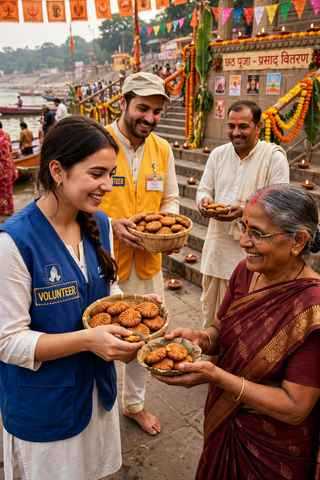
Every year, millions of people search for the perfect festival photo idea, and this prompt captures one of the most loved moments of the season. Generous portrait of volunteers distributing thekua prasad to devotees at a decorated river ghat, smiles is the kind of image that stops people mid-scroll, because it feels real, warm, and deeply familiar. Whether you are creating content for Instagram, Facebook, WhatsApp status, or a family album, this single prompt gives you a professional-looking portrait without a camera, a studio, or any editing skills.
What makes this idea so powerful is its emotional honesty. Indian festivals are not just about rituals and decorations. They are about people, memories, journeys, and the small details that make a celebration feel like home. This prompt focuses on exactly that feeling. It does not ask the AI tool for a generic festive background. Instead, it describes a living scene with real people, real expressions, and a real atmosphere, so the result looks like a photograph someone actually took in the middle of the celebration.
In this article, you will get the complete copy-paste prompt, a clear explanation of why it works so well, step-by-step instructions for using it in any popular AI image tool, practical tips for improving your result, and answers to the questions most people ask before generating their first image. By the end, you will be able to create a beautiful, shareable portrait in just a few minutes, and you will understand how to adapt the same prompt style for many other festival moments too.
The Prompt
Copy the complete prompt below and paste it into your favourite AI image generator. It is written as one ready-to-use block, so you do not need to add or remove anything for your first generation.
Create a photorealistic, cinematic, ultra-detailed portrait photograph of this scene: Generous portrait of volunteers distributing thekua prasad to devotees at a decorated river ghat, smiles, photorealistic. Capture authentic Indian festival atmosphere with natural skin tones, realistic fabric textures, genuine facial expressions, and true-to-life colours. Use soft, warm, golden-hour lighting with a shallow depth of field that keeps the main subject sharp while the background melts into a gentle bokeh. Shot on a full-frame camera with an 85mm portrait lens at f/1.8, eye-level angle, balanced composition with space for text on one side. Include fine details such as wrinkles in cloth, water reflections, diya flames, marigold petals, and dust particles glowing in the light. No cartoon look, no plastic skin, no distorted hands or faces, no watermark, no text overlay. The final image should look like a real photograph taken by a professional documentary photographer, emotionally honest, culturally accurate, and ready to share on social media.
Why This Prompt Works
The first reason this prompt works is specificity. Many people type only two or three words, such as festival photo, and then wonder why the result looks flat and random. This prompt does the opposite. It names the exact scene, the people in it, the setting, and the mood, so the AI tool has a clear picture to work from. When the tool knows what to draw, it spends its effort on details and emotion instead of guessing, and the final image looks far more believable.
The second reason is the photorealistic instruction combined with camera language. Words like full-frame camera, 85mm portrait lens, and shallow depth of field tell the image generator to imitate real photography rather than illustration. That single choice changes everything. Skin looks like skin, fabric shows texture, light falls naturally, and the background blurs the way a real lens blurs it. The result is an image your friends and followers will accept as a genuine photograph at first glance.
The third reason is cultural accuracy. The prompt keeps the traditional elements that matter, such as authentic clothing, ritual objects, and natural expressions, while avoiding exaggerated or cartoonish styling. Festivals feel most powerful when they are shown honestly, without stereotypes or over-decoration. Because this prompt respects the real look and feeling of the celebration, the image connects instantly with anyone who has lived that moment, and that connection is what earns likes, comments, and shares.
How to Use
Follow these simple steps in order, and you will have a finished portrait in just a few minutes, even if you have never used an AI image tool before.
- Copy the full prompt from the box above, exactly as written, including the camera and lighting details.
- Open your favourite AI image generator, such as Midjourney, DALL-E, Gemini, Bing Image Creator, or any photo-style AI app on your phone.
- Paste the prompt into the image prompt box and keep the aspect ratio at portrait (4:5) for Instagram and Facebook posts, or 9:16 for reels and stories.
- Generate the first image, then look closely at the face, hands, and background details before accepting it.
- If something looks off, change only one small detail at a time, such as the lighting, the angle, or the expression, and generate again.
- Download your best version, add a short caption or festival greeting if you like, and share it with your family and followers.
Pro Tips
- Keep the face natural: If the face looks too smooth or artificial, add the words natural skin texture and candid expression to your next generation.
- Use golden light: Festival portraits look warmest in early morning or late evening light, so keep the golden-hour wording unless you want a bright daytime market scene.
- Try two or three versions: Generate a few images and pick the one with the most natural eyes and hands, because those details decide whether a photo feels real.
- Match the caption to the mood: A short, heartfelt caption about family, devotion, or homecoming will make the image perform much better than a generic festival greeting.
- Respect the tradition: Keep ritual elements accurate and dignified, and avoid turning a devotional moment into a joke or an exaggerated costume picture.
FAQ
Can I use this prompt for free?
Yes. The prompt itself is free to copy and use in any AI image tool you already have access to. Some tools offer free daily generations, while others need a subscription, but the prompt works the same way in both cases, and you do not need to pay anything extra to use these words.
Will the image look like a real photograph?
In most cases, yes, especially when you keep the photorealistic and camera-lens instructions in the prompt. Modern AI image tools are very good at realistic portraits. Always check the hands, eyes, and background closely, and regenerate once or twice if any detail looks unnatural before you share the image.
Can I change the prompt for my own family photo style?
Absolutely. You can change the clothing colour, the background, the time of day, or the number of people, while keeping the structure of the prompt the same. Small changes are the best way to personalise the image, and they usually keep the quality high as long as you do not remove the camera and lighting details.
Is it okay to post AI-generated festival photos on social media?
Yes, it is completely fine for personal posts, greetings, and creative content. Many creators clearly enjoy AI festival portraits during the season. If you want to be extra transparent, you can mention in your caption that the image was created with AI, which your audience will usually appreciate.
In the end, the best festival photos are the ones that remind us of home, family, and faith, and this prompt helps you create exactly that kind of image. Try it today, share it with someone who loves this festival, and let one beautiful portrait carry the whole feeling of the celebration.
Related Viral Prompts
Bhai Dooj 2026 Tilak Ceremony: A Loving Portrait of a Sister Applying Tilak on Her Brother Forehead With a Diya Thali | Vishwakarma Puja 2026 Workshop: A Devotional Portrait of Workers Worshipping Tools and Machines in a Busy Workshop | Chhath Puja 2026 Banana Stall: A Bright Portrait of a Fruit Seller Arranging Bananas and Coconuts for Chhath Shoppers
#AIPhotoPrompt #FestivalPhotography #IndianFestivals #PhotorealisticAI #PromptBazar


Leave a Reply