
Introduction
Kharna is the quiet night before the main Chhath fast begins. In a calm home, kheer is cooked in a clay pot, offered with devotion, and eaten as prasad after the evening prayer. There are no crowds and no noise, just the glow of a diya, the smell of the kheer, and a deep sense of peace.
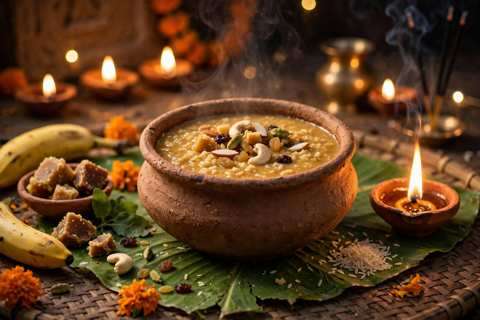
This AI photo prompt captures that sacred Kharna moment in a single still frame. The clay pot, the diya, the banana leaf and the warm light all come together to make a photo that feels holy and homely at once. It is ideal for a devotional post on Kharna evening.
The Prompt
Copy the full prompt below and paste it into your AI tool. It is written to be used exactly as it is, with no editing needed.
Create a sacred, ultra-realistic photograph of Kharna kheer prasad during Chhath Puja. A traditional clay pot filled with creamy white kheer sits on a fresh green banana leaf, garnished with chopped dry fruits, beside a small glowing brass diya and a few marigold flowers. The setting is a clean, peaceful Indian home prayer corner in warm evening light, with soft shadows, a faint wisp of steam rising from the kheer, and a brass plate and folded hand towel nearby. The mood is calm, pure and devotional, with rich warm tones, fine texture on the clay pot and the banana leaf, and gentle depth of field. Capture the scene in a close, cinematic still-life style with realistic detail and soft golden lighting. Photorealistic, high detail, vertical 9:16, no text, no watermark.
Why This Prompt Works
This prompt works because still-life scenes are where AI image tools shine. With no faces or hands to distort, the tool can focus entirely on texture, the roughness of the clay pot, the creaminess of the kheer, the veins of the banana leaf, and that is what makes the photo look real.
The small sensory details make the difference. Steam rising from the kheer, the glow of the diya, the marigold flowers, each one adds a layer of realism and devotion that a plain description would miss. Together they tell the viewer this is not just food, it is prasad.
Warm evening light is the finishing touch. It gives the kheer a soft glow and the brass diya a gentle shine, while the shadows stay soft instead of harsh. The close cinematic framing keeps the prasad as the hero of the photo, exactly as it should be on Kharna night.
Make It Your Own
Once you have tried the Chhath Kharna Kheer Prasad AI Photo Prompt prompt exactly as written, make the next version your own by changing just one ingredient at a time. Swap the background, for example from a river bank to a home courtyard, or change one colour in the outfit, and keep everything else the same. Changing one thing at a time is important, because if you change five things at once and the result looks wrong, you will not know which change caused it. You can also try a different time of day, softer morning light instead of evening glow, or a tighter crop that focuses on the face rather than the full scene. Small, careful changes like these turn one good prompt into a whole series of photos that still feel consistent, and a consistent series is exactly what grows an Instagram page faster than random one-off posts.
Variations to Try
- Morning version: recreate the Chhath Kharna Kheer Prasad AI Photo Prompt scene in soft morning light instead of evening light, keeping the same subject and composition.
- Close portrait version: crop the Chhath Kharna Kheer Prasad AI Photo Prompt idea into a tight face-and-shoulders portrait with the festive background softly blurred.
- Festival series version: reuse the Chhath Kharna Kheer Prasad AI Photo Prompt structure with a different festival or occasion, changing only the clothes, decorations and colours.
How to Use This Prompt
- Open your favourite AI image tool (Gemini, ChatGPT, Midjourney or any photo generator you trust) and upload a clear reference photo if you want your real face in the result.
- Copy the full prompt from the box above and paste it exactly as it is. Do not shorten it, because the lighting, mood and composition details are what make the result look real.
- If the tool asks for an aspect ratio, choose vertical 9:16 for Instagram Reels, Stories and WhatsApp status, or 4:5 for a classic feed post.
- Generate two or three versions and pick the one where the face, hands and background look most natural. Small flaws are normal on the first try.
- Download the best version, add your caption and hashtags, and post it. Keep the prompt saved so you can reuse it with different photos later.
Pro Tips
- Use this as a still-life post, it needs no reference photo at all.
- Ask for a slightly tighter crop if you want it as a phone wallpaper.
- Pair it with a short Kharna greeting rather than a long caption.
- Try the same prompt in the morning light version for a different, softer mood.
FAQ
Do I need to upload a photo for this prompt?
No, this is a still-life scene, so it works perfectly as a pure text-to-image prompt with no reference photo.
Can I add a family member praying in the background?
Yes, add one line about a woman praying softly in the blurred background, and keep the prasad in sharp focus.
Why does the steam matter?
Steam signals that the kheer is freshly cooked, which makes the whole image feel alive and just prepared.
Can I use this for a greeting card?
Yes, it is ideal for Kharna greetings on WhatsApp and Instagram.
Kharna teaches us that devotion is often quietest just before the biggest fast. Share this sacred frame, and let its calm reach everyone who sees it.
Before You Post Checklist
Before you publish, run through this quick checklist so your post performs at its best. First, check the face and hands closely at full size, because small flaws that are invisible in a thumbnail become obvious once the post is opened. Second, confirm the colours look natural and not oversaturated, since realistic colour earns more trust than a neon look. Third, write a short caption that names the festival or trend in the first line, so viewers understand the post instantly. Fourth, add the hashtags from the end of this article, mixing broad tags with specific ones. Finally, post at a time when your audience is active, usually morning for devotional content and evening for entertainment, and reply to the first few comments quickly, because early engagement helps the platform show your post to more people.
Related Viral Prompts
- Chhath Puja Thekua Making AI Photo Prompt
- Chhath Puja Night Diya AI Photo Prompt
- Chhath Puja Prasad Thali AI Photo Prompt
#ChhathPuja #Kharna #KheerPrasad #AIPhotoPrompt #Devotional


Leave a Reply