
Introduction
Not everyone can travel to a village river for Chhath. In Delhi, Mumbai and other big cities, thousands of devotees gather at artificial ghats built along riverfronts, lakes and ponds, and the devotion there is just as deep. The crowd, the diyas and the evening light turn a city waterfront into a sacred space.
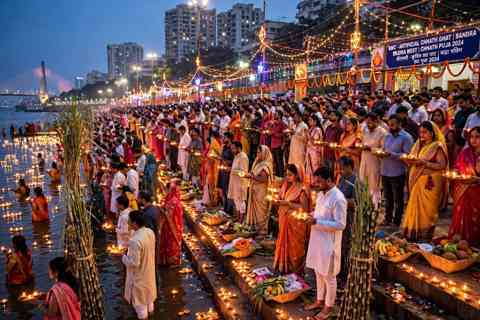
This AI photo prompt captures that city Chhath spirit. A crowd of devotees, rows of glowing diyas and a riverfront at evening all come together in one frame. It is perfect for anyone celebrating Chhath away from home, and for posts that show how the festival travels with its people.
The Prompt
Copy the full prompt below and paste it into your AI tool. It is written to be used exactly as it is, with no editing needed.
Create a vibrant, ultra-realistic photograph of Chhath Puja at a city artificial ghat in the evening. Hundreds of devotees in colourful traditional clothes stand along a decorated riverfront, holding bamboo soops filled with fruits, thekua and sugarcane, while rows of glowing diyas line the steps and float on the water. Marigold garlands and fairy lights decorate temporary bamboo structures, and the city skyline glows softly in the background under a warm orange and purple dusk sky. The crowd is joyful and devoted, with natural expressions, realistic skin texture and gentle evening light on every face. Capture the scene in a wide cinematic shot with warm festive colours, realistic crowd detail and a sacred, celebratory atmosphere. Keep faces natural and unchanged from reference photos where used. Vertical 9:16, photorealistic, high detail, no text, no watermark.
Why This Prompt Works
This prompt works because it balances two worlds, the sacred ritual and the modern city. The soops, diyas and marigolds carry the tradition, while the skyline and fairy lights place it firmly in a city. That contrast is what makes the photo interesting and shareable.
The crowd instruction is also carefully written. By asking for realistic crowd detail and natural expressions, the prompt avoids the melted, repeated faces that often spoil AI crowd scenes. The wide shot keeps the crowd as a beautiful pattern rather than a confusing jumble.
Evening dusk light ties everything together. Orange and purple skies, glowing diyas and fairy lights all share the same warm palette, so the photo feels like one moment instead of many competing elements. The water reflections double the glow and add depth.
Make It Your Own
Once you have tried the Chhath Delhi Mumbai Ghat AI Photo Prompt prompt exactly as written, make the next version your own by changing just one ingredient at a time. Swap the background, for example from a river bank to a home courtyard, or change one colour in the outfit, and keep everything else the same. Changing one thing at a time is important, because if you change five things at once and the result looks wrong, you will not know which change caused it. You can also try a different time of day, softer morning light instead of evening glow, or a tighter crop that focuses on the face rather than the full scene. Small, careful changes like these turn one good prompt into a whole series of photos that still feel consistent, and a consistent series is exactly what grows an Instagram page faster than random one-off posts.
Variations to Try
- Morning version: recreate the Chhath Delhi Mumbai Ghat AI Photo Prompt scene in soft morning light instead of evening light, keeping the same subject and composition.
- Close portrait version: crop the Chhath Delhi Mumbai Ghat AI Photo Prompt idea into a tight face-and-shoulders portrait with the festive background softly blurred.
- Festival series version: reuse the Chhath Delhi Mumbai Ghat AI Photo Prompt structure with a different festival or occasion, changing only the clothes, decorations and colours.
How to Use This Prompt
- Open your favourite AI image tool (Gemini, ChatGPT, Midjourney or any photo generator you trust) and upload a clear reference photo if you want your real face in the result.
- Copy the full prompt from the box above and paste it exactly as it is. Do not shorten it, because the lighting, mood and composition details are what make the result look real.
- If the tool asks for an aspect ratio, choose vertical 9:16 for Instagram Reels, Stories and WhatsApp status, or 4:5 for a classic feed post.
- Generate two or three versions and pick the one where the face, hands and background look most natural. Small flaws are normal on the first try.
- Download the best version, add your caption and hashtags, and post it. Keep the prompt saved so you can reuse it with different photos later.
Pro Tips
- Use a wide reference or no reference at all, crowd scenes work well as pure text prompts.
- If faces in the far crowd look soft, that is normal, the eye reads it as depth of field.
- Crop to the diya rows for a second post, one prompt can give you two images.
- Mention your city in the caption, local Chhath posts get shared in local groups.
FAQ
Can this show my own city skyline?
Yes, name the riverfront or skyline in the prompt, for example Yamuna riverfront in Delhi, and the AI will lean toward that look.
Is an artificial ghat less sacred in the photo?
Not at all. The devotion, diyas and offerings are identical, and the photo celebrates that the festival reaches devotees everywhere.
Can I use it for a group of friends?
Yes, upload a group photo and the AI will place your group at the front of the crowd scene.
What if the crowd looks messy?
Regenerate once or ask for a slightly tighter shot, fewer background people means cleaner faces.
Chhath does not need a village river, it needs devotion, and devotion travels anywhere. Share this city ghat photo and show how the festival lives in every city.
Before You Post Checklist
Before you publish, run through this quick checklist so your post performs at its best. First, check the face and hands closely at full size, because small flaws that are invisible in a thumbnail become obvious once the post is opened. Second, confirm the colours look natural and not oversaturated, since realistic colour earns more trust than a neon look. Third, write a short caption that names the festival or trend in the first line, so viewers understand the post instantly. Fourth, add the hashtags from the end of this article, mixing broad tags with specific ones. Finally, post at a time when your audience is active, usually morning for devotional content and evening for entertainment, and reply to the first few comments quickly, because early engagement helps the platform show your post to more people.
Related Viral Prompts
- Chhath Puja Ganga Ghat AI Photo Prompt
- Chhath Puja Sunset Silhouette AI Photo Prompt
- Chhath Puja City Rooftop Arghya AI Photo Prompt
#ChhathPuja #ChhathDelhi #ChhathMumbai #AIPhotoPrompt #CityGhat


Leave a Reply