
Introduction
If you have been scrolling through Instagram lately, you have probably seen this style of image that makes everyone stop and double-tap. This shadow stripes portrait prompt is one of the most viral photo trends right now, and the best part is that you do not need a professional camera, a studio or any editing skills to create it. All you need is the right prompt, and this article gives you exactly that, ready to copy and paste into your favourite AI image tool.
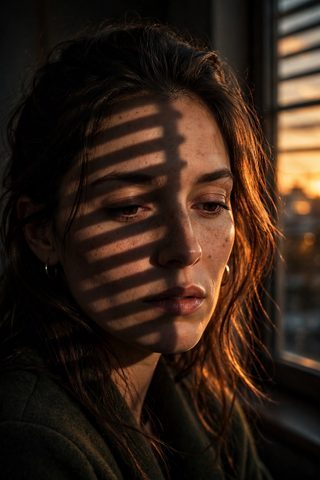
The scene is simple but powerful: a young woman with a calm, thoughtful expression in a room beside a large window with blinds at sunset, lit by warm sunset light passing through window blinds, casting dramatic shadow stripes across half the face. The mood is moody, artistic and emotional, and every detail in the prompt below has been chosen to protect that mood. Whether you want a new profile picture, a poster for a special occasion or just a beautiful image to share, this prompt will give you a result that looks professionally shot. In this guide you will find the full prompt, why it works so well, a step-by-step method to use it, pro tips from experienced creators, and answers to the most common questions.
The Prompt
Copy the complete prompt below and paste it into your AI image generator. It is written as one detailed paragraph so the tool understands the subject, setting, light and mood together.
Ultra-realistic moody closeup portrait of a young woman with a calm thoughtful expression, her face half covered by dramatic window blind shadow stripes, warm sunset light streaming through the blinds, golden rim light on one side of the face, deep soft shadows on the other side, cinematic contrast, natural skin texture, artistic composition, photorealistic, 85mm portrait lens, vertical 4:5 composition, highly detailed
Why This Prompt Works
Shadow stripes instantly turn an ordinary portrait into art. The pattern of light and dark across the face creates drama, mystery and a painterly quality that plain lighting cannot match. Sunset light adds warmth to one side while the shadows keep the other side soft and emotional, which is exactly why photographers love window light portraits.
Another reason this prompt performs so well is its balance. The subject, the setting and the light each get equal attention, so no single element overwhelms the frame. That balance makes the image look intentional and polished, like it was planned by a photographer rather than generated by an app. It also adapts beautifully: change the outfit, the time of day or the background slightly, and you get a whole new portrait while keeping the same winning formula. For creators, that flexibility means one prompt can produce an entire series of posts instead of just one image.
Finally, this style photographs well because it leans on emotion. Viewers do not just see a person in a room beside a large window with blinds at sunset; they feel the moody, artistic and emotional atmosphere the light and setting create. Emotional images get saved, shared and commented on far more than plain portraits, which is exactly why this trend keeps appearing on explore pages and reels. When you generate your version, pay attention to the expression and the light first, because those two details carry most of the emotion in the final image.
There is also a practical reason creators keep coming back to this prompt: it is forgiving. Even if your AI tool interprets one detail differently, the core combination of a young woman with a calm, thoughtful expression in a room beside a large window with blinds at sunset with warm sunset light passing through window blinds, casting dramatic shadow stripes across half the face still produces a beautiful image. That reliability matters when you are creating content regularly, because you do not want to spend twenty generations chasing one usable result. Most creators get a share-worthy image within two or three tries, and each try teaches you something about how your chosen tool handles light, composition and detail. Save your favourite version, note which small tweak produced it, and you will have a repeatable recipe for this style whenever you need fresh content. Over time, that habit of testing and noting results is what separates casual users from creators whose posts consistently stand out in a crowded feed, and this prompt is an excellent place to start building that habit.
How to Use
Follow these simple steps to turn the prompt into a finished portrait you will be proud to share.
- Copy the full prompt from the box below exactly as written, including the style words at the end.
- Open your AI image tool, such as Midjourney, Gemini, ChatGPT images or Flux, and paste the prompt into the image box.
- Set the aspect ratio to vertical 4:5 for Instagram posts, or 9:16 if you want a story, reel cover or phone wallpaper.
- Generate the image and review the face, the lighting and the background carefully before accepting it.
- If anything looks off, adjust one detail at a time, for example the light or the outfit, and regenerate.
- Once you are happy with the result, download it in the highest quality and share it with your own caption and hashtags.
Pro Tips
These small adjustments can lift a good result into a great one, so try them if your first image is not perfect.
- Mention blinds or window slats clearly so the AI renders clean, even stripes.
- Ask for half the face in light and half in shadow for the strongest effect.
- A plain background keeps the stripes as the star of the image.
- Warm sunset tones work better than cool daylight for this moody style.
- If stripes look messy, add evenly spaced clean shadow lines and regenerate.
FAQ
Here are the questions creators ask most often about this style.
Why is this style so popular on Instagram?
Because it looks like a professional studio shoot with almost no effort, and the stripe pattern stands out instantly in a feed.
Can I use this prompt for a male subject?
Absolutely, just change the subject description. The lighting and shadow pattern work for anyone.
What if the shadows cover the whole face?
Add the phrase half face in warm light, half face in soft shadow to control the balance.
Does this work in black and white?
Yes, adding black and white cinematic tones gives it a timeless, classic photography feel.
Sometimes the most beautiful portraits are painted with shadows, and this prompt lets the sunset do the painting for you.
Related Viral Prompts
Biruli Glass Neon Leaves AI Photo Prompt
AI Snow Portrait Winter AI Photo Prompt
Biruli Golden Rim Couple AI Photo Prompt
#ShadowPortrait #MoodyPortrait #SunsetPhotography #AIPhotoPrompt #BiruliStyle


Leave a Reply