
Introduction
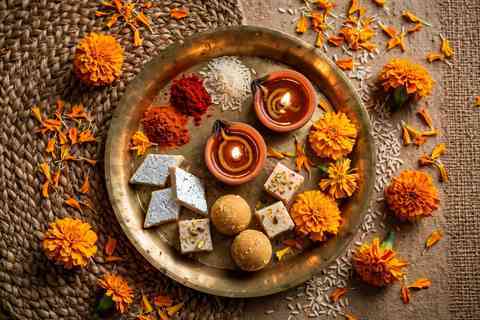
A beautifully arranged puja thali, photographed from directly above, is one of the most satisfying images of any Indian festival. The brass plate, the glowing diyas, the marigold petals, the kumkum and rice in small bowls, and the neat rows of sweets create a pattern that is both sacred and stunning. This Bhai Dooj 2026 AI photo prompt creates that perfect flat lay — a thali so beautiful it looks ready for a magazine cover, with every element in its place.
Flat lay photos are hugely popular because they are calm, symmetrical, and easy to enjoy at a glance. This prompt does not need a face at all, which makes it ideal if you want a festive image without uploading a personal photo. The overhead angle, the warm light, and the rich colours of the diyas and flowers do all the work, and the result is perfect for a Bhai Dooj greeting, a WhatsApp status, or the cover of a festival post.
The Prompt
Copy the complete prompt below and paste it into your favourite AI image tool. It is written to work with a photo of your own, so your face and the festive mood both stay true to life.
Create a beautiful Bhai Dooj puja thali flat lay photograph seen from directly above: a round polished brass thali placed at the centre of a deep maroon silk cloth, arranged with perfect symmetry. On the thali: two small lit brass diyas with warm glowing flames, a small bowl of red kumkum, a small bowl of white rice grains, fresh orange marigold flowers, green mango leaves, a few rose petals, and four pieces of kaju katli and laddoo arranged neatly. Around the thali, a loose circle of marigold petals and two more unlit diyas on the cloth. Soft warm overhead lighting, gentle shadows, rich festive colours, ultra-detailed top-down DSLR photograph, 50mm lens, sharp focus across the whole frame, elegant and sacred mood, high detail, 4K quality.
Why This Prompt Works
Flat lay prompts are among the most reliable AI images because the composition is simple and geometric. A circle inside a circle, seen from above, gives the AI a clear structure to follow, and the result is almost always clean and balanced. There is no face to preserve and no body language to get wrong, so the image succeeds on arrangement and colour alone.
The colour palette is the secret of this prompt. Brass gold, marigold orange, kumkum red, and deep maroon cloth create a warm, festive harmony that looks expensive and intentional. By naming each item and its position, the prompt prevents the AI from adding random objects or leaving empty gaps, which are the two most common flat lay mistakes.
Overhead lighting with gentle shadows adds depth without breaking the symmetry. The prompt asks for sharp focus across the whole frame, which is exactly what a good flat lay needs — every sweet, every petal, and every flame in crisp detail.
Finally, this flat lay is one of the most versatile festive images you can make. Use it as a Bhai Dooj greeting card, a WhatsApp status background, the cover of a festival blog post, or a printed card for relatives. Because there are no faces in the frame, it works for anyone, and the symmetrical arrangement looks just as good in a small phone thumbnail as it does blown up on a screen. Add your greeting text in Canva, keep the font simple and elegant, and you have a professional-looking festival card made in minutes, with no photography skills needed at all.
How to Use This Prompt
Follow these five simple steps to turn your photo into a beautiful festive portrait.
- Open Gemini or Nano Banana 2 on your phone or computer and upload a clear photo of yourself — a well-lit, front-facing picture works best for Beautiful Bhai Dooj puja thali flat lay with diyas flowers and sweets seen from above.
- Copy the full prompt from the box above and paste it into the prompt field exactly as written, without trimming the lighting, camera, or outfit details.
- Tap generate and wait for the first result. Check the faces, the festive details, and the overall framing before you decide whether to keep it.
- If something looks off, refine it with a short follow-up instruction such as “keep the faces exactly the same, make the diyas brighter” and generate again.
- Download your favourite version in the highest quality available and share it on WhatsApp, Instagram, or Facebook with a warm Bhai Dooj or Chhath Puja caption.
Pro Tips
- No face photo is needed for this prompt — it works with a text-only generation in any AI image tool.
- Ask for a square 1:1 version for Instagram and a wide version for a WhatsApp status cover.
- If a diya flame looks odd, ask for “steady small flames” in a follow-up edit.
- Swap the sweets to match your family tradition — barfi, peda, or motichoor laddoo all work beautifully.
- Use the image as a background for a Bhai Dooj greeting by adding text in Canva afterwards.
Frequently Asked Questions
Do I need to upload a photo for this prompt?
No. This is a pure flat lay scene with no people, so you can generate it from text alone in Gemini, ChatGPT, or any AI image tool.
Can I change the items on the thali?
Yes. Add or remove items freely — a coconut, a small idol, or your family’s favourite sweet — and the symmetrical arrangement still works.
What size should I generate for social media?
Square 1:1 is best for Instagram posts, and a 9:16 vertical version works well for WhatsApp status and Reels covers.
Why does my flat lay look messy sometimes?
Too many items is usually the cause. Keep the thali to six or seven elements and let the maroon cloth provide the empty space around it.
A well-arranged thali is a prayer you can see. Create this flat lay and let your Bhai Dooj greeting shine as bright as the diyas on it.
Related Viral Prompts
- Bhai Dooj 2026 AI Photo Prompt: A Sister Applying Tilak on Her Brother’s Forehead in Warm Morning Light
- Chhath Puja 2026 AI Photo Prompt: A Bamboo Soop Filled With Coconut Fruits and Diyas by the Riverbank
- Bhai Dooj 2026 AI Photo Prompt: A Grandmother Blessing Her Grandchildren in a Courtyard Full of Family
#BhaiDooj2026 #AIPhotoPrompt #NanoBanana #PujaThali #FestivalVibes


Leave a Reply