
Introduction
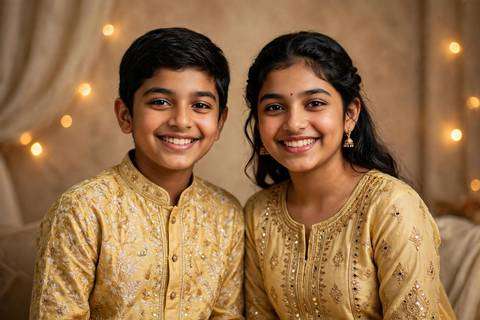
Twinning outfits are the cutest Bhai Dooj trend of the year. A brother and sister in matching festive clothes, standing side by side in a studio portrait, look like they stepped out of a fashion shoot — and the best part is that anyone can create the look with AI. This Bhai Dooj 2026 AI photo prompt turns your photos into a polished studio portrait with matching outfits, soft professional lighting, and a clean festive backdrop.
Studio portraits are popular because they are timeless. There is no clutter, no distraction, just two siblings, matching colours, and confident smiles. The prompt keeps both faces exactly the same, dresses you both in coordinated outfits, and uses soft studio lighting to give the image a premium, magazine-quality finish. It is ideal for a profile picture, a printed portrait, or a Bhai Dooj post that the whole family will love.
The Prompt
Copy the complete prompt below and paste it into your favourite AI image tool. It is written to work with a photo of your own, so your face and the festive mood both stay true to life.
Create a polished Bhai Dooj studio portrait from this photo: keep both faces exactly the same, same brother and sister, same features and same smiles. Show the brother and sister standing side by side in matching festive outfits — the sister in an elegant teal and gold lehenga, the brother in a matching teal kurta with a gold Nehru jacket — twinning in colour and style. They stand confidently against a warm cream studio backdrop with a soft golden bokeh of fairy lights behind them and a small marigold garland at the base. Professional studio lighting, soft and even, with a gentle rim light on their hair. Realistic DSLR studio photograph, 85mm lens, sharp focus on both faces, natural skin texture, elegant and joyful mood, high detail, 4K quality.
Why This Prompt Works
Matching outfits work because the human eye loves symmetry and coordination. When two people wear the same colour family, the portrait instantly looks planned and premium, even if the pose is simple. This prompt uses teal and gold — a combination that photographs beautifully against a cream backdrop — and the AI only has to get the colours right to make the image feel expensive.
The studio setting removes every distraction. A clean backdrop, soft even lighting, and a gentle bokeh of fairy lights give the portrait a professional finish that a busy home background cannot match. By asking for an 85mm lens look, the prompt pushes the AI toward the flattering compression that real portrait photographers use, which is why the faces look natural and the proportions stay true.
Face preservation is the foundation of the whole prompt. A studio portrait lives or dies on whether the people in it look like themselves, and the explicit instruction keeps both siblings recognisable, so the picture works as a real family portrait rather than a fashion illustration.
Finally, a studio portrait like this one never goes out of style. Unlike a casual festival photo that feels dated next year, a clean studio image with matching outfits and soft lighting looks as good in five years as it does today. Use it as a joint profile picture, print it for your parents, or frame it for the living room wall. The twinning outfits make it playful, the studio finish makes it premium, and the fact that both faces are genuinely yours makes it a real family portrait — one that captures this Bhai Dooj exactly as it should be remembered.
How to Use This Prompt
Follow these five simple steps to turn your photo into a beautiful festive portrait.
- Open Gemini or Nano Banana 2 on your phone or computer and upload a clear photo of yourself — a well-lit, front-facing picture works best for Siblings twinning in matching festive outfits for a Bhai Dooj studio portrait.
- Copy the full prompt from the box above and paste it into the prompt field exactly as written, without trimming the lighting, camera, or outfit details.
- Tap generate and wait for the first result. Check the faces, the festive details, and the overall framing before you decide whether to keep it.
- If something looks off, refine it with a short follow-up instruction such as “keep the faces exactly the same, make the diyas brighter” and generate again.
- Download your favourite version in the highest quality available and share it on WhatsApp, Instagram, or Facebook with a warm Bhai Dooj or Chhath Puja caption.
Pro Tips
- Upload a photo where both faces are clear and front-facing for the most accurate studio match.
- Pick outfit colours that suit both siblings — teal, maroon, or royal blue twinning looks great on everyone.
- If the background bokeh looks too strong, ask for “subtle soft bokeh” in a follow-up edit.
- Generate a black-and-white version too — studio portraits in monochrome look timeless and elegant.
- Use the portrait as a joint profile picture or print it for a Bhai Dooj gift to your parents.
Frequently Asked Questions
Can we twin in a different colour?
Yes, absolutely. Replace teal and gold with any colour pair you love — maroon and gold, pink and silver, or green and cream all work.
Do we need to upload a photo together?
A photo of both siblings together gives the best result, but solo photos of each person also work — the AI will place you side by side.
Which tool is best for studio portraits?
Nano Banana 2 in Gemini produces very clean studio lighting, and ChatGPT image editing is also excellent for matching outfits.
Can I use this portrait for a printed frame?
Yes. Generate at the highest quality available and download the full-resolution file for a sharp, beautiful print.
Matching outfits, matching smiles, one unforgettable portrait. Twin with your sibling this Bhai Dooj and make a picture worth framing.
Related Viral Prompts
- Bhai Dooj 2026 AI Photo Prompt: Siblings Recreating a Childhood Photo Together in Their Old Family Home
- Bhai Dooj 2026 AI Photo Prompt: A Brother and Sister Riding a Bike Together on a Sunny Morning Road Trip
- Bhai Dooj 2026 AI Photo Prompt: A Brother and Sister Sharing Chai Together on a Balcony Lit With Diyas
#BhaiDooj2026 #AIPhotoPrompt #NanoBanana #TwinningOutfits #StudioPortrait


Leave a Reply