
Introduction
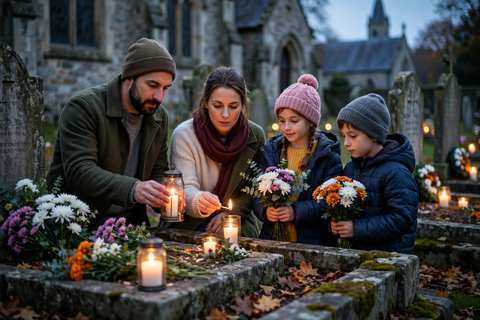
All Saints Day is one of those occasions that looks made for the camera, and this portrait captures exactly why. The scene centres on a quiet family, set against a church cemetery in the evening, where every small detail — from lit candles, flowers on graves, an old church, autumn trees, evening light — adds warmth and meaning to the frame. It is the kind of image that stops thumbs mid-scroll, because it feels both festive and deeply personal at the same time.
All Saints Day on 1 November is when families honour departed saints and loved ones, lighting candles and laying flowers on graves. That emotional connection is what makes this prompt so shareable: people do not just see a pretty picture, they recognise a tradition they grew up with. Whether you are posting for All Saints Day, creating content for a festival page, or simply want a beautiful portrait for your feed, this prompt gives you a ready-made scene with feeling built in.
In this post you will find the complete copy-paste prompt, an explanation of why it works so well, and simple steps to generate your own version in under a minute. No editing skills are needed — just copy the prompt, paste it into your favourite AI image tool, and watch a peaceful and reverent All Saints Day portrait come to life.
The Prompt
Copy the full prompt below exactly as written. It describes a quiet family in a church cemetery in the evening, with lit candles, flowers on graves, an old church, autumn trees, evening light, so the AI has everything it needs to build a rich, realistic scene in one go.
Ultra-realistic high-resolution photograph of a peaceful family lighting candles at a church cemetery in the evening, flowers laid on the graves, soft candlelight glowing against old stone and autumn trees, featuring lit candles, flowers on graves, an old church, autumn trees, evening light, in a church cemetery in the evening, with a peaceful and reverent atmosphere, cinematic lighting, sharp focus, natural skin texture, festive atmosphere, balanced portrait framing, softly blurred bokeh background, professional DSLR quality, photorealistic, Instagram-ready, no text or watermark.
Why This Prompt Works
Great AI photo prompts succeed because they are specific, and this one leaves nothing to chance. It names the subject (a quiet family), the setting (a church cemetery in the evening), the key props (lit candles, flowers on graves, an old church, autumn trees, evening light) and the mood (peaceful and reverent), so the generator does not have to guess. The result is a portrait that looks intentional and complete, rather than random.
The technical phrases do the heavy lifting for realism. Words like cinematic lighting, sharp focus and natural skin texture push the AI away from the flat, plastic look that gives away many AI images. The softly blurred bokeh background keeps attention on the subject, while the balanced portrait framing makes the image ready for Instagram, WhatsApp status and Facebook without cropping.
Finally, the cultural details make it stand out. Generic festival images all look alike, but lit candles, flowers on graves, an old church, autumn trees, evening light root this portrait in All Saints Day specifically. That authenticity is what earns likes, shares and saves — viewers recognise their own celebration in the frame, and that recognition is what turns a good image into a viral one.
How to Use
- Copy the entire prompt from the box above, including every descriptive phrase.
- Open your favourite AI image generator, such as Midjourney, DALL-E, Gemini, Leonardo or Bing Image Creator.
- Paste the prompt into the text box and generate your first version.
- Check the result: look at the face, the hands and the key props, and regenerate if anything looks off.
- Optional: swap small details to personalise it — change the outfit colour, the time of day or add your own name to the scene.
- Download the best version, post it with the hashtags below, and tag your friends who celebrate this festival.
Pro Tips
Keep the tone gentle: soft candlelight and calm faces suit this solemn day far better than bright, cheerful lighting.
If the first result feels too crowded, remove one prop from the prompt and regenerate — simpler scenes often look more premium. For a profile picture, add the words close-up portrait at the start of the prompt so the face fills more of the frame. And if colours look dull, add the phrase rich festive colours before generating again; it deepens the peaceful and reverent mood without changing the scene.
Always generate two or three versions and pick the sharpest one. AI tools vary between runs, and the second or third attempt is often noticeably better, especially for hands, faces and small glowing details like lamps and diyas.
FAQ
Is this All Saints Day prompt free to use? Yes, completely free. Copy it, use it in any AI image tool, and share the result anywhere you like.
Which AI tool works best for this portrait? Midjourney and Gemini usually give the most realistic faces for this scene, while Leonardo and Bing Image Creator are excellent free options for a first try.
Can I change the person or outfit in the prompt? Absolutely. Replace a quiet family with your own description — for example, your age, outfit or hairstyle — and the rest of the scene will stay the same.
Why does my image look different from the description? AI generation is slightly random each time, so regenerate once or twice. Keeping the key phrases — cinematic lighting, sharp focus and photorealistic — helps the result stay close to this peaceful and reverent All Saints Day scene.
This All Saints Day portrait is more than a festival image — it is a small celebration of tradition, family and togetherness, captured in a single frame. Copy the prompt, create your version, and share the warmth of All Saints Day with everyone on your feed.
Related Viral Prompts
#AllSaintsDay #AllSaints2026 #CandleLight #Remembrance #AIPhotoPrompt


Leave a Reply