
Introduction
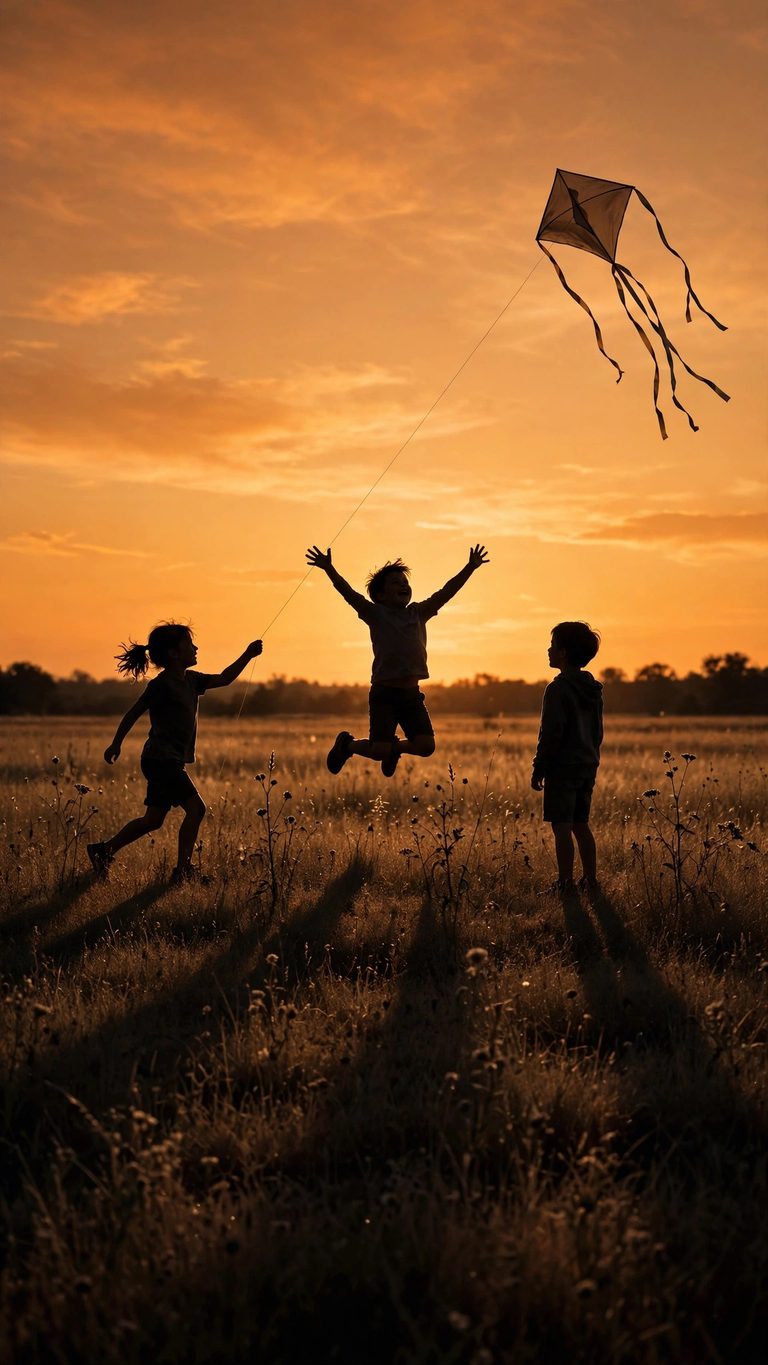
There is a fleeting stretch of evening, just before the sun slips below the horizon, when the world turns to gold and every shadow grows long and soft. Photographers call it the golden hour, and parents call it the one moment their children look like they stepped out of a dream. A sunset silhouette of kids playing with a kite in an open field captures something real cameras almost never catch on their own: pure, unposed childhood freedom, frozen against a sky painted in orange and pink. The kids become timeless shapes, dark against the light, and suddenly the photo is not about faces at all. It is about joy, motion, and the wide open feeling of being small under a huge sky.
That is exactly why silhouette kids photography performs so well online. It is emotional, it is instantly readable on a tiny phone screen, and it carries a nostalgia that crosses every culture. With this AI Photo Prompt, you do not need a field, a sunset, a kite, or even a camera. The prompt engineers the light for you, sculpting warm gradient skies, long dramatic shadows, and one joyful mid-jump moment that makes the whole scene feel alive. Paste it, generate it, and you have fine-art photography that looks like it took a professional crew an entire evening to stage. In this article, we break down why the prompt works, how to run it on every major generator, and how to spin it into a whole gallery of golden hour variations.
The Prompt
Copy the prompt below exactly as written and paste it into your favorite AI image generator. Every adjective shapes the light, the mood, and the fine-art finish, so keep the wording intact for your first generation.
Artistic silhouette photograph of kids playing with a kite in a field at sunset, one jumping joyfully, warm gradient orange sky, long shadows, carefree childhood freedom, hyper-detailed edges, fine-art photography, ultra detailed, 8k quality, clouds painted pink above, boundless youthful energy
Why This Prompt Works
The visual psychology behind this image starts with backlighting. When the main subjects are rendered as silhouettes, viewers stop scanning for facial detail and start feeling the scene instead. Dark shapes against a glowing orange gradient read as story rather than portrait, and stories are what people share. A child mid-jump with a kite string stretching into a pink-clouded sky tells a complete narrative of freedom in a single frame, which is why this style of #Sunset photography consistently earns saves, shares, and long comments across Instagram and Pinterest.
Color does heavy lifting here too. Warm oranges and soft pinks are emotionally associated with safety, comfort, and happy endings, which is precisely the feeling parents want wrapped around images of their kids. The prompt’s long shadows add depth and realism, grounding the silhouettes so they do not float like cutouts. Hyper-detailed edges keep the fine-art label honest: clean rim light around hair and limbs separates each figure from the sky, and that separation is the difference between a flat shadow and a gallery-worthy print.
Platform trends strongly favor this aesthetic. Nostalgic family content, golden hour reels, and cinematic stills dominate the baby and kids niches because they pair perfectly with emotional audio and quote captions. A silhouette needs no perfect smile, no coordinated outfits, and no skin retouching, which makes it forgiving to generate and universally appealing. Parents share it, grandparents print it, and creators use it as hero imagery for blog posts, channel banners, and product mockups, all without staging a single real photoshoot. The #AIPhotoPrompt tag exists for exactly this kind of ready-to-post art.
How to Use This Prompt
Start by choosing your generator. In Midjourney v7, paste the prompt, then add –ar 9:16 –v 7 to lock the tall portrait format the source settings recommend, which is ideal for Reels, Shorts, and phone wallpapers. Use –style raw if you want photographic realism with less stylization, or leave the default style for a more painterly fine-art glow. Generate four variations, pick the composition with the cleanest jumping pose, then use Vary (Subtle) to refine the kite string and hand shapes.
In DALL-E 3, paste the full prompt as your description and add a line like ‘vertical 9:16 portrait orientation’ since DALL-E responds well to explicit sizing in conversation. Ask for the most photorealistic result, then request revisions such as ‘make the sun lower on the horizon’ or ‘sharpen the silhouette edges’ until the light feels right. In Flux, the prompt works well at 768×1344 or 832×1472 for the 9:16 ratio, with a guidance scale around 3.5 to keep the image natural rather than over-processed.
Whichever tool you use, upscale the winner. Fine-art silhouettes live or die on edge quality, so run the final image through your generator’s built-in upscaler or a dedicated enhancement tool before printing or posting. Save the exact prompt text in a note so you can recreate the scene with different children, seasons, or props later. If you need a matching 16:9 version for YouTube thumbnails or blog headers, regenerate with –ar 16:9 or outpaint the portrait master.
Pro Tips & Creative Variations
Change the cast without changing the magic. Swap the kite scene for a single toddler chasing soap bubbles, two siblings holding hands and running toward the sun, or a child releasing a paper lantern, and the silhouette formula still works because the emotion comes from the light, not the headcount. A baby held aloft by a parent against the same orange sky creates an iconic family poster in one generation.
Rotate the season and setting for endless variety. Try a snow-dusted field at blue-hour dusk for a winter holiday card, a beach shoreline with wet sand reflections for summer, or an autumn meadow with drifting leaves for a Thanksgiving post. Each background keeps the core composition, kids mid-motion against a gradient sky, while giving you fresh content for every holiday and milestone.
Play with the sky itself. Replace ‘warm gradient orange sky’ with ‘deep purple and teal twilight’ for a dreamier mood, or ask for ‘dramatic storm clouds parting at sunset’ for high-drama wall art. Add flocks of birds, a distant hot air balloon, or tall grass swaying in the foreground to layer depth. For a sunrise version, flip the mood with ‘soft rose-gold dawn light’ and a child stretching awake, perfect for morning-motivation posts.
Control the fine-art finish with small prompt edits. Adding ‘soft film grain’ gives a vintage photograph feel, while ‘minimalist composition, wide negative sky’ produces modern wall art that interior designers love. If the kite string looks tangled, simplify the prop to ‘a red balloon on a string’ for cleaner geometry. Always generate the 9:16 portrait master first, then crop or outpaint for square and landscape versions so every platform gets a native-looking image.
Frequently Asked Questions
Which AI generator gives the best sunset silhouettes?
Midjourney v7 currently leads for this style because it renders atmospheric light and clean silhouette edges exceptionally well, especially with –style raw. DALL-E 3 is excellent at following the exact composition you describe, such as one child jumping while others run. Flux is a strong free alternative that handles gradients smoothly. Try the prompt on at least two tools and keep the winner.
Why is the 9:16 portrait ratio recommended?
The source settings specify 9:16 portrait because vertical images dominate mobile viewing, filling the full phone screen in Reels, Shorts, TikTok, and Stories. Tall silhouettes also look more dramatic, with more sky above the figures and longer shadows below. You can always generate landscape versions later, but start with portrait for maximum reach.
The kids’ poses look stiff or the kite string looks wrong. How do I fix that?
Add motion cues to the prompt, such as ‘dynamic mid-motion pose, natural running posture’ for the children and ‘taut kite string leading to a diamond kite in the upper sky’ for the prop. Generate several variations and select the most natural pose, then use inpainting or a subtle Vary to clean up the one element that looks off rather than regenerating from scratch.
Can I use these images commercially, for example on prints or in ads?
Check your generator’s license terms, as commercial rights vary between Midjourney, DALL-E 3, and Flux. Generally, paid tiers grant commercial use of generated images. Silhouette art is popular on nursery wall prints, greeting cards, and parenting blog headers, so it is worth confirming your plan covers it, and always review the final image for artifacts before selling or printing.
Few images say childhood like a silhouette against a burning sky, and now you can create one in minutes. Paste this AI Photo Prompt into your generator, pick your favorite golden hour variation, and share the #AIPhotoPrompt result with someone who needs a little warmth today. Your perfect sunset is one generation away.
Related Viral Prompts
- Adorable Baby Yawn AI Photo Prompt: Capture a Heart-Melting Macro Newborn Moment in Soft Morning Light
- Colorful Paint Hands AI Photo Prompt: Turn a Creative Mess into a Vibrant Kids Photography Masterpiece
- Pastel Newborn Wrap AI Photo Prompt: Craft an Angelic Fine-Art Baby Portrait in Dreamy Soft Light Today
# A I V i d e o # P r o m p t B a z a r # A I P h o t o P r o m p t # S i l h o u e t t e # S u n s e t # K i d s

Leave a Reply