
Introduction
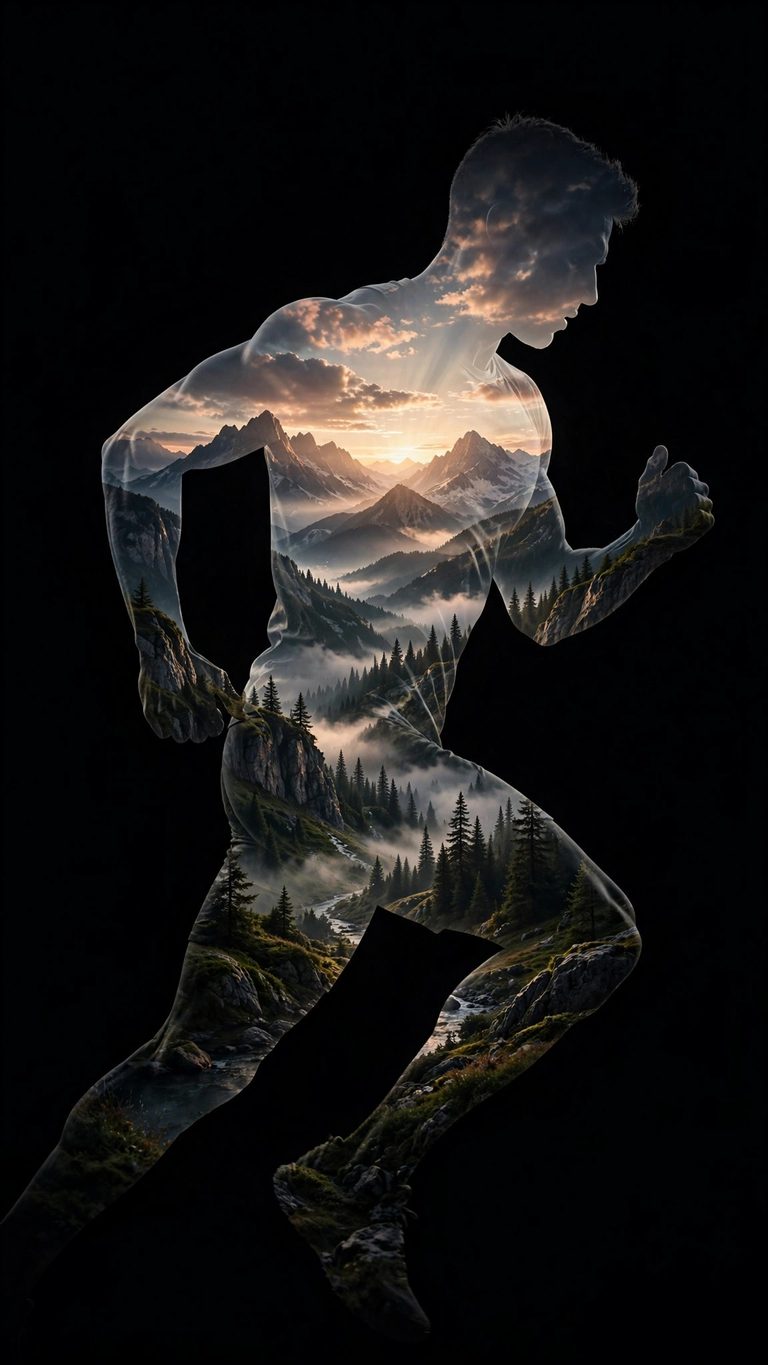
Some images stop your scroll dead. Others make you save the post, tag a friend, and quietly wonder how any human hand could have created something so striking. The athletic double exposure belongs firmly in that second category: a single frame in which the powerful silhouette of an athlete becomes a living window into a mountain landscape at dawn. It is the kind of image that looks like it belongs on a gallery wall, yet you can generate it in about sixty seconds with the right AI photo prompt.
Double exposure photography has been hypnotizing viewers since the film era, when darkroom artists layered two negatives to fuse a portrait with a landscape. What once demanded expensive cameras, perfect timing, and hours of darkroom wizardry now demands only the right words. This prompt is engineered to recreate that magic with startling fidelity, blending the raw strength of the human body with the wild, quiet beauty of mountains at sunrise.
Whether you run a fitness brand, coach clients online, manage a motivational page, or simply want wall-worthy art for your own feed, this prompt delivers. In this guide you will learn exactly why every phrase in it matters, how to run it in Midjourney v7 and DALL-E 3, and how to push it further with creative variations that make the final image unmistakably yours.
The Prompt
Copy the prompt below exactly as written and paste it into your AI image generator of choice.
Artistic double exposure photograph of an athlete's powerful silhouette filled with a mountain landscape at dawn, dramatic sky inside the body shape, dark background, creative sports art photography, seamless blending, inspiring concept, hyper-detailed, gallery-quality fine art, ultra detailed, 8k quality
Why This Prompt Works
This prompt succeeds because every phrase pulls its weight, guiding the AI model the way an art director guides a photographer. The opening words, “artistic double exposure photograph,” immediately lock in the genre, telling the model to blend two scenes inside one frame rather than rendering a literal snapshot. Without that anchor, image generators tend to produce a person standing in front of mountains, which misses the entire effect.
The choice of an “athlete’s powerful silhouette” is equally deliberate. A silhouette is a bold, readable shape, and athletic poses give the model strong, unambiguous contours to work with. The word “powerful” steers the composition away from passive standing poses toward dynamic, muscular forms that fill the frame with energy. Because the silhouette functions as a canvas, its shape defines the entire artwork.
Filling that canvas with “a mountain landscape at dawn” is where the emotion lives. Dawn light carries symbolism that viewers feel instantly: new beginnings, discipline, the quiet hours when athletes train while the world sleeps. The “dramatic sky inside the body shape” adds depth and weather to the interior scene, preventing the mountains from looking flat. Meanwhile, the “dark background” creates the high contrast that makes the glowing silhouette leap off the screen, especially on mobile feeds.
Finally, the quality stack at the end, “hyper-detailed, gallery-quality fine art, ultra detailed, 8k quality,” signals to the model that this should look like premium wall art rather than a casual snapshot. Combined with “seamless blending” and “inspiring concept,” the prompt consistently produces images that feel intentional, emotional, and expensive.
How to Use This Prompt
Running this prompt is straightforward, and the settings field recommends a 9:16 portrait format in Midjourney v7 or DALL-E 3. Follow these steps:
- Copy the prompt exactly. Highlight the full prompt in the box above and copy it. Do not paraphrase it; the phrasing was tested for a reason.
- Midjourney v7 route: Paste the prompt into your Midjourney interface and append –ar 9:16 to lock in the portrait orientation, plus –v 7 to use version 7. Submit and review the four-image grid.
- DALL-E 3 route: Paste the prompt into ChatGPT with image generation enabled and add a short instruction such as “portrait orientation, 9:16.” DALL-E 3 interprets natural language beautifully, so you can simply ask for the vertical format in plain words.
- Pick and refine. Generate two or three batches, choose the silhouette with the cleanest edges, and upscale it. In Midjourney, use the U buttons to upscale your favorite; in DALL-E 3, ask for a variation on the version you like best.
- Flux alternative: If you prefer open models, Flux handles double exposures well too. Paste the same prompt and set a portrait aspect ratio in your Flux interface of choice.
Expect the first batch to be good and the third batch to be great. Small imperfections in blending are normal; choose the version where the mountain scene sits most naturally inside the athlete’s form.
Pro Tips & Creative Variations
Once you have the base image dialed in, the real fun begins. This prompt is a template you can bend in dozens of directions. Try swapping the athlete for a boxer with raised gloves, a runner mid-stride, or a yogi in warrior pose; each body shape creates a completely different canvas and mood. A sprinter’s lean form, for instance, produces a tall, narrow artwork, while a weightlifter’s broad stance fills the frame with mass.
Change the interior landscape to transform the emotion. Replace the dawn mountains with an ocean sunset for calm, a dense forest for mystery, a desert at noon for grit, or a city skyline at night for urban energy. Each swap keeps the double exposure structure intact while telling a new story. You can also shift the lighting from dawn to golden hour, storm clouds, or starry night for radically different palettes.
For a striking minimalist variant, ask for a black-and-white double exposure with a single color accent, such as a red sunrise glowing inside a monochrome silhouette. If you plan to print the result, generate at the highest resolution your tool allows and consider a 2:3 or 4:5 crop for standard frame sizes.
Content creators can build an entire series around this technique: one athlete, one landscape per post, released daily. Fitness coaches use these images as program covers, motivational pages use them as shareable quote backgrounds, and the 9:16 format is perfect for stories and reels covers. For extra polish, run your favorite result through a photo editor to deepen the blacks and add a subtle vignette, which makes the silhouette glow even harder.
Frequently Asked Questions
Q: What exactly is a double exposure, and why does it look so artistic?
A: A double exposure is a photographic technique where two images are layered into a single frame, so one scene appears inside the shape of another. It looks artistic because it creates a visual metaphor: here, the athlete literally contains the mountain, suggesting that wild strength lives inside the human body. That layered meaning is what makes viewers stop and stare.
Q: Which tool gives better results for this prompt, Midjourney v7 or DALL-E 3?
A: Both work well, but they have different strengths. Midjourney v7 tends to produce more painterly, gallery-quality blends with richer texture, which suits the fine-art goal of this prompt. DALL-E 3 follows the literal instructions more precisely and is easier to control with plain language. Try both and keep whichever style matches your feed.
Q: My athlete’s silhouette looks distorted or the blending looks messy. How do I fix it?
A: First, regenerate two or three more times, since blending quality varies between runs. If the problem persists, simplify slightly by removing one adjective phrase, or add the word ‘clean silhouette edges’ to your prompt. Upscaling your best result often smooths out rough blending areas as well.
Q: Can I turn one of my own photos into a double exposure like this?
A: Yes. In Midjourney, you can upload your own athlete photo as an image reference alongside the prompt so the silhouette follows your pose. In DALL-E 3 or ChatGPT, you can upload a photo and ask for a double exposure transformation. This is a great option for personal trainers who want their own body as the canvas.
The mountains are waiting inside the silhouette, and all it takes is one prompt to set them free. Copy the prompt above, run it in Midjourney v7 or DALL-E 3, and create your own athletic double exposure today. Then experiment with new athletes and landscapes until you have a gallery wall worth showing off.
Related Viral Prompts
- Neon Gym Treadmill AI Photo Prompt: Capture a Cyberpunk Fitness Aesthetic with Cinematic Night Lighting
- Meal Prep Flat Lay AI Photo Prompt: Create Mouthwatering Healthy Food Photography with Vibrant Colors
- Jump Rope Freeze Frame AI Photo Prompt: Freeze Peak Athletic Action Like a Professional Sports Shooter
# A I V i d e o # P r o m p t B a z a r # A I P h o t o P r o m p t # D o u b l e E x p o s u r e # A r t # F i t n e s s

Leave a Reply