
Introduction
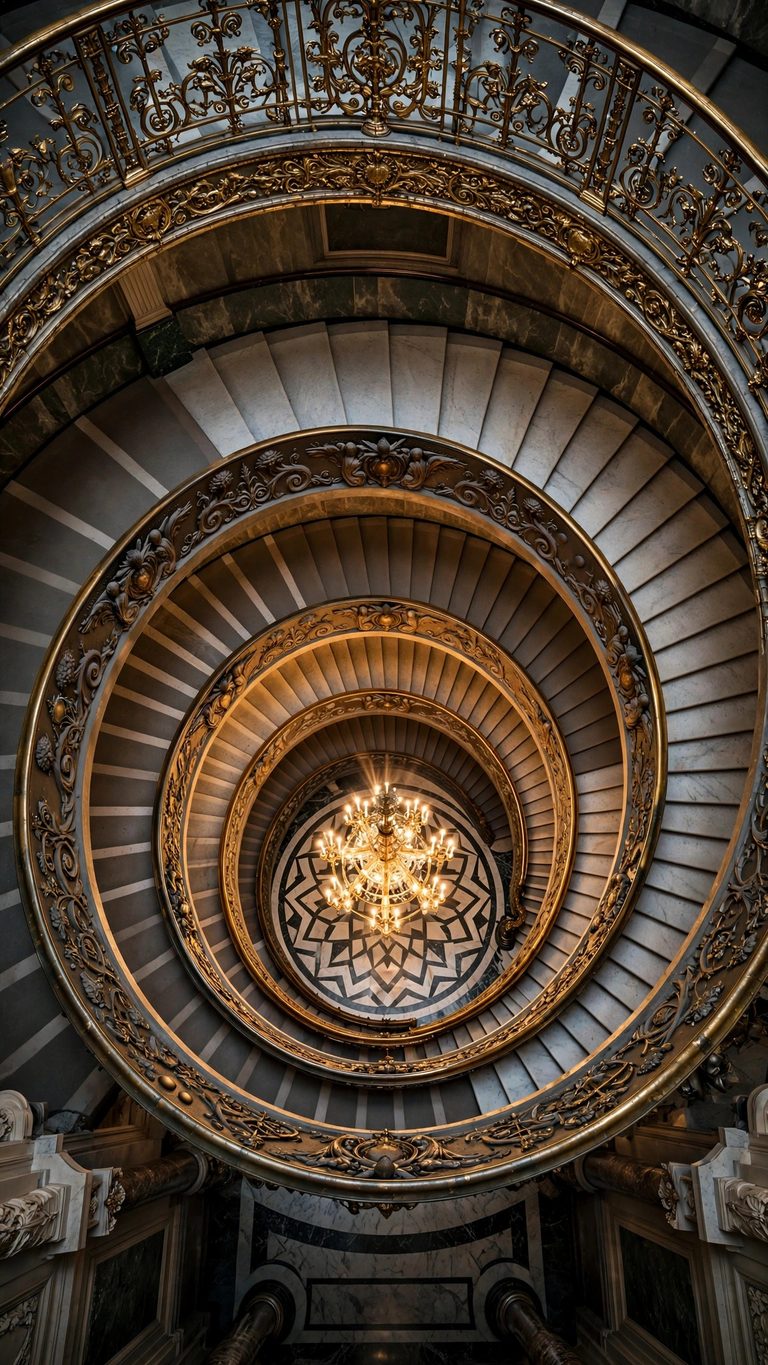
Look straight down. The camera begins its descent into a grand spiral staircase, rotating as it falls, perfectly matched to the curl of the steps below. Ornate railings blur past in rhythmic sweeps. At the center, a chandelier hangs like a jewel, growing larger and more brilliant with every turn. The geometry is flawless — each revolution a mirror of the last — and the effect is genuinely dizzying, the way staring into a kaleidoscope is dizzying. You are falling, gracefully, into pure architectural symmetry.
Hypnotic-geometry videos are a quiet superpower of short-form platforms: they earn rewatches, and rewatches are algorithmic gold. In eight seconds, this prompt delivers a top-down drone descent so mesmerizing that viewers loop it two or three times before they even realize it. Whether your page covers architecture, satisfying visuals, or mind-bending design, this spiral staircase clip is engineered to be watched on repeat — and every loop counts.
The Prompt
Copy the prompt below exactly as written, paste it into your favorite AI video generator, and spiral down through dizzying geometric beauty:
Hypnotic top-down drone descent through a grand spiral staircase, camera spiraling down matching the stairs, ornate railings blurring past, chandelier at the center growing larger, dizzying geometric beauty, perfect symmetry, ultra realistic, 8k, mesmerizing, dizzying architectural spiral, mesmerizing descent deeper
Why This Prompt Works
Symmetry is one of the deepest visual pleasures the human brain knows. We are wired to find balanced patterns beautiful and calming — it is why mandalas, snowflakes, and rose windows hold us. This prompt weaponizes that instinct: a “perfect symmetry” spiral, viewed top-down, fills the frame with balanced geometry in every single frame. There is no dead space, no awkward composition, just an unbroken field of pattern that the eye happily surrenders to.
The descent adds a second hook: controlled vertigo. The camera “spiraling down matching the stairs” creates a falling sensation that is thrilling precisely because it is safe — the same reason roller-coaster videos and drone dives perform so well. The growing chandelier at the center gives the fall a destination, a jewel the viewer is drawn toward, which focuses the dizziness into anticipation. Posts tagged #Geometry and #SpiralStaircase tap a devoted niche of pattern lovers who collect and share this content obsessively, and the “mesmerizing” quality tags push the model toward maximum hypnotic polish.
Then there is the loop. A spiral descent has no natural beginning or end — the pattern looks identical at any point in the rotation — which makes it a near-perfect seamless loop. Looping videos earn dramatically higher average watch time because viewers let them replay, and platforms interpret replays as deep engagement. The “ultra realistic, 8k” finish keeps every railing crisp during the blur of motion, so the loop feels expensive rather than glitchy. Mesmerizing, dizzying, and endlessly rewatchable: that is a viral formula.
How to Use This Prompt
Spiral descents demand rotational stability. Here is the workflow:
- Pick your platform. Kling and Veo 3 handle smooth rotational descents with the least wobble; Sora keeps geometric patterns coherent; Runway Gen-4 offers camera-path precision; Pika is fastest for drafts. Rotational motion is demanding, so use the strongest renderer available.
- Paste the exact prompt into text-to-video mode. Set 9:16 vertical and an 8-second duration per the recommended settings — eight seconds of descent is enough to hypnotize without disorienting.
- Generate two or three variants and watch the rotation. The camera should spiral smoothly, matched to the stairs; if the rotation stutters, reverses, or the staircase warps, discard and regenerate — rotational coherence is the entire illusion.
- Check the chandelier. It should grow steadily larger and stay centered as the camera descends. A drifting or morphing centerpiece breaks the symmetry spell, so select the take where the jewel holds its position like an anchor.
- Export at 1080×1920, loop it two or three times in your editor for a 16 to 24-second hypnotic cut, add a dreamy ambient or slow-pulsing electronic track, and publish with #SpiralStaircase, #Geometry, and #Drone.
Pin a comment asking “how many loops did you watch?” — it turns rewatches into a game and floods the comments.
Pro Tips & Creative Variations
Change the staircase. A medieval stone spiral in a castle tower, all torchlight and shadow, turns the same prompt into dark fantasy — while a modern glass-and-steel spiral in a sunlit atrium becomes airy futurism. Material and era swaps let you run a “stairs of the world” series where every episode feels fresh but the proven hypnotic structure stays intact.
Reverse the journey or bend reality. An ascent variant — camera spiraling upward toward a glowing oculus — trades dizzying descent for uplifting revelation, perfect for motivational captions. For pure spectacle, add a kaleidoscope instruction: mirrored symmetry quadruples the pattern into something genuinely psychedelic. Light rays falling from a skylight above, catching dust in the air, add cinematic atmosphere that elevates the geometry into art.
Grade it like a film. A noir grade — deep blacks, single dramatic light source — makes the spiral menacing and mysterious; a golden grade makes it warm and heavenly. Pair the grade with matching audio: dark pulsing bass for noir, ethereal choir-like pads for gold. And remember the loop trick: trim your clip so the first and last frames show the same rotational phase, and the seam disappears entirely — viewers will never find the edit point.
Frequently Asked Questions
Q: Why does my spiral staircase warp or wobble during the descent?
A: Rotational motion is one of the hardest moves for AI video models, and slight warping is common. The fix is selection, not settings: generate three or four variants and keep the smoothest rotation. Keeping the prompt’s “perfect symmetry” and “mesmerizing” cues helps the model prioritize geometric stability, and shorter 8-second durations warp less than longer ones.
Q: How do I make the video loop seamlessly?
A: Because a spiral looks similar at every rotation, most takes loop almost seamlessly already. For a perfect loop, trim the clip in CapCut or any editor so the first and last frames match in rotational phase, then repeat it two or three times. Seamless loops dramatically increase average watch time, which is why this format outperforms.
Q: Can I use this style for other subjects?
A: Absolutely — the top-down spiral descent formula works for anything with radial symmetry: domes, rotundas, circular libraries, even natural formations like sinkholes or flower fields from above. Keep the “camera spiraling down matching” motion language and swap the subject; the hypnotic structure transfers beautifully.
Q: Which platform is best for hypnotic geometry videos?
A: Kling and Veo 3 currently render the smoothest rotational motion, with Sora strong on pattern coherence. Runway Gen-4 is excellent if you want precise control over the descent path. For rapid experimentation, Pika’s speed lets you test variations quickly. Compare the same prompt on two platforms — the difference in rotational stability is usually obvious.
This spiral staircase prompt turns eight seconds into an endless fall through perfect geometry — dizzying, mesmerizing, and built to loop forever. Run it in Kling, Veo 3, Sora, Runway, or Pika, share it with #Geometry and #SpiralStaircase, and count the rewatches. How many loops did you watch? Be honest in the comments.
Related Viral Prompts
- AI Video Prompt: Glass Skyscraper Piercing Fast-Moving Clouds in a Dreamy Timelapse of Surreal Urban Poetry
- AI Video Prompt: Thrilling Drone Dive Into an Ancient Indian Stepwell With Dizzying Carved Geometric Depth
- AI Video Prompt: Cliffside Villa Infinity Pool at Dusk, Merging With the Ocean in Serene Luxury Tranquility
# A I V i d e o # P r o m p t B a z a r # S p i r a l S t a i r c a s e # D r o n e # G e o m e t r y

Leave a Reply