
Introduction
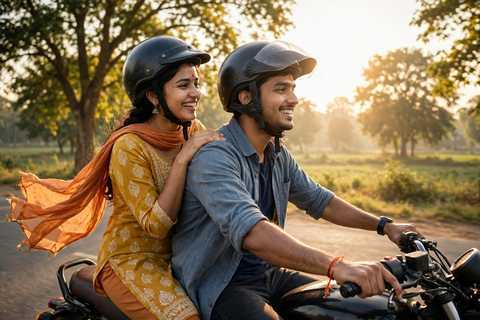
Nothing says freedom like a bike ride with your sibling on a sunny morning, the wind in your hair and the whole road ahead of you. This Bhai Dooj 2026 AI photo prompt turns an ordinary bike photo into a cinematic road-trip portrait — a brother riding with his sister sitting behind him, both laughing, with golden sunlight and an open road stretching into the distance. It is the kind of picture that feels like a movie poster and a family memory at the same time.
Road-trip photos are trending because they capture a feeling, not just a pose. The prompt uses motion, sunlight, and open space to create energy, while the festive outfits and a small marigold garland on the bike keep the Bhai Dooj spirit alive. Upload a clear photo of yourself, and the AI will place you on the bike with your face unchanged, so the result looks like a real ride you actually took together.
The Prompt
Copy the complete prompt below and paste it into your favourite AI image tool. It is written to work with a photo of your own, so your face and the festive mood both stay true to life.
Turn this photo into a sunny Bhai Dooj bike road-trip portrait: keep my face exactly the same, same person, same smile and same features. Show a brother riding a classic motorcycle on a quiet open road in the early morning, his sister sitting behind him holding his shoulder, both laughing joyfully with the wind in their hair. The brother wears a cream kurta with a denim jacket, the sister wears a bright yellow kurta with a flowing dupatta. A small marigold garland hangs on the bike's handlebar. Golden morning sunlight, long soft shadows, green fields and a clear blue sky in the background, slight motion blur on the road, cinematic wide-angle DSLR photograph, natural skin texture, adventurous and cheerful mood, high detail, 4K quality.
Why This Prompt Works
Motion makes a photo feel alive, and this prompt builds motion into the frame. The slight blur on the road, the flowing dupatta, and the wind in the hair all tell the viewer that the bike is really moving, which is far more exciting than a parked-bike pose. The AI handles this well because the instructions are specific about what moves and what stays sharp.
The colour contrast is the second reason this prompt works so well. A bright yellow kurta against green fields and a blue sky creates a natural, joyful palette that stands out in any feed. The marigold garland on the handlebar is a small touch, but it is the detail that ties the adventure back to Bhai Dooj instead of making it a generic bike photo.
Keeping the face exactly the same matters even more in an outdoor action shot, because sunlight and motion can easily distort features. The prompt anchors the face first, then builds the ride around it, so you stay recognisable even at speed.
Finally, this prompt is built to be shared. A bike ride photo carries a natural caption — a line about the open road, a joke about who rides better, or a simple “Happy Bhai Dooj” — and it works just as well as a still image as it does as the cover of a short Reel with a trending song. Post it in the morning when your feed is most active, tag your sibling, and let the comments roll in. The combination of motion, sunlight, and sibling laughter is the kind of image people save, forward, and remember long after the festival is over.
How to Use This Prompt
Follow these five simple steps to turn your photo into a beautiful festive portrait.
- Open Gemini or Nano Banana 2 on your phone or computer and upload a clear photo of yourself — a well-lit, front-facing picture works best for Brother and sister riding a bike together on a sunny morning road trip for Bhai Dooj.
- Copy the full prompt from the box above and paste it into the prompt field exactly as written, without trimming the lighting, camera, or outfit details.
- Tap generate and wait for the first result. Check the faces, the festive details, and the overall framing before you decide whether to keep it.
- If something looks off, refine it with a short follow-up instruction such as “keep the faces exactly the same, make the diyas brighter” and generate again.
- Download your favourite version in the highest quality available and share it on WhatsApp, Instagram, or Facebook with a warm Bhai Dooj or Chhath Puja caption.
Pro Tips
- Use a photo where your face is front-facing and well-lit; side profiles are harder for the AI to preserve on a moving bike.
- If the bike looks wrong in the first result, name the model style — “classic Royal Enfield style motorcycle” gives a cleaner shape.
- Ask for a vertical crop if you want it as a phone wallpaper or a Reels cover image.
- Keep the dupatta colour bright — yellow, orange, or pink pops against a green and blue background.
- Add helmets in a follow-up edit if you want a safety-conscious version for a family post.
Frequently Asked Questions
Is it safe to show a bike ride without helmets?
For a fun AI portrait it is common, but you can easily ask the AI to add helmets if you prefer a responsible version for sharing with family.
Can I use a photo of my brother and me together?
Yes, upload a photo with both of you and the AI will place both faces on the bike, keeping each one exactly the same.
Which tool gives the best result for this prompt?
Nano Banana 2 in Gemini handles outdoor motion scenes very well, and ChatGPT image editing is also strong for this style.
Can I change the road or the background?
Of course. Swap the green fields for a mountain road, a coastal highway, or your own city street — the prompt structure stays the same.
Some Bhai Dooj memories are made at home, and some are made on the open road. Take this ride with your sibling and let the picture tell the story.
Related Viral Prompts
- Bhai Dooj 2026 AI Photo Prompt: Siblings Recreating a Childhood Photo Together in Their Old Family Home
- Bhai Dooj 2026 AI Photo Prompt: A Brother and Sister Sharing Chai Together on a Balcony Lit With Diyas
- Bhai Dooj 2026 AI Photo Prompt: Siblings Twinning in Matching Festive Outfits for a Studio Portrait Session
#BhaiDooj2026 #AIPhotoPrompt #NanoBanana #BikeRide #SiblingLove


Leave a Reply