
Introduction
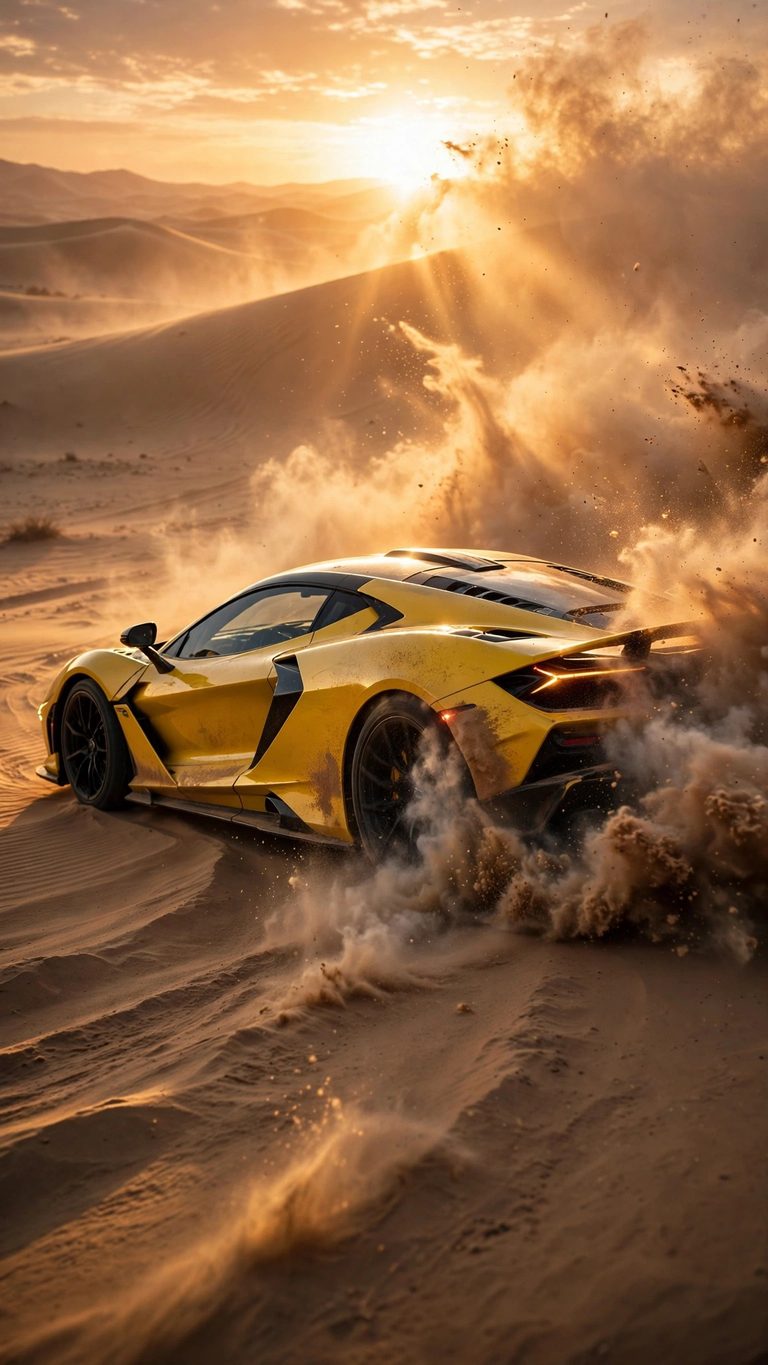
There is a reason car culture owns the short-form feed: nothing stops a thumb faster than a supercar sliding sideways through a cloud of its own making. Now picture that scene at golden hour, on endless dunes, with a drone tracing a perfect arc around the car as sand erupts like slow-motion geysers. That single eight-second shot contains every ingredient of viral automotive content – exotic machine, exotic place, explosive motion, and light that makes everything look expensive. With modern AI video tools, you no longer need a film crew, a closed desert, or a six-figure sports car to shoot it. This AI Video Prompt hands you the exact wording to generate a desert supercar drift that looks like a scene from a blockbuster chase film. Post it with #Supercar energy on Reels, TikTok, or Shorts and watch car lovers replay it. In this article we break down the prompt word by word, explain why each detail triggers engagement, and show you how to run it across Veo 3, Runway, Kling, Pika, and Sora for maximum impact.
The Prompt
Copy the exact prompt below into your AI video generator. Every comma earns its place, so keep the wording intact for the first render.
Epic desert drift sequence, a yellow supercar sliding sideways across golden sand dunes at sunset, massive sand plumes erupting, drone camera orbiting the car in a perfect arc, tire smoke mixing with dust, dramatic backlight, high energy action cinematography, ultra realistic, 8k
Why This Prompt Works
Great automotive content is not about the car alone; it is about the tension between machine and environment, and this prompt engineers that tension on purpose. A yellow supercar is a color psychology masterstroke: yellow is the highest-visibility hue in daylight, and at sunset it punches through the orange atmosphere instead of dissolving into it. The sliding drift, rather than a static beauty shot, triggers what filmmakers call kinetic empathy – viewers feel the lateral g-forces because the brain mirrors motion it watches. The massive sand plumes erupting behind the car serve the same function as tire smoke in drag-racing videos: they make speed visible. Speed itself is invisible on screen; only its effects – dust, blur, shockwaves – tell the audience how fast something is going, and this prompt stacks those effects deliberately.
The drone orbiting in a perfect arc adds a second motion layer that separates premium content from shaky dashcam footage. Orbit shots keep the car centered while the world rotates around it, creating the dizzy, cinematic feeling that dominates car edits on social feeds. Sunset backlight does the heavy lifting for production value: backlit dust glows, tire smoke becomes translucent gold, and the long shadows hide any imperfections the AI might generate in the sand. Automotive channels are among the most competitive niches online, and drift compilations consistently rank as evergreen performers because they deliver a dopamine loop of buildup, slide, and release in seconds. This prompt compresses that entire loop into eight vertical seconds, which is exactly the length that loops cleanly on Reels and Shorts – and loop count is the hidden metric the algorithms reward most.
How to Use This Prompt
Start by pasting the prompt exactly as written into your tool of choice: Veo 3, Runway Gen-4, Kling 2.0, Pika, or Sora. Set the aspect ratio to 9:16 vertical so the clip fills a phone screen with no letterboxing; automotive content loses roughly half its impact when cropped from landscape. Match the duration to the post settings – 8 seconds – because the drift arc is timed for that length and extra seconds often dilute the payoff. Choose the highest quality tier available and select 24 or 30 fps for a cinematic feel; the phrase “ultra realistic, 8k” already pushes the model toward clean detail, so do not stack extra quality keywords that might distort the result.
On tools that support camera controls, reinforce the drone orbit explicitly: Runway and Kling both accept motion directives, so add “smooth drone orbit around subject” to the camera field if your first render comes out static. If the sand looks flat, regenerate with the same seed and raise contrast slightly in post. Export at 1080 by 1920 minimum, add a punchy caption with #Desert drift tags, and post during evening hours in your target market when car content historically peaks. One strong render beats five mediocre variations, so resist the urge to tweak words before you have seen the baseline output.
Pro Tips & Creative Variations
Once the base drift lands, the variations are where a creator builds a series. Swap the yellow for a matte black supercar to get a stealthier, night-ops mood, or try a crimson red car for a classic racing feel against the sand. Change the time of day to blue hour for cooler tones that make headlights and brake glow pop, or to high noon for harsh, documentary-style realism. You can reposition the drone from a high orbit to a low chase angle by appending “low tracking shot skimming the sand” – low angles exaggerate speed because the ground rushes past faster. For a story arc, generate three clips from the same seed: approach, drift, and exit, then cut them into a 24-second sequence with a music drop on the drift.
Layer practical detail prompts for realism: “heat shimmer rising off the hood” and “individual sand grains visible in backlight” push the AI toward micro-detail that sells authenticity. If the car brand matters to your audience, keep it generic – AI models render logos inconsistently, and a clean unbranded supercar avoids both artifacts and trademark issues. Sound design is half the video: layer a real V12 engine note, wind rush, and a sub-bass drop in CapCut or Premiere, because AI video is silent and engine sound is what makes car fans replay. Finally, test a night variant with the headlights carving tunnels through kicked-up dust; it performs exceptionally well as a follow-up post while the original is still circulating.
Frequently Asked Questions
Which AI video tool gives the best drift physics? As of now, Veo 3 and Kling 2.0 handle vehicle motion most convincingly, with the least wheel warping during slides. Runway Gen-4 is excellent at camera motion like the drone orbit. If you only have one subscription, pick the tool whose motion model you trust most and spend your credits on seeds rather than words.
Why does my render look cartoonish instead of ultra realistic? This usually means the quality tier or resolution was set too low, or a stylization filter was left on. Re-render at the highest tier, keep “ultra realistic, 8k” in the prompt, and avoid adding words like “stylized” or “anime” anywhere in your settings.
Can I extend the clip beyond 8 seconds? Yes, but the drift beat is paced for eight seconds. If your tool supports extension, extend the tail where the sand settles rather than the middle, so the loop point stays clean when the video repeats on social feeds.
Will this work for a car review channel? Absolutely. Use the drift as a cold-open hook, then cut to your commentary or real footage. AI-generated establishing shots are now standard practice for channels that cannot film every supercar they discuss.
Desert drifts are pure automotive theater, and this prompt puts you in the director’s chair. Paste it into your favorite AI video tool tonight, generate the eight-second orbit shot, and post it with a bold caption. Then come back and try the blue-hour and night variants to build a drift series your audience will follow. The barrier to blockbuster car cinematography has never been lower – all it takes is the right words.
Related Viral Prompts
- Monsoon Bike Ride AI Video Prompt: Cinematic 8K Rain Adventure Through Lush Green Hills and Puddle Spray
- Hypercar Launch Control AI Video Prompt: Slow Motion 8K Rocket Launch Start With Smoking Tires and Flames
- Mountain Hairpin Chase AI Video Prompt: Thrilling FPV Drone Pursuit of Sports Cars Over Epic Switchbacks
# A I V i d e o # P r o m p t B a z a r # S u p e r c a r # D r i f t # D e s e r t

Leave a Reply