
Introduction
Every year, Kartik Purnima fills homes and hearts with light, devotion and togetherness, and in 2026 the festival is trending everywhere on social media. People are not just celebrating it, they are capturing it, turning their favourite moments into beautiful AI photos that look like they were shot by a professional photographer. That is exactly what this prompt is for. It takes the most loved scene of Kartik Purnima, a radiant full moon over a quiet temple, and turns it into a single copy-paste instruction that any AI image tool can understand, so you can create a picture that feels real, warm and full of life.
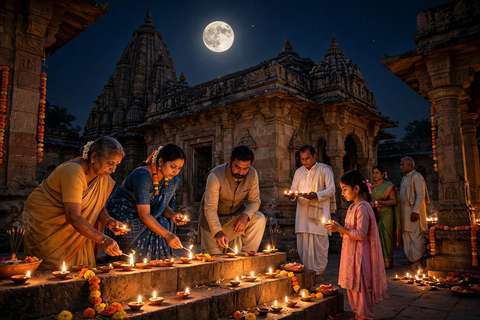
The scene at the heart of this prompt is simple but powerful: a radiant full moon rising over a quiet temple as devotees light diyas on the steps, the temple dome silhouetted in silver moonlight, marigolds and lamps glowing warmly below, and a calm starry sky above. It is the kind of image that stops people while they are scrolling, because it carries both beauty and emotion at the same time. The golden light, the careful details, the people and the quiet feeling of devotion all work together to make a photo that feels like a memory, not just a picture. Whether you want it for a WhatsApp status, an Instagram post, a Facebook greeting or a family photo frame, this prompt gives you a result you will be proud to share.
In this article you will find the complete prompt ready to copy, a clear explanation of why each part of it works, simple step-by-step instructions for using it in Gemini or ChatGPT, pro tips for making your photo even better, and answers to the most common questions. You do not need any editing skills or expensive software. Just copy the prompt, add your own photo if you want your face in it, and let the AI do the rest. By the end of this guide you will have a stunning Kartik Purnima image that looks like it came straight out of a festival photography album.
The Prompt
Here is the complete prompt. Copy the full text inside the box below and paste it into Gemini (Nano Banana) or ChatGPT with your photo attached if you want yourself or a family member in the scene. The prompt already includes the lighting, the setting, the mood and the camera details, so you do not need to add anything else unless you want to personalise it.
Create an ultra-photorealistic, serene photograph of a radiant full moon rising over a quiet temple on Kartik Purnima as devotees light diyas on the steps. The huge glowing moon hangs in a deep indigo starry sky, the temple dome and spire are silhouetted in silver moonlight, rows of small clay diyas glow warmly on the stone steps, devotees in soft colourful clothes kneel to light lamps, marigold petals scattered around. Wide cinematic composition, moonlight and lamplight balanced, cool silver and warm gold tones, peaceful spiritual mood, extremely detailed, 8K quality, no text or watermark.
For the most realistic result, upload a clear, front-facing photo with good lighting before you paste the prompt. If you are creating the image without a personal photo, the prompt still works perfectly on its own, because it describes the full scene in rich detail. Keep the words photorealistic and 8K quality in place, since they tell the AI to aim for a natural photograph rather than a cartoon or painting.
Why This Prompt Works
This prompt works so well because it does not leave anything to chance. Instead of a vague request like a festival photo, it gives the AI a complete picture: the exact place, the exact light, the exact people and the exact mood. AI image tools perform best when they receive clear, specific instructions, and this prompt delivers exactly that. It names a radiant full moon over a quiet temple directly, so the composition has a strong centre, and then it builds the atmosphere around that centre with colour, light and small human details.
The lighting instructions are the secret ingredient. Golden hour light, glowing flames, soft shadows and warm tones make the image feel alive and emotional, while the camera details such as the lens choice and full-frame quality push the AI toward a realistic photographic look. The prompt also asks for natural skin tones and realistic faces, which is what separates a believable photo from an obviously artificial one. When the faces look real, people connect with the image instantly.
- A clear hero subject: a radiant full moon over a quiet temple gives the image one strong focal point that the eye finds immediately.
- Rich sensory detail: colours, textures, flames, flowers and fabrics make the scene feel real and touchable.
- Emotion in every line: words like serene, joyful and peaceful tell the AI what the picture should feel like, not just what it should show.
- Photography language: lens, lighting and quality terms guide the AI toward a professional camera look.
- Respectful realism: the prompt asks for natural faces and a respectful mood, which matters deeply for a sacred festival scene.
Finally, the prompt is balanced. It is detailed enough to control the result, but not so long that the AI gets confused or drops important parts. Every sentence earns its place, and every detail supports the same vision: a beautiful, believable Kartik Purnima moment that anyone would love to share with their family and friends.
How to Use This Prompt
- Copy the prompt: select all the text inside the prompt box above and copy it to your clipboard.
- Open your AI tool: open Gemini (Nano Banana) or ChatGPT on your phone or computer and start a new image chat.
- Upload your photo (optional): if you want your own face in the image, attach a clear, front-facing photo with good light and a neutral expression.
- Paste the prompt: paste the full prompt into the chat box and send it. Do not shorten it, because the details are what create the quality.
- Wait for the result: the AI will take a few seconds to generate your image. Let it finish before you ask for changes.
- Refine if needed: if something looks off, reply with a short fix, such as make the light warmer or add more diyas in the foreground, and generate again.
- Download and share: save your favourite version in high quality and share it as a status, post or greeting card for Kartik Purnima.
Pro Tips
- Use a sharp original photo: a clear, well-lit selfie gives the AI the best material to keep your face looking like you.
- Keep the face-lock wording: if you edit the prompt, keep the phrases about realistic faces and natural skin tones, because they protect the result from looking artificial.
- Try a vertical version: add portrait orientation 9:16 at the end of the prompt when you want a phone wallpaper or a WhatsApp status.
- Change one thing at a time: if you want a different colour of clothes or a different time of day, change only that detail so the rest of the scene stays perfect.
- Generate two or three versions: small variations in the AI output mean your second or third try is often the best one, so compare them before you choose.
- Share at the right time: post your Kartik Purnima photo on the morning of the festival, when friends and family are most active and greetings get the most love.
FAQ
Can I use this prompt for free?
Yes, you can use this prompt for free in the free versions of Gemini and ChatGPT. Just copy the text, paste it into the image tool of your choice, and generate your photo. Some tools may limit how many images you can create per day on a free plan, but the prompt itself costs nothing.
Will my face look real in the generated photo?
Yes, if you upload a clear, front-facing photo with good lighting. The prompt includes face-lock wording and asks for natural skin tones, which helps the AI keep your features realistic. Avoid blurry photos, sunglasses or heavy shadows, because those make it harder for the AI to match your face.
Can I change the scene, like the clothes or the background?
Absolutely. The prompt is a starting point, not a fixed rule. You can change the colour of the clothes, add more people, or adjust the background by editing one or two words. Just keep the lighting and mood descriptions in place, because those are what give the image its beautiful, realistic feel.
Which app works best with this prompt, Gemini or ChatGPT?
Both work very well, and most people get great results with either one. Gemini (Nano Banana) is excellent at keeping faces consistent when you upload your own photo, while ChatGPT is very good at rich, detailed scenes. Try the prompt in both tools and keep whichever version you like best.
Light a diya, share the warmth, and let this Kartik Purnima photo carry your blessings to everyone you love. Copy the prompt, create your image, and make this festival glow a little brighter.
Related Viral Prompts
Kartik Purnima 2026 Ganga Diyas AI Photo Prompt
Dev Diwali 2026 Varanasi Ghats AI Photo Prompt
Chhath Puja 2026 Usha Arghya AI Photo Prompt
#KartikPurnima #FullMoon #AIPhotoPrompt #Diwali2026 #PromptBazar


Leave a Reply