
Introduction
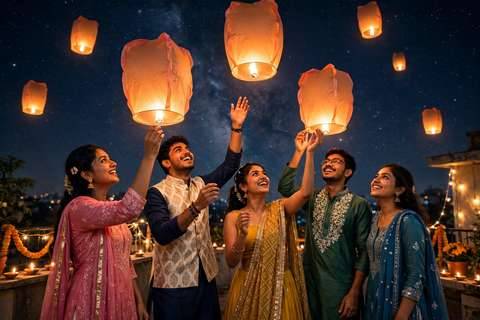
When Diwali arrives, everyone wants a photo that does the festival justice, and this prompt was written for exactly that moment. The scene it creates, a group of friends on a rooftop releasing glowing paper lanterns into a starry sky, warm light on their upturned faces, and city lights twinkling far below, is the kind of image that gets saved, shared and printed, because it feels personal and festive at the same time. In this article you will find the full copy-paste prompt, why it works so well, and how to make it your own.
The Diwali season is also one of the busiest times for AI photo trends, with families, couples and friends all looking for fresh ideas that stand out from last year’s posts. A photo of a group of friends on a rooftop releasing glowing paper lanterns into a starry sky, warm light on their upturned faces, and city lights twinkling far below works because it is specific: it has a place, a moment and a feeling, and the AI can render all three when the prompt is written well. Vague prompts produce vague photos, but this one names the flowers, the light, the clothes and the expressions, so the result looks like a real photograph taken at a real celebration.
In this article, you will get the complete prompt ready to copy, a breakdown of why each part of it works, step-by-step instructions for Gemini and ChatGPT, pro tips for the best result, and answers to the questions people ask most about this Diwali photo idea. By the end, you will have everything you need to create a photo that looks professional, feels personal, and is ready to share with everyone you love.
The Prompt
Copy the full prompt below and paste it into Gemini or ChatGPT along with your photo. It describes the scene in rich detail, including the lighting, the setting, the outfits and the mood, so the AI has everything it needs to create a realistic, festive photograph.
Photorealistic magical photo, Diwali starry night, a group of happy young friends in festive kurtas and sarees releasing glowing orange paper sky lanterns together from a rooftop, lanterns rising into a deep blue starry sky, warm golden light glowing on their upturned smiling faces, a few diyas and marigolds on the rooftop ledge, city lights twinkling far below, one lantern just leaving a friend's hands, keep every face 100% identical, natural skin texture, ultra-detailed, cinematic night tones, 4K, vertical portrait, shot on 35mm lens
Why This Prompt Works
The reason this prompt trends every Diwali is simple: it gives the AI everything it needs and nothing it does not. Let us look at the choices that make the difference.
- Sky lanterns are the most cinematic Diwali image there is: glowing orbs rising into a starry sky, full of hope and friendship.
- Friends looking up together creates a natural composition with every face lit by warm lantern glow.
- The contrast of orange lanterns against a deep blue night sky is made for social media.
- A rooftop setting with city lights below adds depth and a sense of celebration.
Put together, these choices do something simple but powerful: they give the AI a complete scene instead of a vague idea. That is why photos made with this prompt look like they were taken by a professional photographer at a real Diwali celebration, and why they keep getting shared long after the festival is over.
How to Use This Prompt
Using this prompt takes less than five minutes, even if you have never tried AI photo generation before. Follow these steps and you will have a share-ready photo on your first try.
- Open Gemini or ChatGPT on your phone or computer and start a new image chat.
- Upload a clear, well-lit photo of yourself or your family. A front-facing photo with a natural smile works best.
- Copy the full prompt from the box above and paste it into the chat, keeping the face-lock wording exactly as written.
- Wait for the first result, then look closely at the faces, the hands and the festival details before deciding anything.
- If something looks off, change one detail at a time, for example the outfit colour or the background, and generate again.
- When you are happy with the photo, download it in the highest quality available and save the original.
- Share it on Instagram, WhatsApp status or Facebook with a short festive caption and the hashtags at the end of this article.
If your first result is not perfect, do not worry, that is normal. Even professional photographers take many shots to get one great photo. Change one small detail, generate again, and within two or three tries you will have a Diwali photo you are proud to share.
Pro Tips
These small tips come from testing this prompt many times, and each one can lift your photo from good to unforgettable.
- Ask for ‘one lantern just leaving a friend’s hands’ to freeze the perfect moment.
- Use a deep blue starry sky, not black, so the image keeps detail.
- Keep the friends’ faces upturned so the lantern light falls naturally on them.
- Add diyas on the rooftop ledge to anchor the scene in Diwali.
- Use ‘city lights twinkling far below’ for depth and scale.
- Generate a wide version too, to show more lanterns rising into the sky.
Remember, the prompt is a starting point, not a rulebook. Once you have a version you love, feel free to experiment: change the colours, the time of day or the background, and make the photo truly yours. The best AI photos always have a personal touch that no prompt can write for you.
FAQ
Are sky lanterns safe to release on Diwali?
Real sky lanterns can be a fire risk and are banned in many cities, so always check local rules. This AI photo gives you the magical look with zero risk.
Can I use this prompt with a photo of my friends?
Yes. Upload a group photo and the prompt will place your friends on the rooftop releasing lanterns, keeping every face identical.
What time of night works best in the prompt?
Just after dusk, when the sky is deep blue and stars are appearing. The prompt uses that exact light, so the lanterns glow beautifully.
Can I change the lantern colour?
Of course. Swap ‘orange’ for red, gold or pink lanterns. Orange and gold photograph best against a blue night sky.
Try the prompt tonight, share the result with your family, and let the festival glow a little longer in your feed.
Related Viral Prompts
Diwali 2026: Diyas Lighting Up One by One Across a Dark Courtyard as Fireworks Bloom Above
Dev Diwali 2026 Boats: Wooden Boats Full of Diyas Drifting on the Ganga as Fireworks Light the Sky
#Diwali2026 #AIPhotoPrompt #SkyLanterns #FriendsNight #PromptBazar


Leave a Reply