
Introduction
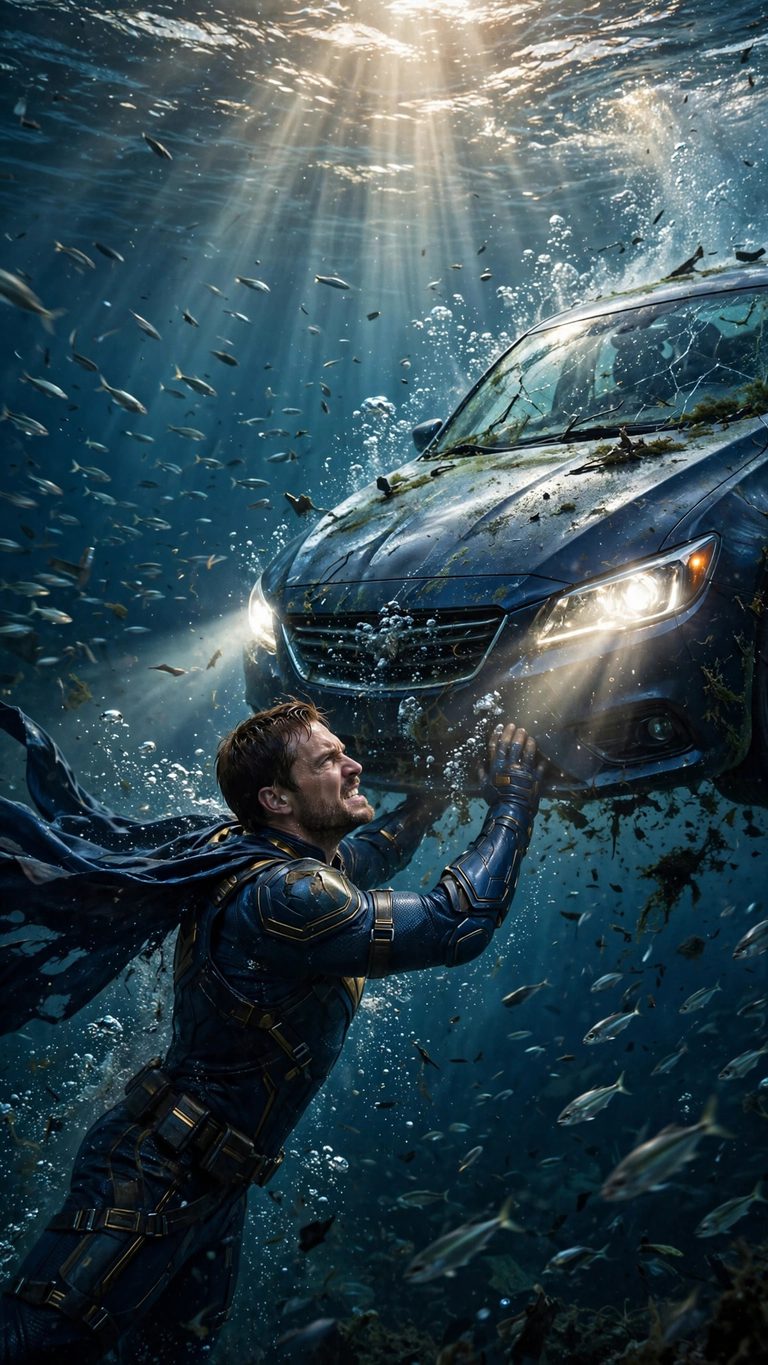
Most superhero art lives in the sky. This one lives at the bottom of the ocean. Picture it: a hero diving deep through blue water toward a sinking car, headlights cutting ghostly beams through the dark, bubbles streaming past a straining figure, fish scattering, a family visible through the glass, sunbeams falling from impossibly far above. It is incredible underwater heroism frozen in time — and it is exactly what this free viral AI photo prompt creates. Underwater scenes are some of the hardest images to nail by hand and some of the most rewarding when an AI model gets them right, because water does half the cinematic work for you: the light rays, the floating particles, the weightless hair and cape, the deep-blue color story. This dramatic #Superhero #Underwater #Rescue photograph prompt packs all of that into one paste-ready paragraph. Use it for an action-movie poster look, a charity or water-safety awareness post, or simply the most dramatic image in your feed this week. Below: the full prompt, a breakdown of why it works, platform-by-platform instructions for Midjourney, DALL-E 3, Flux and Stable Diffusion, and variations from arctic rescues to alien oceans. Hold your breath. We are going down.
The Prompt
Here is the exact copy-paste prompt — use it verbatim for the most faithful results, then tweak from there:
Dramatic superhero photograph of a hero diving deep underwater to rescue a sinking car with a family inside, bubbles streaming, headlights cutting through blue depths, the hero straining against the weight, fish scattering, sunbeams from above, incredible underwater heroism frozen in time, ultra detailed, 8k, masterpiece
Why This Prompt Works
Underwater scenes are where AI image generators quietly show off, and this prompt gives the model everything it needs to show off with. “Dramatic superhero photograph” sets medium and stakes, and then the prompt builds a complete action scene with unusual clarity. The core action — “diving deep underwater to rescue a sinking car with a family inside” — is specific, physical, and directional: down, toward, against weight. Models render physics-based action (“straining against the weight”) far more convincingly than abstract heroics, because strain has visual tells: tensed limbs, streaming bubbles, distorted water. And bubbles are the prompt’s secret weapon. “Bubbles streaming” gives the model dozens of small, easy-to-render elements that instantly sell the underwater setting — no single bubble needs to be perfect, but together they scream depth and motion. “Headlights cutting through blue depths” introduces volumetric light, the single most cinematic element in underwater photography: visible beams in water read as big-budget filmmaking, and diffusion models render light-through-medium beautifully. “Fish scattering” adds life and scale contrast, the same trick as the bats in a moon shot. “Sunbeams from above” layers a second, warmer light source over the cold blue, creating the color contrast that makes underwater images glow. The “family inside” the car is the emotional anchor — it converts a cool action shot into a #Rescue story with stakes, which is what makes people share it rather than just admire it. “Incredible underwater heroism frozen in time” tells the model this is a peak-action freeze frame, sharpening the sense of suspended motion. And the quality stack (“ultra detailed, 8k, masterpiece”) matters more than usual here: water, glass, faces through glass, and refracted light are detail-hungry, and the tokens push the model to spend its effort there. It is a technically ambitious prompt that plays entirely to the medium’s strengths.
How to Use This Prompt
Underwater prompts reward high detail settings and wide frames — here is how to run this rescue scene on each major platform for maximum cinematic impact.
Midjourney
Paste the full prompt as your /imagine input. Add --ar 2:3 for a poster-style portrait or --ar 16:9 for a cinematic wallpaper, plus --style raw if you want the photography to feel less processed. If the first roll is close but not perfect, use Vary (Subtle) rather than starting over — this prompt’s composition is strong, so small variations usually land the winner within two or three rolls.
DALL-E 3 (via ChatGPT)
Paste the prompt into ChatGPT and ask for a wide or portrait image explicitly, e.g. “Generate this as a vertical poster.” DALL-E 3 follows descriptive instructions very literally, so the detailed staging in this prompt (poses, light sources, background layers) translates unusually faithfully. If something renders wrong, describe the fix in plain words — “make the cape larger and more windswept” — and regenerate rather than editing the whole prompt.
Flux
Flux excels at photorealism and follows long prompts well. Paste the prompt verbatim, set your aspect ratio before generating, and use 30-50 inference steps for maximum detail. Flux is particularly strong on fabric, water, and light effects, so lean into those strengths — and if you want text-free clean output, add “no text, no watermark” to be safe.
Stable Diffusion (SDXL / Pony / realism checkpoints)
Put the prompt in the positive field and add a short negative prompt such as “blurry, deformed hands, extra limbs, watermark, low quality.” Use 30+ steps, CFG 5-7, and a realism or cinematic checkpoint for photographic results. SDXL gives you the most control: if one element misbehaves, mask it and inpaint just that region instead of rerolling the whole image.
Universal tip: generate 3-4 variations every time and judge at full size. AI composition varies seed to seed, and with a prompt this detailed the difference between a good result and a viral one is usually one reroll away.
Pro Tips & Creative Variations
The underwater rescue is a formula with serious legs — once you nail the base image, the variants write themselves. Environment swaps are the biggest lever: “sinking car” becomes “a sinking ship with passengers on deck,” “a trapped submarine,” or “a crumbling underwater research station” — each escalates the scale while the hero’s desperate dive stays the emotional core. Change the water: “crystal-clear tropical shallows, sunbeams everywhere” for a hopeful rescue, “dark arctic depths, ice shards drifting” for a brutal one, or “an alien ocean, bioluminescent creatures scattering” for full sci-fi. Time-of-rescue variants tell different stories: “hero arriving just as the car touches the seabed, silt exploding upward” is the last-second save; “hero already lifting the car toward the light, family waving through the windshield” is the triumphant ascent — generate both and you have a before-and-after diptych. For style experiments, try “cinematic film still, teal underwater grade” for realism, or “epic comic book splash page, dynamic ink lines” for pulp energy. Craft notes that matter underwater: add “caustic light patterns dancing on surfaces” for instant realism — models love rendering caustics; keep the hero’s pose readable by naming it (“arms wrapped around the car door, legs kicking hard”) since underwater poses can turn floaty and vague; and if faces through the windshield smear, simplify to “silhouettes of a family visible through the glass.” Reroll for the bubbles — bubble trails vary enormously between seeds, and a great streaming trail is what sells the speed of the dive. As #Underwater #Rescue content goes, this is peak drama: pair the final image with a three-word caption (“Nobody left behind.”) and let the #Superhero community do the rest.
Frequently Asked Questions
Do AI generators handle underwater scenes well?
Better than almost any other environment. Water gives the model free cinematic effects — light rays, floating particles, caustics, color falloff with depth — that are all heavily represented in training data from real underwater photography. Underwater prompts consistently produce some of the most beautiful AI images per unit of prompt effort, which is why this #Underwater #Rescue scene punches above its weight.
The car looks distorted underwater. How do I fix it?
Complex objects warp when the model splits attention between water effects and the object. Strengthen the car with specific language — ‘a modern sedan, intact, headlights on’ — and consider generating the car larger in frame so it gets more pixel budget. If it still warps, simplify: ‘the roof and windshield of a sinking car’ asks for less than a full vehicle and usually renders cleaner.
Can I make the rescue less intense for younger viewers?
Yes — soften the stakes while keeping the heroism: ‘hero gently guiding a floating car toward the surface, family smiling and waving through the window, bright turquoise water, sunbeams everywhere.’ Brighter water, visible smiles, and ‘guiding’ instead of ‘straining’ transform the same prompt from edge-of-seat drama into an uplifting all-ages #Rescue image.
What is the best use case for this image?
It is built for impact: action-movie-style posters, water-safety awareness campaigns, charity fundraiser graphics for rescue organizations, and high-drama social posts. The strong diagonal composition (hero diving down, light falling from above) also makes it excellent key art for videos and thumbnails — #Superhero thumbnails with a clear action verb outperform static portraits on click-through.
Heroism is not about where you stand — it is about how deep you will dive for someone else. This free viral AI photo prompt freezes an impossible #Underwater #Rescue into one breathtaking frame. Run it, pick your most dramatic take, and share it with the #Superhero community. Somebody is waiting in the deep. Go bring them home.
Related Viral Prompts
- Hero Training Montage at Dawn: Free Viral AI Photo Prompt for Epic Gritty Superhero Gym Training Scenes
- Villain Lair Infiltration: Free Viral AI Photo Prompt for Cinematic Stealthy Superhero Spy Thriller Art
- Superhero Team Pose Amidst a Lightning Storm: Free Viral AI Photo Prompt for Epic Cinematic Squad Poster Art
# A I P h o t o # P r o m p t B a z a r # S u p e r h e r o # U n d e r w a t e r # R e s c u e

Leave a Reply