
Introduction
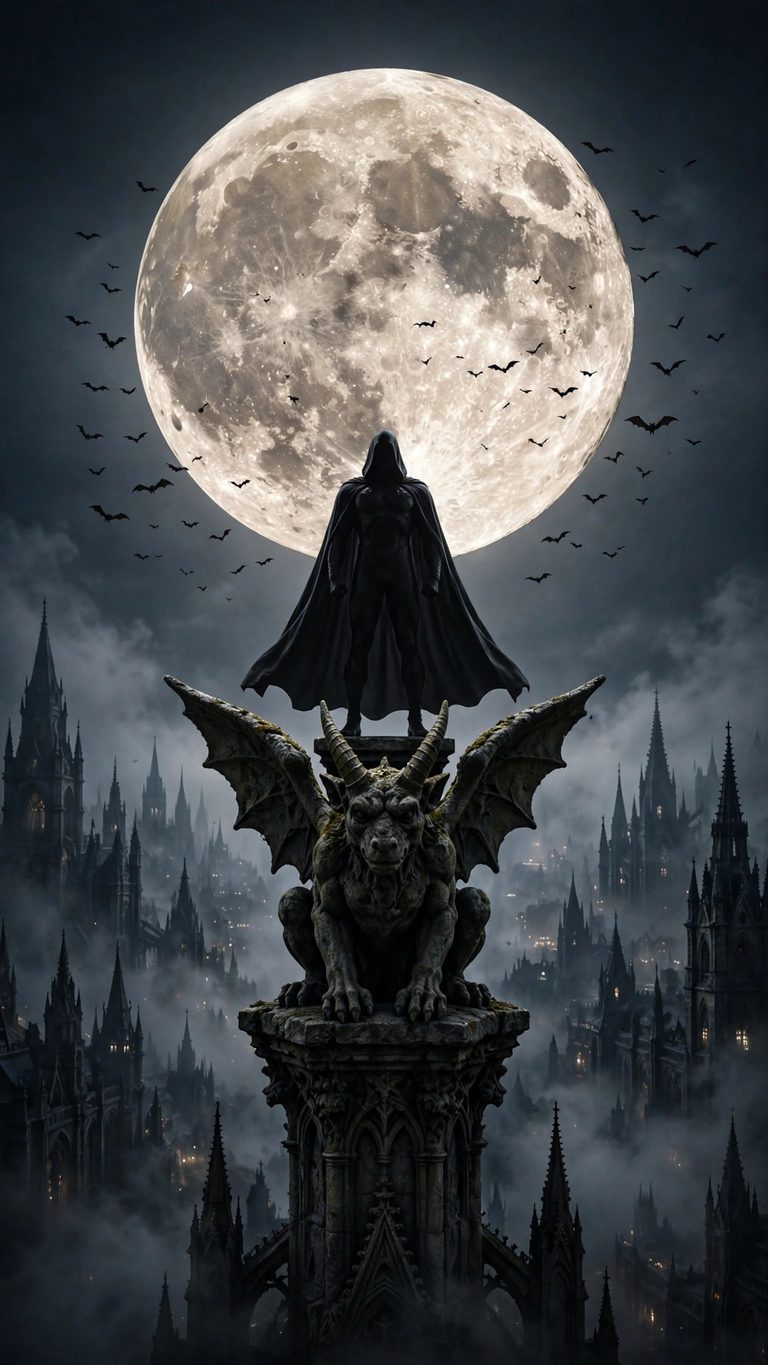
It might be the most famous silhouette in all of comics: a caped guardian crouched on a gargoyle, perfectly still, framed against a giant full moon while bats scatter across the lunar disc and gothic spires fade into the mist below. You do not even need to see the hero’s face — the shape alone tells the whole story. This free viral AI photo prompt recreates that legendary composition with photographic realism: an iconic superhero photograph of a caped hero perched on a gargoyle against an enormous full moon, rendered in perfect symmetry with ultra-detailed #Silhouette work and #Moon glow. Symmetry, negative space and strong backlight are things AI generators handle beautifully when the prompt is precise, and this one is. The result is wallpaper gold — equally at home as a phone background, a poster print, or a #Superhero post that instantly reads as legendary. In this article we hand you the exact prompt, dissect why the moon-and-gargoyle formula works so reliably, show you how to run it on Midjourney, DALL-E 3, Flux and Stable Diffusion, and give you variations that swap the moon for eclipses, city fire-glow, and storm-lit skies. The night is watching. So is your audience.
The Prompt
Here is the exact copy-paste prompt — use it verbatim for the most faithful results, then tweak from there:
Iconic superhero photograph of a caped hero silhouette perched on a gargoyle against a giant full moon, bats scattering across the lunar disc, gothic city spires below in mist, the hero absolutely still like a statue, legendary guardian watching over the night, perfect symmetrical composition, ultra detailed, 8k, masterpiece
Why This Prompt Works
This prompt is a masterclass in why some images become icons: it reduces a hero to pure shape and lets the sky do the talking. “Iconic superhero photograph” sets the ambition in the first three words — not just a picture, an icon — and then the prompt builds the icon out of the most reliable ingredients in the AI art pantry. The giant full moon is the key. A huge, bright, circular light source behind the subject gives the model a simple, high-contrast compositional task: dark shape, bright disc, done. Diffusion models handle strong backlight and silhouette (“#Silhouette” is practically a cheat code) with exceptional reliability, because silhouette removes the hardest rendering problems — faces, hands, costume detail — and replaces them with one clean edge. “Perched on a gargoyle” provides the pedestal: a recognizable, textured foreground element that grounds the composition and adds gothic character without needing detail in the hero himself. “Bats scattering across the lunar disc” is brilliant because it adds life and motion to what could be a static image, and small dark shapes against a bright moon are trivially easy for the model to place correctly. “Gothic city spires below in mist” layers the depth — foreground gargoyle, midground hero, background moon, distant misty spires — four clean planes that read as epic scale. “Absolutely still like a statue” is negative action direction, and it matters: it stops the model from inventing motion blur or awkward poses, freezing the guardian into a monument. “Legendary guardian watching over the night” reinforces the theme for the model’s semantic understanding, and “perfect symmetrical composition” is one of the most powerful composition tokens you can use — symmetry reads as intentional, monumental, and poster-ready, and models can actually execute it. The #Moon glow plus the quality stack finishes a prompt that fails rarely and stuns often.
How to Use This Prompt
Silhouette prompts are among the most reliable in AI art, and this one is no exception — here is how to run it on each major platform for that perfect moon-disc composition.
Midjourney
Paste the full prompt as your /imagine input. Add --ar 2:3 for a poster-style portrait or --ar 16:9 for a cinematic wallpaper, plus --style raw if you want the photography to feel less processed. If the first roll is close but not perfect, use Vary (Subtle) rather than starting over — this prompt’s composition is strong, so small variations usually land the winner within two or three rolls.
DALL-E 3 (via ChatGPT)
Paste the prompt into ChatGPT and ask for a wide or portrait image explicitly, e.g. “Generate this as a vertical poster.” DALL-E 3 follows descriptive instructions very literally, so the detailed staging in this prompt (poses, light sources, background layers) translates unusually faithfully. If something renders wrong, describe the fix in plain words — “make the cape larger and more windswept” — and regenerate rather than editing the whole prompt.
Flux
Flux excels at photorealism and follows long prompts well. Paste the prompt verbatim, set your aspect ratio before generating, and use 30-50 inference steps for maximum detail. Flux is particularly strong on fabric, water, and light effects, so lean into those strengths — and if you want text-free clean output, add “no text, no watermark” to be safe.
Stable Diffusion (SDXL / Pony / realism checkpoints)
Put the prompt in the positive field and add a short negative prompt such as “blurry, deformed hands, extra limbs, watermark, low quality.” Use 30+ steps, CFG 5-7, and a realism or cinematic checkpoint for photographic results. SDXL gives you the most control: if one element misbehaves, mask it and inpaint just that region instead of rerolling the whole image.
Universal tip: generate 3-4 variations every time and judge at full size. AI composition varies seed to seed, and with a prompt this detailed the difference between a good result and a viral one is usually one reroll away.
Pro Tips & Creative Variations
The moon-gargoyle composition is iconic because it is simple, which means it is also endlessly remixable. Start with the sky: “giant full moon” becomes “blood-red lunar eclipse,” “crescent moon through torn storm clouds,” or “twin moons over an alien city” — each one keeps the silhouette formula while changing the entire genre. Swap the perch: a gargoyle is classic, but “the spire of a cathedral,” “a crane over a neon construction site,” or “a cliff edge above a sleeping village” each tell a different guardian story. The bats are optional atmosphere — try “a flock of crows,” “drifting embers,” or “snow falling across the lunar disc” for seasonal variants. For a radical recomposition, flip the symmetry: “off-center composition, hero small at the frame’s edge, vast empty moon” creates loneliness and scale that the centered version cannot. Color-grade experiments shine here because the palette is so restrained: “monochrome silver gelatin print” for fine-art vibes, “deep blue and gold” for a regal poster, or “the moon tinted green over a foggy city” for horror-adjacent chills. Technical notes: symmetry tokens work best when you also name the aspect ratio — square or 16:9 both suit this, but pick one deliberately; if the moon renders small, add “moon filling the entire background” to force the scale; if the gargoyle melts into the hero’s silhouette, add “clear separation between hero and gargoyle, crisp edge lighting.” This image is also perfect text real estate — the moon’s face and the misty sky leave natural negative space for a quote or title, making it the ultimate #Silhouette poster base for #Moon-themed #Superhero drops.
Frequently Asked Questions
Why do silhouette prompts work so reliably?
Silhouettes delete the hardest problems in AI generation — faces, hands, costume detail, anatomy — and replace them with a single clean edge against a bright background. The model only has to nail one shape and one light source, both of which are heavily represented in training data. That is why moon-silhouette prompts have one of the highest first-try success rates in all of AI art.
How do I get the moon HUGE like in the classic posters?
Models default to realistic moon sizes, so you have to demand the fantasy: add ‘enormous full moon filling most of the background’ or ‘giant moon, telephoto compression look.’ The phrase ‘telephoto’ is a great trick — it tells the model you want that compressed, looming-moon photography style where the moon dwarfs the foreground.
The hero and gargoyle keep blending into one blob. Help?
Backlit dark-on-dark shapes merge easily. Fix it with separation language: ‘crisp rim light separating hero from gargoyle,’ ‘clear gap of moonlit sky between hero’s cape and the stone,’ or place the hero ‘crouched at the gargoyle’s edge, outlined against the moon.’ Rim-light phrases are the single most effective tool for untangling silhouettes.
What is this image best used for?
It is a poster-format natural: phone and desktop wallpapers, print-on-demand posters, book or comic covers, and title cards for videos. The huge negative space of the moon and misty sky is ideal for overlaying quotes or titles, so it doubles as a template for motivational #Superhero content and #Moon-themed event graphics.
Icons are not drawn — they are silhouetted against the moon. This free viral AI photo prompt gives you the legendary guardian-on-the-gargoyle composition, tuned for perfect symmetry and lunar glow. Generate your #Silhouette tonight, frame it against that giant #Moon, and share it with #Superhero fans everywhere. The night has a new guardian: yours.
Related Viral Prompts
- Dive Into Deep-Sea Heroism: Free Viral AI Photo Prompt for a Dramatic Underwater Superhero Rescue Scene
- Hero Training Montage at Dawn: Free Viral AI Photo Prompt for Epic Gritty Superhero Gym Training Scenes
- Villain Lair Infiltration: Free Viral AI Photo Prompt for Cinematic Stealthy Superhero Spy Thriller Art
# A I P h o t o # P r o m p t B a z a r # S u p e r h e r o # M o o n # S i l h o u e t t e

Leave a Reply