
Introduction
The walking away from an explosion shot is one of the most iconic images in action cinema. The hero does not look back, the fireball blooms behind him, debris flies in slow motion, and the whole frame shakes with power. It is pure movie magic, and it is one of the most recreated scenes on social media, because it instantly communicates confidence, danger, and blockbuster scale. You do not need explosives, stunt teams, or a film set to create it anymore.
This article gives you a complete building explosion action video AI prompt for Veo, Flow, Kling, and Runway. It stages the explosion, the hero silhouette, and the camera shake so your clip looks like a Hollywood action sequence instead of a random fire effect.
The Prompt
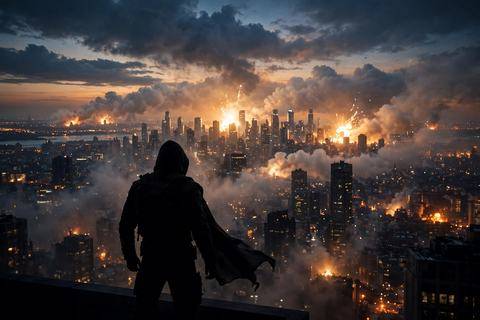
Create an ultra realistic dramatic action vertical video, 9:16 aspect ratio, 8 seconds long. Scene: at dusk, a stylish hero in a black coat walks slowly and confidently away from the camera toward the foreground, silhouetted, while a large abandoned building behind him erupts in a massive cinematic explosion. A huge orange fireball blooms, debris and sparks fly outward in slow motion, thick smoke billows upward, and the explosion light flickers across the hero's coat and the empty street. The hero does not look back, does not flinch, and keeps walking with total calm. Camera: steady low angle shot from behind the hero, framing his full silhouette against the explosion, with a subtle shake at the blast moment, then a slow push in as he walks. Style: blockbuster action movie quality, ultra realistic fire and smoke physics, dramatic orange and deep blue dusk colour contrast, sharp silhouette edges, smooth slow motion debris, film grain, no text, no watermark, no distorted body or extra limbs.
Why This Prompt Works
This prompt works because it follows the golden rule of explosion scenes: the hero must not react. The calm walk, the refusal to look back, and the steady pace are what make the shot iconic. AI video models often add flinching or turning when they see an explosion in the prompt, because they associate blasts with panic. Explicitly stating that the hero does not look back and does not flinch overrides that instinct and preserves the cool, cinematic attitude that viewers love.
The camera choice is equally deliberate. Shooting from behind the hero creates a perfect silhouette against the fireball, which is both dramatic and technically forgiving: a silhouette hides facial details, so the model cannot distort the face. The low angle makes the hero look larger and more powerful against the explosion, while the subtle shake at the blast moment sells the impact without making the footage unwatchable. Slow motion debris stretches the spectacle across the full 8 seconds.
Dusk lighting completes the blockbuster look. The deep blue evening sky against orange fire creates the strongest possible colour contrast, which is why action films stage explosions at dusk. The flickering explosion light on the hero’s coat adds realism and movement to the silhouette, preventing it from looking like a flat cutout. Together, these choices turn a simple effect shot into a scene with real cinematic weight.
The walk away from an explosion has survived decades of action cinema for a reason: it is a visual shorthand for total confidence. Audiences recognise the trope instantly, which means the clip needs no explanation and no setup. Within two seconds, viewers understand exactly what kind of character they are watching, and that instant understanding is gold for short form video, where the first second decides everything. Add a heavy bass drop at the blast moment and the clip becomes almost impossible to scroll past.
How to Use This Prompt
Paste the full prompt into your AI video tool, select 9:16 vertical and 8 seconds, and generate. Veo 3 and Flow render fire, smoke, and explosion physics most convincingly, while Kling handles slow motion debris well. Explosion clips vary a lot between generations, so generate several takes and choose the one where the fireball blooms cleanly, the debris moves naturally, and the hero’s walk stays smooth. Avoid takes where the hero’s body warps or the building collapses unnaturally.
For posting, add a powerful action background track and a caption that matches the attitude, like “He never looks back.” Action clips perform best when posted in the evening and paired with a strong first frame: use the fireball bloom moment as your Reel cover to maximise taps.
Pro Tips for Best Results
- Always write “does not look back, does not flinch.” This single instruction protects the iconic attitude of the shot.
- Film the hero from behind. A silhouette hides facial distortion and looks more powerful than a front view in explosion scenes.
- Stage explosions at dusk. Orange fire against a deep blue sky gives the strongest colour contrast and the most cinematic result.
- Ask for subtle camera shake, not violent shaking. A gentle shake sells impact, while heavy shake makes the clip unwatchable.
- Use the fireball bloom as your cover frame. Bright explosive thumbnails earn far more taps than dark walking shots.
Frequently Asked Questions
Is it safe to post AI explosion videos?
Yes, AI generated action scenes are widely posted as creative content. Avoid captions that claim a real explosion happened, and label the clip as AI generated if your platform requires it.
Why does my explosion look fake or cartoonish?
Cartoonish fire usually comes from missing physics details. Asking for slow motion debris, billowing smoke, and flickering light on surfaces pushes the model toward realistic fire behaviour.
Can I replace the building with a car explosion?
Yes. Change the building to a car on an empty road and keep the hero walk and camera plan identical. The silhouette technique works for any explosion scale.
Which AI tool renders fire best?
Veo 3 and Flow currently lead for realistic fire and smoke. Runway Gen-4 is also strong for cinematic explosion lighting.
Real heroes never look back. Copy this prompt, create your explosion walk, and give your audience the most badass eight seconds of their feed.
Related Viral Prompts
- Stone To Castle Video AI Prompt: Create a Magical Epic — a stone transforming into a grand fantasy castle.
- Metro Station Hero Entry Video AI Prompt: Create a Movie — a mass hero walk through a metro station.
- Gym Transformation Video AI Prompt: Create a Motivational — a motivational fitness transformation story.
#ActionVideo #ExplosionScene #HeroWalk #AIVideoPrompt #MovieStyle #PromptBazar


Leave a Reply