
Introduction
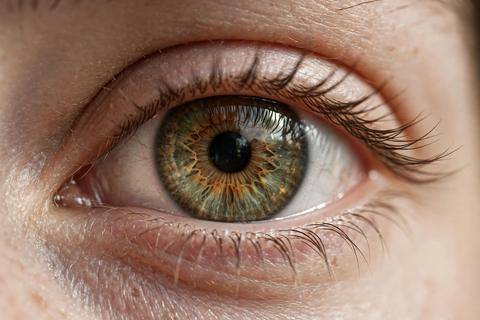
Eyes are the most expressive part of the face, and a close-up eye portrait proves it. When the camera moves in close enough to show every detail of the iris, the catchlight, the lashes, and the soft skin around the eye, the result is mesmerising. It is intimate, artistic, and strangely powerful, because eyes communicate emotion without a single word. That is why eyes closeup portraits have become a favourite aesthetic on Instagram, Pinterest, and photography pages: they are beautiful, mysterious, and impossible to scroll past.
The macro eye portrait works differently from a normal portrait. A normal portrait shows a person; an eye closeup shows a feeling. The viewer does not see a full face to judge or categorise. Instead, they see depth, colour, and light, and they project their own emotions onto the image. That openness is what makes eye closeups so shareable. They work as profile pictures, art prints, poetry post backgrounds, and aesthetic feed fillers, all at the same time.
Creating a true macro eye photo normally requires an expensive lens, perfect lighting, and a very still subject. AI removes all of that. With one prompt, Gemini can transform your photo into a stunning macro eye portrait with detailed irises and soft aesthetic lighting. This article gives you that exact prompt, explains why eye closeups perform so well, and shows you how to get a version that looks genuinely beautiful.
The Prompt
Copy the full prompt below and paste it into Gemini along with your photo:
Transform the photo into a stunning macro closeup portrait of the person's eyes, keeping their exact eye colour, eye shape, and natural features. Frame the image as an extreme closeup showing both eyes with beautifully detailed irises, fine eyelashes, soft natural eyebrows, and smooth skin texture. Use soft aesthetic lighting with a gentle window glow, a delicate catchlight in each eye, dreamy pastel background tones in soft beige and blush, and a shallow depth of field that keeps the eyes razor sharp while everything else melts into softness. Use ultra realistic macro photography style with intricate iris detail, natural reflections, and a refined artistic finish. The portrait should feel intimate, dreamy, and beautiful, like a fine art macro photograph celebrating the beauty of human eyes.
Why This Prompt Works
The eye closeup works because the human brain is wired to look at eyes first. In any image, our gaze goes to eyes before anything else, because eyes signal emotion, attention, and intention. A macro eye portrait exploits that instinct perfectly: the entire image is eyes, so the viewer’s attention has nowhere else to go. That total focus creates an unusually strong first impression, which is why these portraits stop thumbs so effectively.
The detail is the second strength. Irises are as unique as fingerprints, with radial patterns, colour gradients, and tiny flecks that most people never notice in daily life. Macro photography reveals that hidden complexity, and the surprise of seeing it creates delight. AI models render iris detail remarkably well, because the pattern language of eyes is consistent and well-represented in their training. When the prompt asks for intricate iris detail and catchlights, the result feels alive rather than flat.
The third reason is versatility. An eye closeup is anonymous enough to feel artistic and personal enough to feel intimate at the same time. It works for people who want a beautiful profile picture without showing their full face, for poets and writers who want an aesthetic cover image, and for photography lovers who appreciate macro art. That broad appeal means the image finds audiences in many different communities, which multiplies its reach.
How to Use This Prompt
Follow these steps to create your macro eye portrait:
- Choose a clear photo where your eyes are visible, sharp, and well-lit.
- Open the Gemini app and upload your photo.
- Copy the full prompt from the box above and paste it with your photo.
- Generate the image and check the eye colour, iris detail, and catchlights.
- If the eye colour looks wrong, add your actual eye colour, for example “deep brown eyes”, and regenerate.
- Download the result and use it as a profile picture, art print, or aesthetic post.
Your original photo should show your eyes clearly, without sunglasses or heavy shadow. A straight-on or slightly angled face photo works best. The AI uses your real eye colour and shape as its reference, so a photo taken in natural daylight gives the most accurate result.
Pro Tips for Best Results
- Ask for a square format for profile pictures and art prints.
- If you wear coloured contact lenses, mention the colour you want in the prompt.
- Try a version with one eye in sharper focus than the other for a more artistic, editorial feel.
- Soft pastel backgrounds like blush, beige, or sage make the eye colour stand out beautifully.
- Pair the portrait with a short quote or poem for a stunning Instagram post.
- Generate a second version with dramatic side lighting for a moodier, more intense eye portrait.
Frequently Asked Questions
Will the AI keep my real eye colour?
Yes, in most cases, because the prompt asks for your exact eye colour. If the result shifts the colour, name your eye colour explicitly in the prompt and regenerate once.
Can I use a photo where I am wearing glasses?
It is better to use a photo without glasses, since frames and reflections confuse the macro framing. If you only have glasses photos, ask the AI to remove the glasses in the prompt as well.
Is this good for a profile picture?
It is excellent for that. An eye closeup is distinctive, artistic, and recognisable without revealing your full face, which many people prefer for privacy.
Why do the lashes sometimes look unnatural?
Extreme macro detail is challenging for AI. If lashes look too perfect or clumped, add “natural fine eyelashes, realistic lash detail” and regenerate for a softer result.
Eyes say what words cannot, and a closeup lets them speak clearly. With one prompt, your own eyes become a work of art: detailed, luminous, and unforgettable. Try it today and see yourself the way the camera sees you at its closest.
Related Viral Prompts
Love this style? Try these next:
- Impressionist Painting Portrait AI Photo Prompt: Create an
- Gemini Black And White Studio AI Photo Prompt: Create a
- Split Face Young Old AI Photo Prompt: Create an Artistic Black
#EyesCloseup #MacroPortrait #AestheticEyes #AIPhotoPrompt #EyeArt #PromptBazar


Leave a Reply