
Introduction
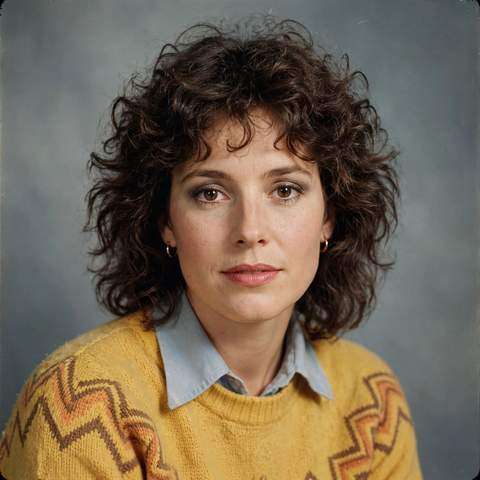
The 1980s had a portrait style all its own: soft film colours, gentle studio light, big hair, bold shoulders, pastel backdrops, and a confident smile that belonged on a magazine cover or a family studio wall. Those portraits still look wonderful today, because they were made with film, patience, and a sense of occasion. A studio portrait in the eighties was not a quick selfie, it was an event, and the photographs carry that warmth and care in every frame.
That classic look is back in a big way. On Instagram and TikTok, people are transforming their modern selfies into 1980s studio portraits, complete with feathered hair, oversized blazers, polka dots, denim jackets, and the soft, slightly dreamy colour palette of old film. The images stand out precisely because they are calm and elegant in a feed full of harsh, fast content. They feel timeless, a little glamorous, and endlessly shareable, especially as profile pictures and throwback posts.
This article gives you a complete Gemini prompt for creating a classic 1980s retro studio portrait from your own photo. You will learn why soft film colours and eighties fashion work so beautifully together, how to use the prompt for a clean and accurate result, and the small tweaks that let you move from a pastel studio backdrop to a neon-lit evening version. Whether you want a profile picture with character, a gift for a parent who grew up in the eighties, or a fun throwback series, this prompt delivers it in seconds.
The Prompt
Copy the full prompt below and paste it into Gemini together with your photo:
Transform this photo into a classic 1980s retro studio portrait. Keep the person's face, facial features, and identity exactly the same and clearly recognisable. Photograph them in a vintage 1980s photo studio: soft, diffused studio lighting with gentle shadows, a seamless pastel or muted grey studio backdrop, and the warm, slightly faded colour palette of 1980s film photography. Style the subject in authentic 1980s fashion: voluminous feathered or permed hair, an oversized blazer with shoulder pads, a polka dot or pastel blouse, high-waisted jeans or a pleated skirt, and simple retro jewellery. Pose them in a classic studio portrait composition, shoulders angled slightly, chin up, looking directly at the camera with a warm, confident smile, framed from the chest up. Add fine film grain, soft focus on the skin, and a gentle, nostalgic glow, like a treasured portrait from a professional 1980s studio session. No modern fashion, no harsh digital lighting, no smartphone selfie look, no oversaturated colours.
Why This Prompt Works
This prompt works because it recreates the full studio recipe of the 1980s, not just one element of it. Soft diffused lighting is the foundation: unlike the harsh flash of party photography, studio light in the eighties wrapped gently around the face, softening skin and creating flattering, even tones. By asking for gentle shadows and a seamless backdrop, the prompt keeps the focus entirely on the person, which is exactly how classic studio portraits were composed.
Colour is the second pillar. The soft, slightly faded film palette, with its warm skin tones and muted pastels, is instantly recognisable as eighties photography, and it flatters almost everyone. Modern digital colour is sharper and more saturated, which would break the illusion, so the prompt deliberately steers the AI toward the gentler film look. The fine grain and soft skin focus complete the effect, giving the image the texture of a photograph printed from film rather than rendered on a screen.
Fashion and pose finish the transformation. Voluminous hair, shoulder pads, and high-waisted styles are unmistakable eighties signatures, and the classic chest-up pose with a confident smile mirrors the portraits hanging in millions of homes from that decade. The identity instruction ties it all together, ensuring the glamorous eighties person in the portrait is still unmistakably you. That combination of nostalgia, elegance, and recognition is why these portraits make such popular profile pictures and gifts.
How to Use This Prompt
Begin with a clear, front-facing photo with good lighting and a neutral background, since the AI will replace the background with a studio backdrop anyway. Upload your photo to Gemini and paste the full prompt. Check the result for three things: your face is accurate, the colours feel soft and film-like rather than bright and digital, and the outfit reads as eighties rather than modern. If the result looks too contemporary, regenerate with extra emphasis on the fashion details, for example by adding “strong 1980s styling: big hair, shoulder pads, pastel colours” to your version.
You can create a whole series by varying the backdrop and outfit while keeping the lighting and film instructions the same. Try a dusty pink backdrop with a polka dot blouse, a soft blue-grey backdrop with a denim jacket, or a warm beige backdrop with an oversized blazer. Each variation feels like a different frame from the same studio session. Use the best one as your profile picture, and save the rest for throwback posts, birthday tributes, or a fun before-and-after carousel showing your modern photo beside its eighties twin.
Pro Tips for Best Results
Choose a source photo where your hairline and face shape are clearly visible, because eighties hairstyles frame the face dramatically and the AI needs a clean reference. Keep the identity sentence in every version, and do not let the hairstyle completely cover your features, or recognition will suffer. A 4:5 vertical crop suits profile pictures and feed posts, while a square crop works beautifully for avatars. If you want a couple’s version, generate each person separately in the same studio style and place them side by side, which keeps both faces accurate. For an evening twist, swap the pastel backdrop for a deep navy one and add subtle neon rim light, but keep the soft film colours so the portrait stays retro rather than modern. Finally, resist heavy post-editing: a gentle warm filter is fine, but modern sharpening and saturation will undo the soft film character.
Frequently Asked Questions
Will this prompt change my face too much?
No, the prompt explicitly protects your facial features and identity, and starting from a clear front-facing photo gives the best accuracy. The hairstyle and clothing change, but your face should remain clearly yours. If a result drifts, regenerate rather than settling for a stranger’s portrait.
Can I use this for a professional profile picture?
Yes, with a small adjustment. The eighties studio style is elegant and polished, so it works well as a distinctive profile picture, especially in creative fields. If you want a more corporate feel, choose a muted grey backdrop and a classic blazer, and keep the pose confident and simple.
What is the difference between the 1980s and 1970s retro styles?
The seventies look is warmer, more golden, and often set in a home with family album energy, while the eighties look is cleaner, studio-based, and defined by soft pastel colours, big hair, and shoulder pads. The eighties portrait feels like a professional studio session, and the seventies photo feels like a family memory.
Can I make a black and white 1980s portrait?
Yes, simply add “in elegant black and white film” to the prompt while keeping the soft lighting and eighties styling. Black and white suits this era beautifully and gives the portrait an even more timeless, gallery-like quality.
So step into the studio, paste the prompt, and let the soft light and big hair do their magic. Your 1980s portrait is waiting, and it might just become your favourite photo of yourself.
Related Viral Prompts
- 1970s Bollywood Family Album AI Photo Prompt: Create a
- Y2K Flash Portrait AI Photo Prompt: Create a Viral Early
- Gemini Black And White Studio AI Photo Prompt: Create a
#RetroPortrait #AI photo prompt #PromptBazar #1980sStyle #VintageStudio #ThrowbackPhoto


Leave a Reply