
Introduction
There is a special kind of fear that comes from a door opening when nobody is there to open it. It is quiet, slow, and impossible to explain away, which is exactly why it works so well in short horror videos. You do not need a monster, a scream, or a sudden shock to make viewers hold their breath. You need a dark hallway, a closed door, ten seconds of patience, and a camera that moves just slowly enough to make the audience feel trapped in the corridor with you.
This prompt is built for the short-form horror wave that dominates Halloween on Reels, Shorts, and TikTok. A ten-second clip is long enough to build tension and short enough to loop, which means viewers often watch it twice: once to see what happens, and once to check whether they missed something in the shadows. That second watch is gold for the algorithm, and it is the reason slow, atmospheric horror clips often outperform louder, faster videos that give everything away in the first two seconds.
What makes this clip safe and shareable is what it deliberately leaves out. There is no gore, no blood, and no monster jumping at the camera, so it stays within platform rules and stays watchable for a wide audience. The terror comes from suggestion: a handle that turns on its own, a door that creeps open inch by inch, and darkness behind it that never explains itself. Your viewers will fill in the rest with their own imagination, and their imagination is always scarier than anything you could show.
The Prompt
Copy the full prompt below and paste it into your image or video generator exactly as written. You can swap the subject details to match your own photo while keeping the atmosphere, lighting, and composition words unchanged, because those are the parts that create the finished look.
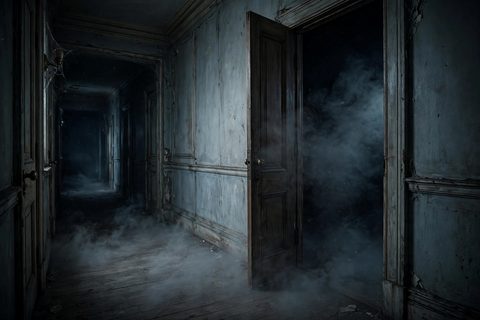
Create a terrifying 10-second cinematic horror video clip. Setting: a dark, narrow hallway in an old house at night, with peeling wallpaper, a worn wooden floor, and thick fog creeping along the ground. A closed wooden door at the end of the hallway slowly opens by itself over the full 10 seconds. No one is visible pushing it. Camera: slow, steady push-in from the hallway entrance toward the door, handheld with a very subtle shake for realism. Motion: the door handle turns slightly, then the door creaks open inch by inch, revealing only darkness behind it. Lighting: a single flickering ceiling bulb, cold moonlight through a side window, deep shadows in the corners. Atmosphere: tense, silent, suspenseful, with dust particles floating in the light beam. Style: photorealistic, 16:9, 24fps cinematic look, muted colours, film grain. No gore, no blood, no jump-scare monster, no screaming, no text on screen.
Why This Prompt Works
This prompt works because it controls time. Ten seconds is a very specific choice, and the prompt uses every one of them. The door does not fly open, it opens slowly, which forces the viewer to wait. Waiting creates tension, and tension creates engagement. Viewers keep watching because they need to know what is behind the door, and the clip ends before it answers them, which leaves the question hanging in exactly the right way for comments and replays.
The camera movement is the second secret. A slow, steady push-in toward the door puts the viewer inside the hallway instead of watching it from outside. The very subtle handheld shake adds realism, because a perfectly smooth camera would feel like a video game, while a slightly unsteady one feels like someone is really standing there holding a phone. That small imperfection makes the impossible event, a door opening by itself, feel documented rather than staged.
The lighting and atmosphere do the third job. A single flickering bulb gives the hallway an unreliable light source, cold moonlight adds a second, colder colour, and fog along the floor hides the bottom of the frame so the viewer cannot be sure what else might be in the corridor. Dust particles floating in the light beam give the eye something real to track, which makes the slow door movement feel even more deliberate by contrast. Every detail is there to make the ordinary hallway feel wrong.
Finally, the negative instructions protect the clip. By explicitly saying no gore, no blood, no monster, and no screaming, the prompt stops the video tool from adding a cheap jump-scare that would ruin the mood and possibly get the video flagged. Restraint is what makes this clip feel like a scene from a real horror film rather than a prank video, and that professional restraint is what viewers respect, save, and share.
How to Use This Prompt
Open your video generator, such as Flow or Veo, and create a new project in 16:9 landscape mode if you plan to post on YouTube, or check whether your tool can output vertical video if the clip is mainly for Reels and Shorts. Paste the full prompt exactly as written, including the duration, the camera movement, and the no-gore instruction. Those details are not decoration; they are the directions the model follows frame by frame.
Generate the first version and watch it all the way through without skipping. Check that the door opens slowly across the full ten seconds rather than swinging open in the first two, and check that nobody appears in the frame to push it. If the door moves too fast, regenerate with the phrase opens extremely slowly over the full duration added, and if a hand or figure appears, regenerate with the no person visible instruction emphasised.
If the hallway looks too clean or too bright, that is usually a sign the atmosphere words were weakened by your tool’s style settings. Make sure any automatic beautify or brighten filter is switched off, and keep the muted colours and film grain wording in the prompt. Horror needs shadow, and a hallway that is too well lit will feel like a real-estate tour instead of a haunted house.
Once the clip feels right, add sound only if your workflow supports it. A low creak, a distant hum, or near-silence with a faint room tone will strengthen the tension far more than loud music. Export at the highest quality available, keep the clip at ten seconds without trimming the slow build, and post it with a caption that asks a question, such as what would you do if this door opened in your house, to invite comments.
Pro Tips for Best Results
The biggest mistake with this kind of clip is rushing it. If the door opens in three seconds, the viewer has no time to feel uneasy, and the video becomes a simple animation rather than a horror moment. Protect the slow pace by keeping the full ten seconds intact, and resist the urge to cut to the reveal faster when you edit. The waiting is the video, and viewers who sit through it are far more likely to comment, share, and watch again.
Sound design matters almost as much as the visuals, even though this prompt focuses on the picture. Silence is powerful in horror, but total digital silence can feel like a muted video, so a very quiet room tone, a soft creak, or a faint hum gives the audience something to lean into. Avoid sudden loud stingers unless you want a jump-scare style, because a loud noise at the end will change the clip from suspenseful to startling, and suspense is what makes this prompt special.
You can build a whole Halloween series from this single idea by changing only the location while keeping the door, the pacing, and the lighting rules the same. Try a basement door, a bedroom door at night, an attic door, or a hotel corridor door, and post them as a series across Halloween week. When viewers recognise the format, they will watch each new episode to see which door opens next, and that familiarity turns one viral clip into a returning audience.
Finally, test the clip on your phone before posting, not just on a large screen. Most viewers will see it on a small screen in a bright room, so the darkness needs to read clearly at that size. If the hallway becomes a black rectangle on your phone, raise the shadow detail slightly or brighten the moonlight wording, but keep the fog and the flickering bulb, because those are the details that keep the clip atmospheric rather than simply dark.
Frequently Asked Questions
How long should the clip be?
Ten seconds is ideal for this prompt. It is long enough for the door to open slowly and build real tension, and short enough to loop cleanly on Reels, Shorts, and TikTok. If your tool only offers fixed lengths, choose the closest option to ten seconds and keep the slow door movement across the whole clip.
Will this video be flagged for horror content?
It should not be, because the prompt explicitly excludes gore, blood, monsters, and screaming. The fear comes from atmosphere and suggestion, which is allowed on major platforms. Keep the clip free of graphic content when you edit it, and it will stay suitable for a general audience.
Do I need to film a real hallway first?
No, this is a fully AI-generated clip, so you do not need to film anything yourself. The prompt describes the hallway, the door, the fog, and the camera movement, and the video tool creates the whole scene. You only need the prompt and a video generator that supports text-to-video.
Can I add my own face or a person to the hallway?
You can, but this prompt works best with an empty hallway, because an empty corridor makes the self-opening door feel more impossible. If you add a person, place them at the hallway entrance watching the door, and keep them still, so the focus stays on the door moving by itself.
A door that opens by itself is frightening precisely because it breaks a rule we all trust: doors stay closed until someone opens them. This prompt breaks that rule slowly, quietly, and without showing anything else, and that is why ten seconds is enough to make viewers uneasy long after the clip ends. Try it, post it, and watch how many people comment that they would never walk down that hallway.
Related Viral Prompts
- Halloween Haunted House AI Photo Prompt: Create a Spooky Portrait
- Halloween Hallway Lights Flicker Video AI Prompt: Create a Suspense
- Halloween Ghost Photoshoot Video AI Prompt: Create a Playful 6
#HalloweenAI #AIVideoPrompt #HorrorClip #SpookySeason #PromptBazar


Leave a Reply