
Introduction
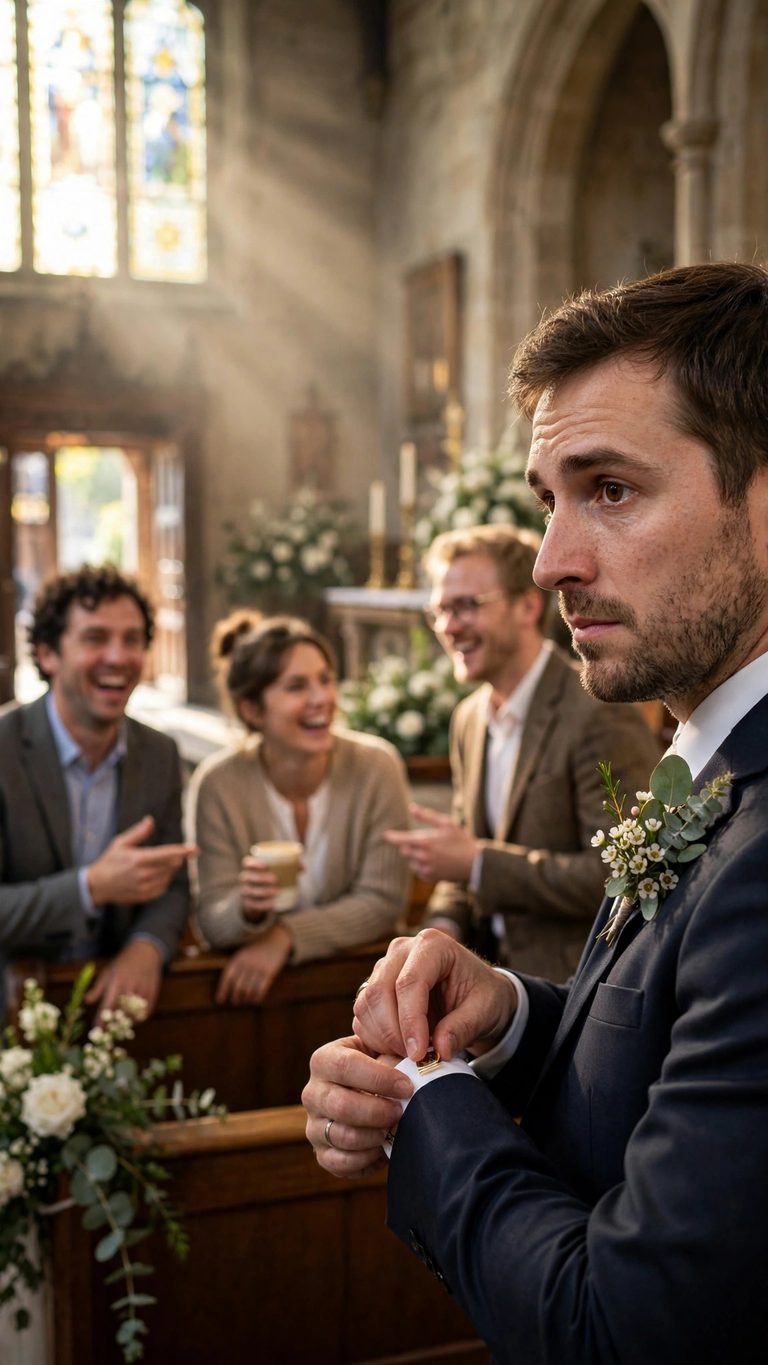
While the world obsesses over the bride’s entrance, some of the most beloved wedding footage ever filmed belongs to the groom, waiting. He stands at the altar, adjusting his cufflinks for the third time, glancing toward the entrance, trying to look calm and failing adorably. His friends tease him in the background. He takes a deep breath. Anyone who has been a groom, loved a groom, or watched a wedding film knows this exact cocktail of nerves and joy, and it is universally, helplessly relatable. That is why candid groom moments quietly outperform polished poses on social media: they feel real. The trouble is that real anticipation cannot be staged, and by the time the cameras roll, the moment has passed. This #Groom #Waiting #Wedding prompt bottles that nervous charm into an on-demand #AIVideo. A candid, cinematic shot of the groom at the altar, fidgeting, glancing, breathing, bathed in soft morning light, ready to drop into highlight reels, wedding stories, and #ViralReels that make viewers smile with recognition.
The Prompt
Use this prompt in any AI video generator to create a charming, candid shot of a nervous groom waiting at the altar.
Charming candid shot of a groom waiting nervously at the altar, adjusting cufflinks, glancing toward the entrance, friends teasing in background, soft morning light through church windows, relatable anticipation, ultra realistic, cinematic wedding film, 8k, boutonniere adjusted twice, endearing nervous charm
Why This Prompt Works
This prompt succeeds because it is built from behavioral details rather than adjectives, and behavior is what makes AI video feel human. The anchor action, “adjusting cufflinks,” is a perfect fidget: it is small, repetitive, and instantly readable as nervousness, and it gives the model a concrete hand motion to animate instead of asking it to render an abstract emotion. “Glancing toward the entrance” adds a second behavior that creates narrative tension, because every glance asks the unspoken question of when she will arrive, and viewers instinctively feel that anticipation. “Friends teasing in background” is a brilliant depth cue: it fills the midground with life and laughter, contrasts the groom’s nerves with his friends’ ease, and makes the scene feel like a real moment caught between people rather than a posed portrait. The lighting direction, “soft morning light through church windows,” does triple duty: it sets a time of day, motivates beautiful volumetric light rays that video models render gorgeously, and bathes the scene in a gentle, hopeful mood that matches pre-ceremony anticipation. Then come the personality phrases that most prompts forget: “relatable anticipation” and “endearing nervous charm” explicitly instruct the model on the emotional flavor, steering it away from stiff formality and toward warmth. The delightful specificity of “boutonniere adjusted twice” is the kind of hyper-specific human detail that makes generated video feel observed rather than imagined, because real nervous grooms do exactly that. Finally, the quality stack of “ultra realistic, cinematic wedding film, 8k” wraps it all in premium wedding-film texture. The result is a #Wedding #Cinematic clip with genuine personality, the rare AI video that makes people say “that is so him” instead of “that looks AI.”
How to Use This Prompt
Here is the step-by-step workflow for each major platform. Step one: copy the prompt verbatim from the
block above. Step two: select 9:16 vertical and an 8-second duration, matching the original post settings; anticipation reads best in a short, punchy clip. In Veo 3, paste the prompt at the highest quality setting. Veo excels at subtle human micro-motions like fidgeting and glancing, so the cufflink adjustment will look natural. In Runway, use Gen-4 with minimal camera motion, perhaps a very slow push-in, since the charm here is in the performance, not the camera. If the friends in the background look odd, add "friends softly blurred" to push them into bokeh. In Kling, Standard Mode is usually sufficient for a single-subject scene like this, but Professional Mode will sharpen the church-window light rays. In Pika, keep the style realistic and the motion subtle; this prompt lives or dies on naturalism. In Sora, paste as-is and let its strong temporal coherence carry the repeated gestures, like the boutonniere adjustment, without morphing. Step three: watch the hands closely in your first render, since cufflink fiddling involves small finger motions; if they warp, shorten to 6 seconds or add the negative prompt "deformed hands." Step four: in editing, this clip pairs beautifully with a voiceover or text overlay like "the calm before she walks in," and a soft acoustic track underneath. Step five: post it as a standalone candid or as the opening beat of a ceremony sequence, where it builds delicious tension before the bridal entrance.Pro Tips & Creative Variations
This candid concept adapts to many wedding traditions and tones. First, change the venue to match your story: swap "church windows" for "soft light through mandap drapes" for a Hindu ceremony, "garden pergola" for an outdoor wedding, or "grand hotel windows" for a city celebration, and the whole scene re-contextualizes while keeping the nervous charm. Second, vary the fidget. "Adjusting cufflinks" can become "straightening his tie," "checking his watch," or "practicing his vows under his breath," and each one gives the model a different, equally relatable behavior to animate. Third, play the comedy gently upward: append "best man whispering something funny, groom stifling a laugh" for a warm, humorous variant that performs brilliantly as a #ViralReels clip, since laughter is deeply shareable. Fourth, try the emotional inverse: "groom seeing bride for the first time, eyes widening, emotional smile" turns anticipation into payoff, and pairing the waiting clip with this reveal creates a two-shot mini-story with a perfect emotional arc. Fifth, adjust the light for mood: "soft morning light" gives hopeful freshness, while "warm golden afternoon light" gives a richer, more cinematic glow, and "dramatic side light" gives an editorial, fashion-film edge. Sixth, build a pre-ceremony sequence: groom waiting, bridesmaids giggling, flower girl peeking down the aisle, and you have a three-clip countdown that wedding pages love to post as a carousel or story series. Seventh, for personalization, use image-to-video in Runway or Kling with a photo of the real groom as the first frame, so the candid moment stars the actual person, which makes it infinitely more meaningful as a gift or a highlight-reel insert.
Frequently Asked Questions
Q: Will the friends in the background look realistic or like blurry blobs?
A: Background figures are a known weak spot, which is why the prompt keeps them "teasing in background" rather than in focus. On Veo 3 and Kling they usually render as plausible, lively figures. If they look strange, add "background softly blurred" to push them into bokeh, where motion and laughter still read clearly without demanding facial detail.Q: Can I adapt this for a bride waiting instead of a groom?
A: Absolutely, and it works beautifully. Swap "groom" for "bride," "cufflinks" for "adjusting her veil" or "smoothing her dress," and "friends teasing" for "bridesmaids giggling." The anticipation emotion is universal, and bridal waiting-room content is hugely popular.Q: What is the ideal length for this kind of candid clip?
A: Eight seconds is ideal, matching the original settings. Anticipation is a seasoning, not a meal: a short clip of fidgeting and glancing lands the emotion and gets out before it feels repetitive. Use it as an opener before a longer bridal-entrance clip for maximum narrative payoff.Q: How can I make this feel less "AI" and more like real documentary footage?
A: Add a subtle handheld feel with "slight handheld camera movement," grade it with a touch of grain, and keep the color natural rather than over-saturated. Cutting it between two real clips, or adding genuine ambient audio like murmuring guests, sells the documentary illusion completely.Behind every grand entrance is a groom trying very hard to look calm, and that small, human struggle is pure storytelling gold. This prompt captures it perfectly: the fidgeting, the glancing, the deep breath before forever begins. Generate your candid groom moment, pair it with the bridal entrance, and give your audience the full emotional arc. Try the prompt today, because the most relatable #Wedding moments are the ones worth sharing.
Related Viral Prompts
- Joyful Wedding Cake Cutting AI Video Prompt: Celebration Scene for Veo 3, Runway, Kling & Pika Films
- Golden Hour Bridal Portrait AI Photo Prompt: Regal Red & Gold Wedding Photography in Stunning 8k Detail
- Dreamy Wedding Venue Decor AI Photo Prompt: Breathtaking Blue Hour Mandap & Fairytale Lighting in 8k Detail
# A I V i d e o # P r o m p t B a z a r # G r o o m # W a i t i n g # W e d d i n g # V i r a l R e e l s

Leave a Reply