
Introduction
On bridges from Paris to Seoul, couples have been fastening padlocks to railings for decades, each lock a small metal vow: we were here, we loved, we remain. The love lock bridge is one of travel photography’s most romantic subjects, a glittering wall of promises glowing in the sunset. It is also one of the hardest to photograph well. The light has to flare through the metal just so, the river below has to blur into silk, and the crowd of tourists has to somehow vanish. AI image generation erases all of that friction.
With a single carefully written prompt, you can conjure a perfect love lock bridge at golden hour: hundreds of padlocks catching the sun, engraved initials glinting on the nearest ones, the river dissolving into soft bokeh below. This guide breaks down a professional AI photo prompt for that exact scene, explores why travel romance imagery dominates social feeds, and shows you how to run it in Midjourney, DALL-E 3, Flux, and Stable Diffusion. Whether you are building wanderlust content, anniversary posts, or a romantic travel series, this #LoveLock prompt delivers the golden flare and the story in every lock. It is also a natural fit for #Romance boards on Pinterest, where bridge and sunset imagery is saved at extraordinary rates.
The Prompt
Copy the text below exactly as written. The golden light flaring through metal and shallow depth of field phrases are what create the signature glow and dreamy river blur:
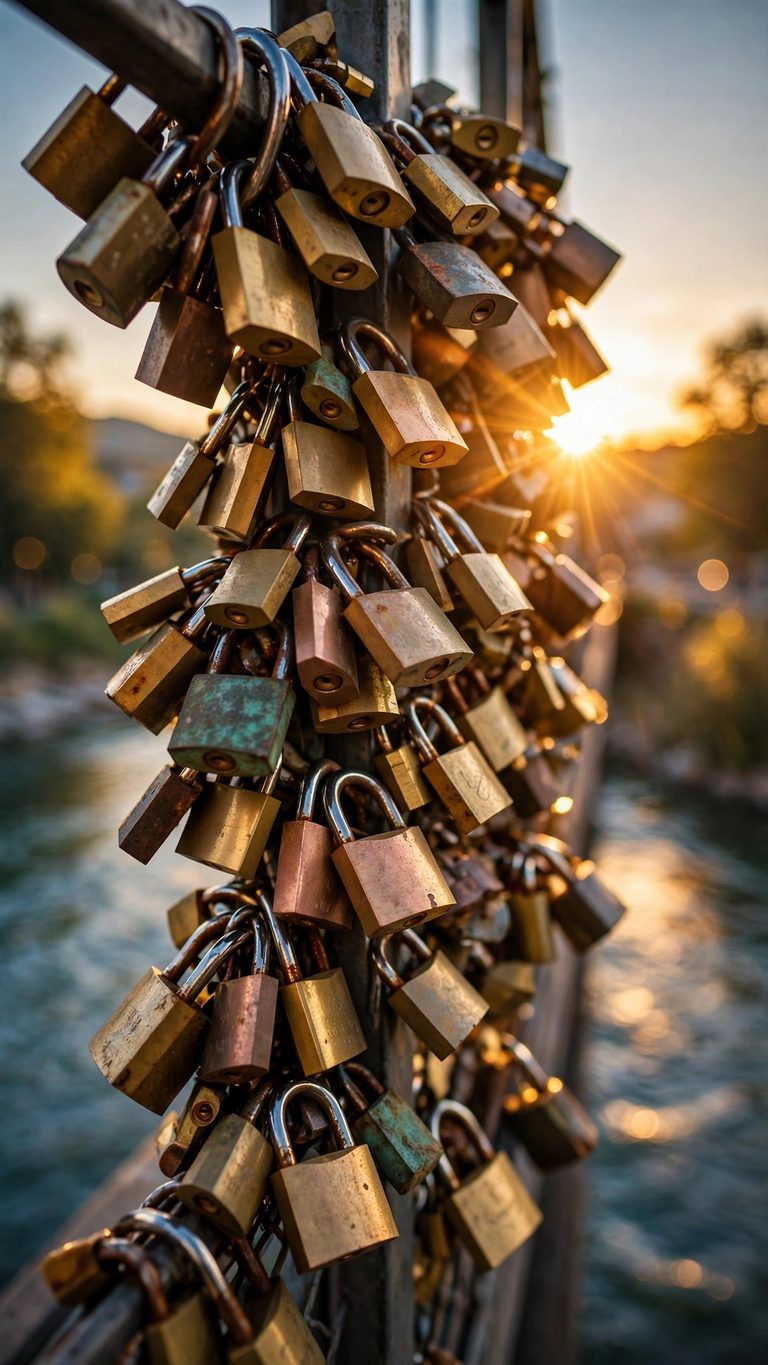
Beautiful photograph of love lock padlocks covering a bridge railing at sunset, engraved initials visible, golden light flaring through metal, river blurred below, romantic travel mood, hyper-detailed, shallow depth of field, ultra detailed, 8k quality, sunset glow on metal, a story in every lock
Why This Prompt Works
Love locks work as imagery because they are love made countable. Each padlock is a decision, a date, a pair of initials, and a bridge covered in them becomes a monument to thousands of love stories at once. Viewers respond to that accumulated meaning: the image is not about one couple but about the very idea of devotion, which makes it universally shareable. The engraved initials visible detail adds a crucial human anchor. Among hundreds of locks, a few legible initials let the viewer imagine real people behind the metal, and that flicker of narrative is what turns a pretty travel photo into an emotional one.
The lighting does the rest. Golden light flaring through metal creates natural starbursts and warm halos that the human eye finds irresistible; lens flare at sunset is one of the most consistently engaging visual effects on Instagram and Pinterest. The prompt pairs that flare with a river blurred below, and the contrast is deliberate: sharp, glittering locks in the foreground against silky, out-of-focus water creates depth that pulls the viewer into the frame. Shallow depth of field keeps the composition artistic rather than documentary, so the image feels like a memory rather than a snapshot.
Travel romance is also a proven viral category. Wanderlust content consistently outperforms generic travel posts because it attaches emotion to place, and sunset scenes earn some of the highest save rates on Pinterest’s travel boards. The romantic travel mood phrase steers the model toward that dreamy, aspirational register: warm tones, soft edges, a sense that the viewer is standing on the bridge at the perfect moment. A story in every lock gives the generation narrative richness, encouraging varied, weathered, distinct padlocks rather than a repetitive texture. The result is an image that feels discovered rather than generated, and discovered-feeling images are the ones people save, share, and revisit.
How to Use This Prompt
Start in portrait orientation as the settings specify. In Midjourney v7, paste the prompt with –ar 9:16; Midjourney renders metallic reflections and sunset flare with exceptional richness, and the vertical frame lets the railing of locks stack dramatically from bottom to top. DALL-E 3 takes the prompt verbatim in a portrait request and is particularly good at the narrative touches, rendering believable engraved initials and a convincing blurred river.
In Flux, keep the full descriptive prompt and generate at high resolution so the individual padlocks resolve with distinct shapes and the flare keeps its starburst quality. For Stable Diffusion, a portrait resolution near 768 by 1344 with 30 to 40 steps works well, and a slight increase in contrast during post-processing will make the golden flare pop. Generate three to four variations and choose the one where the nearest locks are sharpest and the flare sits naturally within the metal rather than looking pasted on. If the initials come out as gibberish on close inspection, that is normal for AI text rendering; either accept it at social-media sizes where it reads as texture, or inpaint the closest lock faces with simpler two-letter initials. A gentle warm color grade finishes the golden-hour feel.
Pro Tips & Creative Variations
The engraved initials are your personal-touch lever. For anniversary content, inpaint or overpaint the nearest lock with the couple’s actual initials and a date; that single customization transforms a beautiful stock-like image into a bespoke gift. If the AI’s lettering looks off, keep initials to two or three characters and a simple serif style, which models render far more reliably than script fonts.
Time of day is your biggest creative dial. The prompt’s sunset is the classic, but a blue-hour version with the bridge lamps glowing and locks rimmed in cool light is stunningly moody. A misty morning variant with soft diffused light and dew on the metal reads as quiet and contemplative, perfect for reflective captions. Night versions with bokeh city lights across the river turn the scene cinematic. You can also change the bridge itself: a Parisian-style ornate railing, a rustic wooden footbridge over a mountain stream, or a modern cable-stayed bridge for a contemporary travel-magazine feel.
Composition ideas multiply from there. Go extreme close-up on a single heart-shaped lock with the bridge dissolving into golden bokeh behind it for an intimate macro companion piece. Pull wide to show the full span of locks curving into the sunset for epic scale. Add narrative props: a hand fastening a new lock, a key tossed mid-air over the railing, or two coffee cups on the bridge wall beside the locks. Seasonal twists work beautifully too: autumn leaves caught between locks, snow dusting the metal in winter, or spring blossoms framing the top of the frame. Each variation keeps the golden flare DNA, so the series feels cohesive across a whole travel-romance campaign.
Frequently Asked Questions
Will the engraved initials actually be readable?
AI models still struggle with small text. At typical social media sizes, the initials read as convincing texture, which is all most uses need. For a hero image where legibility matters, inpaint the two or three closest locks and specify short initials in a simple font, or add the text yourself in an editor for perfect control.
Which tool handles the sunset flare best?
Midjourney v7 produces the most natural metallic flare, with believable starbursts through the padlocks. DALL-E 3 renders cleaner narrative details like initials and the blurred river. Flux offers excellent control for local generation, and Stable Diffusion rewards careful step counts. All four deliver strong results with this prompt.
Can I use this for a travel blog or commercial project?
Check your AI tool’s current license terms for commercial use; most paid tiers permit it. One caution: real love lock bridges in some cities have had locks removed for structural reasons, so if your content implies a specific real location, a quick factual note keeps you accurate.
How do I keep the padlocks from looking repetitive?
The prompt’s a story in every lock phrase already encourages variety. If generations still look uniform, add varied padlock shapes and sizes, weathered and new mixed together. Generating at higher resolution also helps the model differentiate individual locks.
Every padlock on that railing is a love story, and now you can photograph the whole bridge at perfect golden hour without leaving home. Copy this AI photo prompt, generate your sunset flare tonight, and let hundreds of tiny vows glow on your feed. Try it now and tell your own story in every lock.
Related Viral Prompts
- Rings on Rose Petals AI Photo Prompt: Diamond Sparkle Macro With Velvet Box for a Luxurious Proposal Scene
- Milky Way Couple AI Photo Prompt: Tiny Silhouette Under a Vibrant Galaxy Core With Glowing Tent and Stars
- Vintage Love Letters AI Photo Prompt: Timeless Nostalgic Romance with Wax Seals and Dried Rose Petals
# A I V i d e o # P r o m p t B a z a r # A I P h o t o P r o m p t # L o v e L o c k # B r i d g e # R o m a n c e

Leave a Reply