
Introduction
Studio Ghibli has always celebrated people who make things with their hands. From the meticulous craftsmen of Princess Mononoke’s Irontown to the bakers, inventors, and artisans scattered through every film, Ghibli treats honest work as a form of magic. The blacksmith’s forge is the purest expression of that idea: fire, iron, and skill transforming raw metal into something built to last.
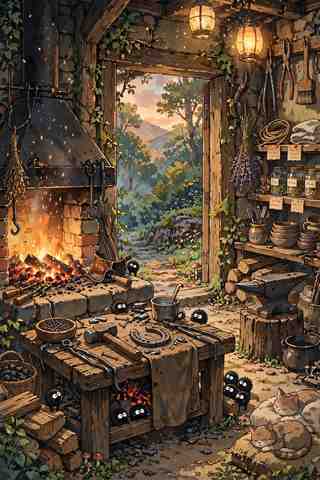
The Ghibli style blacksmith forge AI photo prompt puts the hammer in your hand. It transforms your photo into a hand-painted anime portrait of you as a blacksmith at a glowing forge, hammer raised over red-hot metal, sparks flying while tools and horseshoes line the stone walls around you.
Craftsman aesthetics are hugely popular, but real forge photos are hard to come by unless you actually are a blacksmith. This prompt gives everyone access to that powerful imagery: the firelight, the strength, the ancient craft, all rendered in warm Ghibli watercolor.
Whether you admire traditional crafts, love fantasy imagery, or want a portrait that radiates strength and skill, the forge prompt forges you into someone legendary.
Princess Mononoke’s Irontown showed Ghibli’s deep respect for the people who work metal and fire, portraying craftsmen with dignity and complexity rather than as background extras. The blacksmith forge prompt carries that same reverence, casting you not as a fantasy warrior but as a skilled maker, which is arguably the cooler role.
The Prompt
Copy the prompt below exactly as written, then paste it into your favorite AI image generator along with your photo:
Transform this photo into a Studio Ghibli anime style portrait, keeping the person's face identity exactly the same. Show them as a blacksmith at a glowing forge, hammer raised over red-hot metal on an anvil, sparks flying, tools and horseshoes lining the stone walls. Warm hand-painted watercolor look, fiery orange glow against deep shadows, strong craftsman spirit, rich storybook detail, portrait orientation, 4:5.
Why This Prompt Works
Firelight is one of the most dramatic lighting sources in art, and this prompt builds everything around it. The fiery orange glow against deep shadows creates intense chiaroscuro that AI models render spectacularly, giving the portrait a cinematic power that flat-lit images can never match.
Action makes the portrait feel alive. A hammer raised mid-swing, sparks flying, metal glowing: the scene captures a decisive moment rather than a static pose. Dynamic action consistently earns more attention than standing portraits, and the forge delivers it naturally.
The workshop details reward the model’s love of specificity. Anvils, horseshoes, hanging tools, stone walls: each named object fills the background with authentic texture instead of empty darkness, which is why the forge feels like a real place rather than a backdrop.
The face identity instruction keeps the craftsman personal. Dramatic firelight and dynamic poses can distort features in loose generations, but the explicit preservation order anchors your real face at the center of all that glorious chaos.
The orange-and-teal contrast in this prompt is pure cinema. Fiery orange forge light against cool deep shadows is the same palette blockbuster films use for their most dramatic scenes, and the prompt achieves it with a single descriptive phrase about glow versus shadow.
How to Use This Prompt
Heating up your forge portrait takes just minutes. Follow these steps:
- Pick a strong, determined photo of yourself. A focused or powerful expression matches the blacksmith’s intensity beautifully.
- Upload it to an AI image generator with reference-photo support, such as ChatGPT image generation, Google Gemini, or Midjourney.
- Paste the complete prompt exactly as written, keeping the forge glow, sparks, and workshop details intact.
- Generate in portrait orientation at 4:5, which frames you, the anvil, and the rising sparks in one powerful vertical shot.
- Check the hammer, hands, and sparks. Forge scenes are detail-dense, so regenerate once or twice if any element looks off until the craftsmanship shines.
Moments later you will be mid-swing at the anvil, sparks in the air, in a portrait with the heat and heart of a true craftsman.
Pro Tips for Best Results
Choose a source photo with a strong jawline-forward angle if possible. Confident, direct poses translate best into the blacksmith’s powerful stance.
Keep the sparks. Flying sparks are the signature visual of any forge scene, scattering light and energy across the whole image. They are worth more than any filter.
Personalize the craft by naming what you are forging, like ‘shaping a horseshoe’ or ‘forging a sword blade.’ One phrase turns a generic blacksmith into your blacksmith.
Portrait orientation lets the sparks rise and the forge glow fill the frame vertically. The composition needs that height to feel properly epic.
If the scene feels too dark, add ‘warm and readable, face clearly lit by forge glow.’ This keeps the drama while ensuring your features stay visible.
Mention a leather apron with a phrase like ‘wearing a worn leather apron’ to ground the costume in authentic blacksmith tradition. It adds a layer of texture the AI renders beautifully and makes the craftsman portrayal feel genuinely earned.
Frequently Asked Questions
Will the firelight distort my face?
It should not. The prompt instructs the model to keep your face identity exactly the same, which preserves your features even under dramatic lighting. If a generation looks too shadowy, regenerate or add a phrase requesting the face be clearly lit.
Can women use this prompt too?
Absolutely. Blacksmithing has no gender, and the prompt works beautifully for everyone. The AI adapts the craftsman portrayal to your reference photo while keeping the forge scene equally epic.
Which AI tool handles fire and sparks best?
Most modern image models render firelight well, including ChatGPT image generation, Gemini, and Midjourney. For the richest spark detail, use the highest quality setting your tool offers.
My hammer looks weird or my hands look wrong. What now?
Hands holding tools are among the trickiest things for AI to render. Regenerate once or twice; the model usually resolves it quickly. Starting from a sharp, high-resolution source photo also reduces these artifacts.
Iron remembers every strike, and now your portrait will too. Paste the prompt, upload your photo, and step up to the anvil, because some portraits are taken, and others are forged.
Related Viral Prompts
Inventor Workshop AI Photo Prompt
Archaeologist Ruins AI Photo Prompt
Knight Dragon AI Photo Prompt
#GhibliAI #StudioGhibli #AIPhotoPrompt #GhibliStyle #BlacksmithArt




Leave a Reply