
Introduction
There is a very specific kind of magic in watching rain fall outside a warm cafe window, and nobody captures it like Studio Ghibli. Think of the quiet, rain-soaked streets in Whisper of the Heart, or the way Totoro waits patiently at the bus stop while raindrops drum against an umbrella. Ghibli rain is never gloomy. It is cozy, reflective, and strangely comforting, the kind of weather that makes you want to slow down.
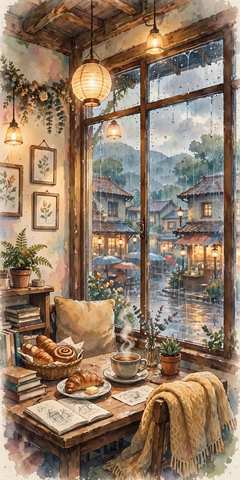
The Ghibli style cafe window rain AI photo prompt bottles that exact feeling. It places you at a small wooden table beside a rain-streaked window, hands wrapped around a warm cup, city lights smearing softly through the glass behind you. The result looks like a still frame pulled from a film about your own quiet, beautiful life.
Rainy-day aesthetics dominate social media every monsoon season, but most rain photos are just wet. This prompt adds the crucial Ghibli layer: warm amber light glowing inside, cool blue tones washing the world outside, and that hand-painted storybook texture that turns an ordinary moment into something cinematic.
If your camera roll is already full of moody window photos, or you simply love the cozy melancholy of a rainy afternoon, this is the prompt that turns ‘it is raining again’ into your most-liked post of the month.
The Prompt
Copy the prompt below exactly as written, then paste it into your favorite AI image generator along with your photo:
Transform this photo into a Studio Ghibli anime style portrait, keeping the person's face identity exactly the same. Show them sitting at a small wooden cafe table beside a large rain-streaked window, holding a warm cup of coffee, city lights blurred softly outside. Warm hand-painted watercolor look, soft amber cafe glow against cool blue rain tones, cozy melancholic mood, rich storybook detail, portrait orientation, 4:5.
Why This Prompt Works
Contrast is the secret weapon of this prompt. It deliberately pairs warm interior light with cool rainy blues, and that warm-versus-cool contrast is one of the most powerful tools in visual storytelling. AI models render this beautifully because the color instructions are explicit, giving you that glowing amber cafe set against blue rain tones in nearly every generation.
Rain-streaked glass is a detail most prompts forget, and it changes everything. A window full of droplets with blurred city lights beyond creates natural depth: you in sharp focus in the foreground, the world melting softly behind you. It is the difference between a flat portrait and a scene with genuine atmosphere.
The face identity line keeps you recognizable through the stylization. Rainy, low-light scenes can tempt AI models to darken or obscure faces, but the explicit instruction to preserve your identity keeps your features clear and true while all the Ghibli magic happens around you.
Emotionally, this scene strikes the ‘main character moment’ nerve that drives so much viral content. Everyone has sat by a window watching rain and felt like the protagonist of something. This prompt simply renders that universal feeling as art, and art that stars you is irresistible to share.
How to Use This Prompt
The process is quick and beginner-friendly. Follow these steps for the dreamiest result:
- Pick a calm, softly lit photo of yourself. A gentle or thoughtful expression works best here, since it matches the reflective mood of the rainy cafe scene.
- Upload your photo to an AI image generator that supports reference images, such as ChatGPT image generation, Google Gemini, or Midjourney.
- Paste the complete prompt exactly as written. The phrases describing the rain-streaked window and the amber-versus-blue color contrast are essential, so keep them untouched.
- Generate in portrait orientation at a 4:5 ratio, which frames both you and the tall rainy window perfectly for phone screens and social feeds.
- Inspect the window and background details. If the rain looks more like noise than droplets, or the city lights feel harsh, regenerate. The model usually nails the cozy balance within a couple of attempts.
Within minutes you will have a portrait that looks like the quietest, prettiest scene from an anime film, with you sitting right at the center of it.
Pro Tips for Best Results
Choose a source photo with soft, even lighting on your face. Harsh shadows in the original can fight against the gentle cafe glow the prompt is trying to build.
Let your expression stay relaxed. A faint smile or a calm, distant gaze sells the contemplative rainy-day mood far better than a big grin.
Do not remove the rain details to ‘simplify’ the prompt. The droplets, the blurred lights, and the color contrast are exactly what make this image stand out in a crowded feed.
Try a nighttime variation by adding ‘late evening, glowing street lamps’ to the prompt. The amber-and-blue contrast becomes even more dramatic after dark.
Avoid heavy filters after generation. The hand-painted watercolor look is already color-graded by the prompt, and extra filtering can muddy the delicate rain tones.
Frequently Asked Questions
Will my face still look like me in such a moody, low-light scene?
Yes. The prompt explicitly instructs the model to keep your face identity exactly the same, which prevents the AI from hiding your features in shadow or stylizing them beyond recognition. Using a well-lit source photo gives the model the clearest possible reference to work from.
Can I swap the coffee for tea or something else?
Of course. The warm cup is a storytelling prop, not a rule. Change it to tea, hot chocolate, or even a slice of cake on a small plate. One short edit is all it takes, and the rainy Ghibli atmosphere stays completely intact.
Which AI generator gives the best rain effects?
Results vary slightly by model, but ChatGPT image generation and Midjourney both handle rain-streaked glass and bokeh city lights very well. The prompt uses plain descriptive language, so feel free to try whichever tool you already use and compare a generation or two.
My first result looks too dark and gloomy. What went wrong?
Nothing is broken; the model simply leaned too hard into the ‘rain’ and forgot the ‘cozy.’ Regenerate, and if it persists, add the phrase ‘warm and inviting, hopeful mood’ to reinforce the amber cafe glow. Two or three attempts almost always land the right balance.
Rainy days will never feel boring again once you have seen yourself inside a Ghibli cafe window. Paste the prompt, upload your photo, and let the rain fall beautifully around you while you stay warm, glowing, and unmistakably yourself.
Related Viral Prompts
Tea Time Cakes AI Photo Prompt
Fireplace Reading Nook AI Photo Prompt
Attic Bedroom AI Photo Prompt
#GhibliAI #StudioGhibli #AIPhotoPrompt #GhibliStyle #RainyDayAnime




Leave a Reply