
Introduction
Few films have ever made the ocean look as alive as Ponyo. Remember those astonishing underwater sequences: waves curling like living creatures, jellyfish drifting like lanterns, and the whole sea rendered in swirling, hand-painted magic? That underwater wonderland has now become one of the most enchanting styles in the viral Ghibli AI photo trend.
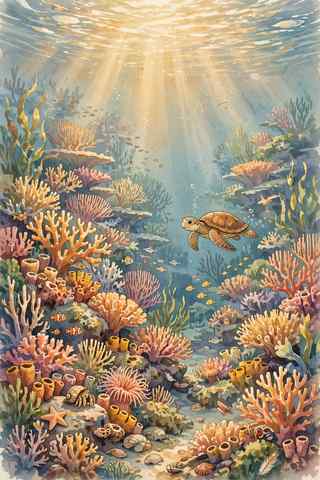
The Ghibli style coral reef underwater prompt drops you straight into that world. Your face, preserved true to life, floating among colorful coral gardens while schools of glowing fish swirl past and sunbeams dance down through the blue. It is part fantasy portrait, part aquarium dream, and it produces some of the most colorful, shareable images in the entire Ghibli trend.
This style is exploding because underwater fantasy portraits tap into pure childlike wonder. Everyone has imagined breathing underwater or swimming with sea creatures, and this prompt makes that daydream visible. Divers, ocean lovers, and fantasy fans are using it for profile pictures that look like stills from a film about the sea’s secret heart.
What sets the Ponyo-inspired reef apart from generic underwater edits is the painterly magic. Ghibli water is never just blue; it glows, it swirls, it feels enchanted. This prompt captures that enchantment, turning your photo into a luminous dive through a living painting.
Parents have discovered a special use for this style: turning children’s photos into underwater adventures. Because Ponyo itself is a story about a child’s boundless imagination, kids placed among the glowing fish and jellyfish look completely at home, and the results are pure magic for family albums. Just remember to keep children’s images in private family sharing rather than public posts.
The Prompt
Copy the prompt below exactly and paste it into your AI image generator with your photo. It builds the full glowing reef world around your likeness:
Transform this photo into a Studio Ghibli anime illustration, preserving the person's exact face identity and likeness. Place them floating in a magical Ponyo-inspired underwater world, surrounded by colorful coral reefs, schools of glowing fish, jellyfish, and sunbeams dancing through the blue water. Portrait orientation (9:16), soft cel shading, warm hand-painted backgrounds, luminous dreamy underwater light.
Why This Prompt Works
This prompt works because Ponyo gave the AI world an unmistakable underwater visual language: luminous water, jellyfish like floating lanterns, fish rendered as ribbons of light. By invoking that Ponyo-inspired magic directly, the prompt steers the AI toward enchanted, painterly water instead of a flat stock-photo ocean.
Face preservation matters enormously underwater. A dreamy reef scene only feels personal if the floating figure is recognizably you, and the prompt’s identity clause ensures your features survive the transformation into soft cel shading. Your expression becomes the calm center of a swirling, colorful world.
The lighting description seals the effect. Sunbeams dancing through blue water is the signature Ghibli underwater look, creating natural spotlights that illuminate your face while the coral glows around you. It is the difference between a dark dive photo and a radiant fantasy portrait.
Color is the secret weapon here. The reef’s palette of corals, teals, and glowing blues is among the most saturated in the whole Ghibli trend, which means these portraits practically leap off the screen. High color contrast correlates with longer view times, and in human terms, it simply looks joyful. It is hard to scroll past a glowing underwater world without stopping.
- Ponyo-inspired reference gives the AI Ghibli’s signature enchanted underwater style.
- Face identity preservation keeps the underwater explorer recognizably you.
- Colorful coral reefs and glowing fish create a vibrant, eye-catching palette.
- Jellyfish add the dreamy lantern-like magic fans love from the film.
- Dancing sunbeams provide natural, flattering light on your face.
- Portrait 9:16 format is ideal for wallpapers and vertical social posts.
How to Use This Prompt
Dive into your reef portrait in five simple steps:
- Choose a clear photo of yourself with your face well-lit and facing forward.
- Open an AI image generator that accepts a reference photo plus a text prompt.
- Upload your photo and paste the complete prompt from the box above.
- Generate two or three versions and pick the one with the most magical light rays.
- Download the best version in high resolution and share your underwater fantasy.
Pro Tips for Best Results
- A serene, gentle expression matches the floating, weightless mood perfectly.
- For a deeper ocean feel, add “dark blue depths below, bioluminescent creatures”.
- For a shallower tropical look, add “turquoise shallows, sunlight sparkling on sand”.
- Long hair in the source photo looks stunning rendered as floating underwater.
- If fish crowd too close to your face, regenerate for a clearer composition.
- Pair the final image with calm ocean sounds or dreamy music in video posts.
Frequently Asked Questions
Will my face look natural underwater?
Yes. The prompt preserves your exact face identity while the AI renders you floating serenely, so you look like a calm underwater explorer rather than a distorted cartoon. Clear source photos give the most natural results. Avoid underwater or pool source photos; ironically, a simple dry-land portrait transfers best.
Can I use this for a child’s photo?
Absolutely, and it is especially magical for kids. Ponyo itself is a story about childhood wonder, so children placed in this glowing reef world look utterly enchanting. Always supervise children’s photo use online. For extra safety, share these magical portraits only with family and close friends.
Which tool renders the water best?
Leading image models with strong style transfer produce the most luminous, painterly water. Try two or three different generators, since each renders underwater light a little differently. Midjourney-style tools often excel at luminous water, while chat-based generators keep faces very accurate.
Is the prompt free to reuse?
Yes, completely free. Copy it as many times as you like and experiment with different photos and variations. Each generation brings a slightly different reef to explore.
The sea in Ponyo is not just water; it is a living, breathing world of light. Float through it in your own photo, drift past the jellyfish lanterns, and let a little of that underwater magic follow you back to the surface.
Related Viral Prompts
Ghibli Style Seaside Cliff Village AI Photo Prompt
Ghibli Style Cloud Sea Sunset AI Photo Prompt
Ghibli Style Moonlit Lake AI Photo Prompt
#GhibliAI #AIPhotoPrompt #Ponyo #StudioGhibliStyle #AnimePhotoTrend




Leave a Reply