
Introduction
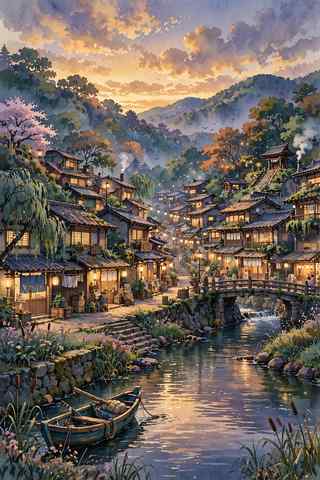
Dusk is Studio Ghibli’s favorite hour. It is the hour of Kiki flying home over the rooftops as the shop lights flicker on, of the riverside town in Whisper of the Heart glowing amber before the stars come out. Ghibli’s artists paint twilight the way poets write about it — that brief, golden-blue moment when the day exhales and every window becomes a small promise of warmth. The Ghibli style riverside town dusk AI photo prompt captures that exact hour and places you inside it, your face preserved, the river shimmering at your side.
This trend has a quieter energy than the louder Ghibli photo fads, and that is precisely why it is spreading. Instead of spectacle, it offers atmosphere: willow branches trailing over dark water, a stone bridge arching into the distance, boats drifting with their lanterns lit, and the sky performing its slow melt from amber to indigo. People are using these portraits for evening posts, for anniversary and couple photos, and as phone wallpapers that make every unlock feel like the opening frame of a film. It is romance without cliché.
The emotional hook runs deeper than beauty. A riverside town at dusk is the universal image of coming home — lights turning on, water carrying the day’s last light, the feeling that somewhere warm is waiting. In a feed full of noise, an image that whispers instead of shouts stands out. The dreamy twilight palette flatters every skin tone, the reflections double the visual richness, and your preserved face, softly lit by window-glow, becomes the calm center of a painterly evening.
The Prompt
Below is the exact prompt to copy. Pair it with your photo in any AI image generator, and you will be standing in a riverside town at dusk — amber sky above, glowing windows beside you, and the river carrying the light away.
Transform this photo into a Studio Ghibli anime illustration, keeping the person's exact face, identity and likeness unchanged. Set the scene in a charming riverside town at dusk — warm glowing windows along the water, a small stone bridge, willow trees, drifting boats and the sky melting from amber to indigo with reflections rippling across the river. Portrait orientation (9:16), soft cel shading, warm hand-painted Ghibli backgrounds, dreamy twilight palette, gentle film-grain texture, nostalgic and romantic mood.
Why This Prompt Works
This prompt works because twilight is the most cinematic light of the day, and the prompt describes it with unusual precision — ‘the sky melting from amber to indigo.’ That gradient gives the AI a clear color script: warm golds at the horizon cooling into deep blues overhead. Ghibli’s background painters build their dusk scenes on exactly this gradient, and when the AI follows it, the result has the authentic, glowing depth of a real Ghibli sky rather than a flat purple filter.
The prompt also works because water doubles everything. Rivers are a cheat code in visual art: every glowing window, every lantern, every streak of amber sky gets reflected and rippled across the surface, instantly doubling the image’s richness without adding clutter. The prompt’s mention of reflections ‘rippling across the river’ instructs the AI to paint that doubling effect, which is why these portraits feel so lush and complete even in a simple vertical composition.
Finally, the scene is built from storybook components — the stone bridge, the willows, the drifting boats — each one a small narrative promise. Bridges suggest journeys, boats suggest departures and returns, lit windows suggest lives being lived. Together they turn a portrait into a story, and story-images earn the saves, shares, and ‘this looks like a movie’ comments that make a trend travel.
- The amber-to-indigo twilight gradient mirrors authentic Ghibli dusk skies, giving the image genuine cinematic color.
- River reflections visually double the glowing windows and sky, creating lush richness in a simple vertical frame.
- Storybook elements — stone bridge, willows, drifting boats — turn a portrait into a narrative scene people want to share.
- Twilight light flatters every face and skin tone, making this one of the most universally beautiful Ghibli prompts.
- Face-identity preservation keeps you clearly recognizable as the calm center of the painterly evening.
- The nostalgic, romantic mood suits couples, anniversaries, evening posts, and dreamy wallpapers alike.
How to Use This Prompt
- Pick a clear, well-lit photo of yourself — a head-and-shoulders selfie or a half-body shot works best. The prompt preserves your face identity while the AI rebuilds everything around you as a dreamy riverside town at dusk, so a sharp, front-facing source photo gives the cleanest and most recognizable result.
- Open your favorite AI image generator — ChatGPT’s image mode, Gemini, Midjourney, Leonardo AI, or any tool that accepts a text prompt together with an uploaded photo — and upload your picture first.
- Copy the exact prompt from the
block above and paste it into the prompt box. Keep the wording untouched: the face-preservation clause, the portrait 9:16 instruction, and the soft cel-shading directions are tuned to work together as one package.
- Generate the image and review the result carefully. If a detail feels slightly off — the lighting, the background density, the mood — regenerate once or twice. AI image tools very often nail the composition on the second attempt.
- Download your new Ghibli-style portrait in full resolution and share it anywhere. It is sized 9:16, which is perfect for Instagram Stories, TikTok, WhatsApp status, Facebook posts, and phone wallpapers.
Pro Tips for Best Results
- Use a well-lit, front-facing photo with a simple background. Busy original backgrounds can confuse the AI, while a clean source photo lets the Ghibli scene take over completely.
- Do not edit the prompt's technical instructions — the face-preservation line, the 9:16 portrait note, and the cel-shading directions are the load-bearing parts of the prompt.
- A soft, calm expression in your source photo harmonizes with the tranquil dusk mood better than an exaggerated smile.
- Couple photos work beautifully here — the romantic riverside setting was practically made for two preserved faces side by side.
- If the sky looks too dark in your first generation, regenerate once — the amber-to-indigo balance varies and often improves on the second try.
- This makes an exceptional phone wallpaper: the vertical composition and glowing horizon line suit lock screens perfectly.
Frequently Asked Questions
Will this prompt really keep my face looking like me?
Yes — that is the entire point of the face-preservation clause in the prompt. It explicitly instructs the AI to keep your exact face, identity, and likeness unchanged while only the scene around you is rebuilt in Studio Ghibli anime style. For the most faithful likeness, start with a front-facing, well-lit photo where your face fills a good portion of the frame, and avoid heavy filters or sunglasses in the source picture.
Which AI image generator works best with this prompt?
This prompt works with any modern generator that accepts image input plus a text prompt — including ChatGPT's image mode, Gemini, Midjourney, and Leonardo AI. Free options like ChatGPT's image mode or Gemini handle a dreamy riverside town at dusk scenes very well. If you want the most painterly, hand-drawn-looking backgrounds, Midjourney tends to produce the richest Ghibli-style textures, while ChatGPT is usually the most faithful at preserving your face.
Is this Ghibli AI photo prompt free to use?
Yes, the prompt itself is completely free to copy and use as many times as you like. You only need access to an AI image generator — many of which offer free daily generations. There are no watermarks added by the prompt, and you can regenerate the scene endlessly until you love the result.
Does this prompt work for couple or group photos, or only solo portraits?
It works wonderfully for couples and small groups. The prompt's face-preservation instruction applies to every face in the source photo, so two or more people will each keep their own likeness while the riverside dusk scene builds around them. For groups, use a source photo where all faces are clearly visible and reasonably large in the frame — tiny distant faces are harder for any AI to preserve faithfully.
Amber sky, glowing windows, and a river carrying the light — dusk has never looked this personal. Copy the prompt, upload your photo, and step into the evening.
Related Viral Prompts
Ghibli Style Cherry Blossom Path AI Photo Prompt
Ghibli Style Morning Mist Lake AI Photo Prompt
Ghibli Style Rice Terraces AI Photo Prompt
#GhibliAI #AIPhotoPrompt #StudioGhibliStyle #AnimePhoto #GhibliTrend




Leave a Reply