
Introduction
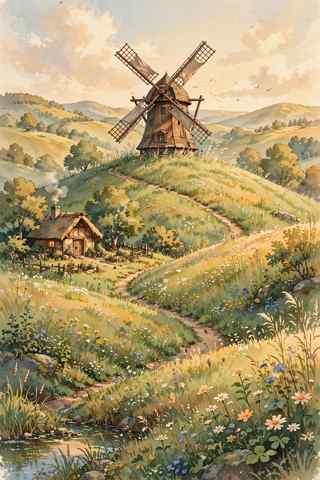
Wind in the grass, sails turning slow overhead, and the whole sparkling sea spread out below — the windmill hill is Ghibli joy in its purest form, and this trend puts you on top of it. The Ghibli style windmill hill prompt turns your photo into a portrait on a breezy hilltop: an old wooden windmill behind you, meadows rolling down to a seaside town, clouds racing a bright blue sky. It is going viral because happiness, painted this well, is contagious.
This is Kiki’s Delivery Service country — the hilltop views over the seaside town of Koriko, where every gust of wind feels like possibility. Ghibli’s hilltops are always places of arrival and beginning: characters stand on them, look out, and decide who they will become. This prompt gives you that same cinematic vantage point. You are not just posing on a hill; you are surveying your whole bright future.
Picture the finished portrait: you stand in tall meadow grass bending in the breeze, the old wooden windmill’s sails turning lazily behind you. Below, a seaside town’s red rooftops cluster around a harbor, and beyond it the sea sparkles to the horizon. Clouds — big, sculpted, unmistakably Ghibli clouds — race across an impossible blue sky. Soft cel shading and hand-painted detail make the grass, wood grain, and water shimmer with life.
Windmill hill portraits perform because they radiate uncomplicated joy — the rarest emotion in a feed full of moody aesthetics. The prompt’s bright blue sky, green meadow, and sparkling sea form a primary-color harmony that reads as instantly uplifting, and the Ghibli styling keeps it artful rather than cartoonish.
The Prompt
Copy the prompt below exactly as written and paste it into your AI image tool with your photo. Every phrase targets the windmill hill look — turning sails, meadows, seaside town — so keep it complete.
Transform my photo into a Studio Ghibli anime illustration while preserving my exact face, features, hairstyle and expression. Set the scene on a breezy hilltop crowned with an old wooden windmill, with rolling green meadows, a seaside town and sparkling sea below, and clouds racing across a bright blue sky. Use soft cel shading, hand-painted background detail, and a cheerful nostalgic mood, in portrait 9:16 orientation.
Why This Prompt Works
This prompt works because it choreographs motion: sails turning, grass bending, clouds racing. Still images feel alive when they imply movement, and Ghibli’s hilltop scenes are famous for exactly this — wind made visible. Those motion cues tell the AI to render dynamic, windswept detail rather than a static postcard, which is why the results feel like a paused film instead of a flat illustration.
The layered vista is the second strength: hilltop foreground, seaside town midground, sparkling sea and racing clouds beyond. That classic Ghibli depth stack turns a simple hill into a whole world you can see, and the hand-painted background instruction ensures each layer gets painterly richness rather than smooth digital gradients.
Your identity is explicitly preserved — exact face, features, hairstyle, expression — so the joy on the hill is unmistakably yours. Portrait 9:16 stacks the composition beautifully: windmill above, you in the meadow, the town and sea falling away below.
- Motion cues (turning sails, bending grass, racing clouds) make a still image feel alive
- Layered vista — hilltop, seaside town, sparkling sea — creates a whole visible world
- Big sculpted Ghibli clouds deliver the iconic sky viewers instantly recognize
- Preserves your exact face, hairstyle, and expression
- Bright primary-color harmony reads as pure, contagious joy
- Portrait 9:16 stacks windmill, figure, town, and sea into one sweeping view
How to Use This Prompt
Turning your photo into this Ghibli scene takes less than two minutes. Follow these steps:
- Choose a clear photo of yourself — front-facing, good lighting, and your whole face visible. Bright, happy outdoor photos match the prompt’s cheerful hilltop energy perfectly.
- Open an AI image generator that accepts photo uploads. ChatGPT, Google Gemini, and Microsoft Copilot all work for free — just start a new chat and upload your photo.
- Paste the complete prompt from the
box above into the chat, exactly as written, and send it together with your photo.
- Wait for the generation to finish, then review the result carefully: check your likeness, the windmill and the seaside town below, and the overall Ghibli look.
- Download the portrait in the highest resolution available, then share it as a post, a Story, or your new wallpaper.
Pro Tips for Best Results
A few small choices separate a good Ghibli portrait from a breathtaking one:
- Start with a photo that has a simple, uncluttered background so the AI focuses on preserving your face.
- After generating, use a short follow-up message (“more …”) to fine-tune details instead of starting over.
- Generate first, then crop: the full 9:16 portrait gives you the most flexibility for wallpapers, Stories, and profile pictures.
- If the windmill looks small or plain, follow up with “larger traditional wooden windmill with turning sails” for the full storybook silhouette.
- Hair or clothes caught by wind in your input photo blend seamlessly into the breezy scene.
- Add “a red seaside town with a clock tower” in a follow-up for a Koriko-inspired skyline below the hill.
Frequently Asked Questions
Will this prompt keep my face looking like me?
Yes — face preservation is written directly into the prompt. It instructs the AI to keep your exact face, features, hairstyle, and expression while transforming everything else into a hand-painted hilltop daydream. For the best likeness, upload a sharp, front-facing photo with even lighting and skip heavy beauty filters. If the first result drifts a little, generate once more with the same prompt; likeness usually locks in on the second pass.
Which free AI tools can I use this Ghibli prompt with?
The prompt works in any image-capable AI tool that accepts a photo plus text instructions: ChatGPT, Google Gemini, and Microsoft Copilot all handle it for free. Dedicated art generators like Leonardo AI, Adobe Firefly, and Playground AI also produce beautiful results. Paste the prompt exactly as written — its Ghibli-specific wording (soft cel shading, hand-painted backgrounds) is phrased to work consistently across different models.
Why does the prompt specify portrait 9:16 orientation?
The 9:16 vertical format is chosen deliberately for this scene: the vista stacks vertically — windmill above, you in the meadow, town and sea below. It is also the native size for phone wallpapers, Instagram Stories, TikTok, and Reels covers — exactly where Ghibli portraits go viral. If you need a square profile picture, generate the full portrait first and crop the center afterward so you keep the complete composition.
Can I change the setting or add my own details to the scene?
Absolutely. Keep the face-preservation line and the Ghibli style phrases untouched, then adjust the scenery to taste: try “windmill hill at golden hour” for warmer light, or add “sheep grazing in the meadow” or “a kite soaring overhead”. Small, specific additions work best — AI image models handle concrete details far better than vague requests, so name exactly what you want to see.
Some hills are just hills; this one is a beginning. Windmill sails turning, sea sparkling below, clouds racing toward everything — your windmill hill portrait is Ghibli joy at full brightness, and it has your face on it.
Related Viral Prompts
Ghibli Style Riverside Town Dusk AI Photo Prompt
Ghibli Style Coastal Railway AI Photo Prompt
Ghibli Style Sunflower Field Sunset AI Photo Prompt
#GhibliAI #AIPhotoPrompt #StudioGhibliStyle #GhibliSky #AnimePortrait




Leave a Reply